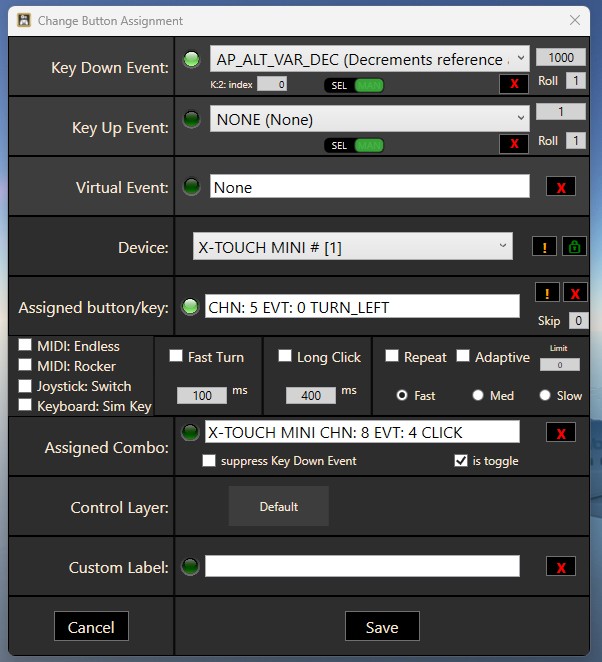
My X-touch is working with the B737 Max.
Only the Altitude setting with the rotary controller is not working.
Can anybody help me please?
I suggest that you ask over at Axis and Ohs support forum linked below.
Regards
You should delete the assigned combo and the âtoggleâ check. Also check the midi endless option
I apologise if this has been already answered, I skimmed through most of this thread and didnât see that mentioned.
Using spad.next are the rotary encoders proper analogue inputs or do they still work as an increase/hold/decrease button?
You can use them in both ways. They trigger CW and CCW events but also provide integer values (0-127) that can be used to feed sim vars like an axis does. But they are not exposed as standard axis (except the right slider as far as I can remember, not sure of that).
Yes the slider is an axis, but with the switches with CW and CCW turns and the fact that you can easily now control the little LED lights it functions perfectly as sort of rotaries for lights or audio volume (you can have all LEDS light up to indicate level) or EFIS pangel (range for example you only light up the 12 o clock LED to indicate 20nm or only 9 o clock for 10) or whatever you want.
For me the behringer has been one of the best hardware purchases for flightsim. It is so incredibly versatile and feels high quality especially for the price. The only thing annoying is theres no real stand for it, it lying flat kinda sucks, iâve bought a little tablet stand and taped it to that so it all works out. Iâm honestly thinking of picking up another one.
Iâm guessing the values to simvar should be a good enough approximation unless Spad.next requires a 1:1 mapping (setting heading, which has 359 values) with a range of 0-127 wouldnât work for example).
Not a big fan of the idea of using CW/CCW, unless it works well enough?
Iâm looking to fly VOR to VOR, so setting course and heading to exact values is important, while also being responsive, just like the real knob would (increasing by increments of 5-10 isnât good enough)
To manage VOR OBS or HDG course, best way is still to use CW/CCW events with 1° inc or dec steps of the targeted var. You can even setup acceleration values within SPADâŠ
And few months ago I discovered a very handy new device (especially in VR). It can be used directly in MSFS as it is exposed as a standard HID joystick. But I have also created universal snippets for SPAD. Great quality and precision, itâs really worth trying.
One is just not enough. Iâve got 2 and Iâm gonna buy a 3rd one soon-ish as many study-level aircraft have lots of rotary knobs and even with modes A/B Iâm running out of options quickly.
Sure, spad.next can support more than 2 modes nowadays and in some aircraft Iâve ended up using 3 modes which I change through the 2 layer buttons.Or even through Elgato Stream Deck as I can not only change Xtouch modes through it, but I can even document which button is doing what in Xtouch mini. In the Stream Deck page below, none of the buttons does anything (except Xtouch left/right and page 1/2 which is effectively modes A/B), they just show which Xtouch button does what depending on mode and itâs sometimes more useful than having to print different labels for each aircraft and sticking them on Xtouch or printing and laminating A4 sheets with all mappings.
The main problem is that Xtouch miniâs donât have unique hardware IDs, so apps like spad.next canât really tell one from another. Sometimes (rarely though) depending on the sequence theyâll be detected by your USB hubs and Windows, their order may change and thisâll affect spad.next mappings. Then the workaround is to either swap cables directly in the USB hub or to just replug them manually in the expected order. Doesnât happen often but itâs still a pain and something you need to check everytime you turn on the PC.
Other than that, the combination of spad.next and Xtouch mini is a match made in heaven. And thatâs because theyâre CHEAP and offer lots of knobs and buttons without having to pay $150 or more.
This other device is interesting, but for 140⏠I might as well spend 8⏠more and get the 737 MCP from WinWing, thatâs way above my price target.
Good to know that CW/CCS increase/decrease by 1° works well though
Latest Windows 11 update KB5074105 breaks MIDI devices, kills MIDI LED light controls etc. So if youâre using X-touch or similar, stay away from this update until further notice. Or remove it if you have already installed it.
From the Windows Forum:
Microsoft published a nonâsecurity preview update, KB5074105 , on January 29, 2026 , delivering an optional cumulative package for Windows 11 versions 24H2 and 25H2 . This update is a monthly, nonâsecurity âpreviewâ rollup: itâs optional, staged, and intended to let IT teams test fixes and quality improvements ahead of the next mandatory Patch.
Interesting that Microsoft would release a âtestâ patch to the general public.
True, but as that points out it is optional. It appeared on my list but did not install automatically.
I donât think this is new behaviour - Iâve been seeing these optional preview updates for quite a while. It used to be that they were only visible under Advanced Options - Optional Updates (along with the .Net Framework previews), but then at some point were displayed within the main windows update page too.


