I have a Problem with the Brakes.
On every Plane the brakes are messed up like when i disengage the parkingbrake and start rollig evertime i step on the normal brake the plane gets verry slow and i cant roll, even wehen the brakes are not pushed anymor.
Then i have to set the Prakingbrak and release them. Only when i do this i can start roling again.
I have the exact same issue. Set brakes to my axis L and R. But when I touch one of them it goes into full stop and won’t roll again until is set and release the parking brake.
It does not matter what type of aircraft that I have in 2024, but every time I retract the landing gear or extend the landing gear, the parking brake turns on automatically.
Very frustrating aircraft systems problem, on top of 2024 crashing or freezing the computer every hour.
Having the exact same issue with the thrustmaster Boeing yoke and Thrustmaster tfrp rudder pedals.
Super frustrating and have to use parking brakes to get the plane going again.
It is ABSOLUTELY REDICULOUS THAT WE CANT GET A SOLUTION TO THIS VERY BASIC ISSUE??? Especially when we are ment to TAXI all over. That and the out of control taxi and hold-short pathing.
Will keep this tab open and reply with what it find. Anyone try a reinstall yet?
Have you found a solution already? I have the same problem with the Flightstick X. I take a taxi for a few meters and then I can’t go any further. It shows that the autobrake is not set, but I can’t continue taxing.
Same issue here. Using a brake pedal to engage the left+right brake axis also engages the parking brake for some reason. Haven’t found any fixes yet other than not using the brake axis.
Still same issue. Braking with pedals needs that parking brake to be set and unset to release brakes again when once applied using the pedals. Seems like the minimum (pedals fully relased) still applies 50% brake. Let’s say you got a joystick axis which could have e.g. max positive/negative value of ±100. I guess it it is assumed the +100 got 0% brake and -100 got 100% brake. So axis value of 0 would be 50% brake. But in case of e.g. Thrustmaster pedals the corresponding axis got a range from e.g. -100 to 0 and not from -100 to +100. This means even if brake pedal is fully release still 50% brakes are applied. I could not figure out how to setup the axis within msfs correctly.
Please add the corresponding configuration features.
I have the thrustmaster rudder pushers. After reading all I can find, I went into setting the curves and changed the neutral to -.5, which seems to resolve the issue with unable to move after a full depress of toe brakes. The issue with that setting is a full deflection of the toe brakes doesn’t seem to brake as effectively. Is anyone from MS even reading this?
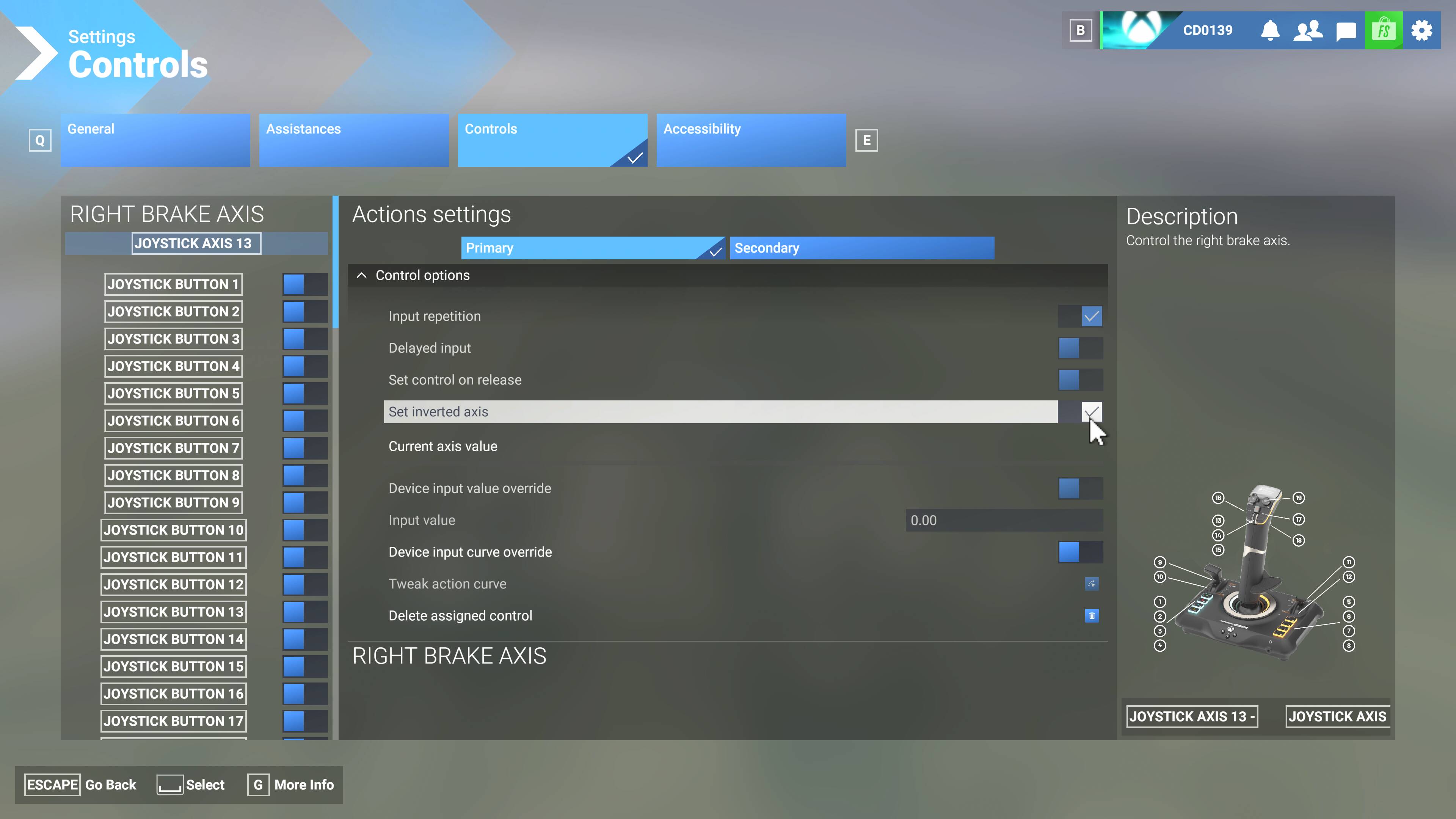
Just wondering if anyone with this issue has tried toggling “Set inverted axis”?
Mine were working bu I just toggled the “Set inverted axis” ON and sure enough, the brakes are applied fully after touching them. Setting and releasing the parking brake then allows the a/c to move again.
What’s happening in this case is the sim doesn’t initially read that the brake pedals are at minimum (max braking) so allows the a/c to move. Applying brakes causes the sim to now read that the pedal is at minimum and applies maximum braking. I was able to taxi with the foot brakes at max (minimum braking) . By reversing the axis again my pedals are back to normal.
I’m on Xbox using Velocity One rudder pedals but this might fix it for some of you.