I assigned LT and RT to the two rudder axis but when I check in the sensitivity settings it’s still a on/off situation. What am I doing wrong?
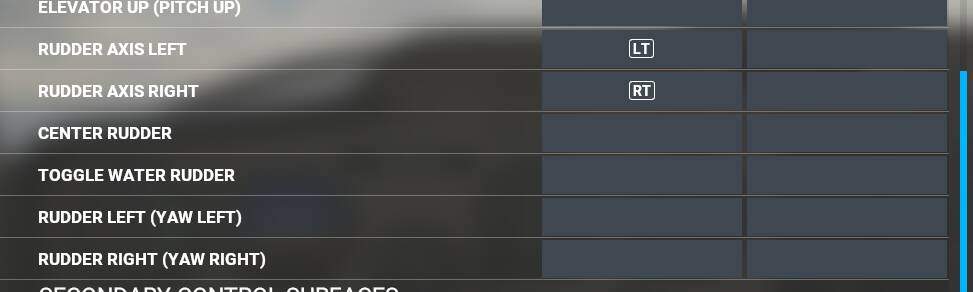
It seems that the devs can’t figures out what is the issue and fix it, even when they try, they just make it worse, now there is a sensitivity curves on the LT and RT axis ( wich was asked from the begining ), but for a reason, it still doesn’t work : no matter the push on the axis, it still goes straight to the maximum, when on this xbox gamepad, it’s supposed to react to different level of pressure. But even worse, when set LT and RT on Yaw Left and Yaw Right, now it doesn’t go back to the center after an input, if you push the axis once, it will react like you keep the same push with your foot on the rudder forever, making almost impossible to use it and find back the balance between left and right yaw…
(my xbox one controller is working just fine, it is almost new and works perfectly in others programs )
I still don’t get how they can mess this up while other flight simulators that are never been planned to be on xbox get it right since the begining!
1 Like
It’s really mind boggling.
A top Microsoft software doesn’t work with the main Microsoft controller, even a year after release.
1 Like
This is really not the correct way to implement things. Every other flying game (that uses gamepads) takes differential trigger as rudder. MSFS just does it wrong for some reason. And then you can’t just quickly feed in the opposite rudder, you need to first unwind this side before you can feed in the other side. So weird.
Indeed, but it is a regression because upon release the game had a different problem: if you pulled one of the paddles just a bit, it would start jerking the rudder violently until it finally settled for full rudder towards that side. But as soon as you had both paddles partially pressed, it would start applying the difference between paddles. Now the violent shaking and full rudder upon light pressure has been fixed but the difference is no longer computed.
I bet Asobo developers are working on a replacement input subsystem for gamepads to switch to upon console release. I hope that they’ll fix everything and add great cockpit interaction support, and that a better gamepad input model also applies to the PC version of the game. So far I use reWASD and a head tracker so rudder is mapped to the right stick as it is no longer needed move my virtual head around.
1 Like
Continuing the discussion from Broken XBOX Controller - Rudder:
This really helped, thank you!!
I´m still straggling with the sensitivity settings of the rudder. Does anyone have some numbers for the different options in the sensitivity menu which maybe help me out. (rudder is already assigned to Rudder Axis left and Rudder Axis right)
Thanks a lot and healthy flying.
Which buttons do you have mapped for rudder control?
LT and RT are mapped for rudder control
Got it. I also use an Xbox One (wireless) controller when I don’t feel like setting my yoke but I’m not having a problem with the rudder sensitivity - or maybe I just got use to it. You do have to be light and gradual otherwise it does jerk.
My question was mainly related to the axis sensitivity tab. Are there any useful axis sensitivity numbers to choose and get a more useful rudder behavior like you will have e.g. with a flight stick. I will send later add a screener with my settings to this topic.
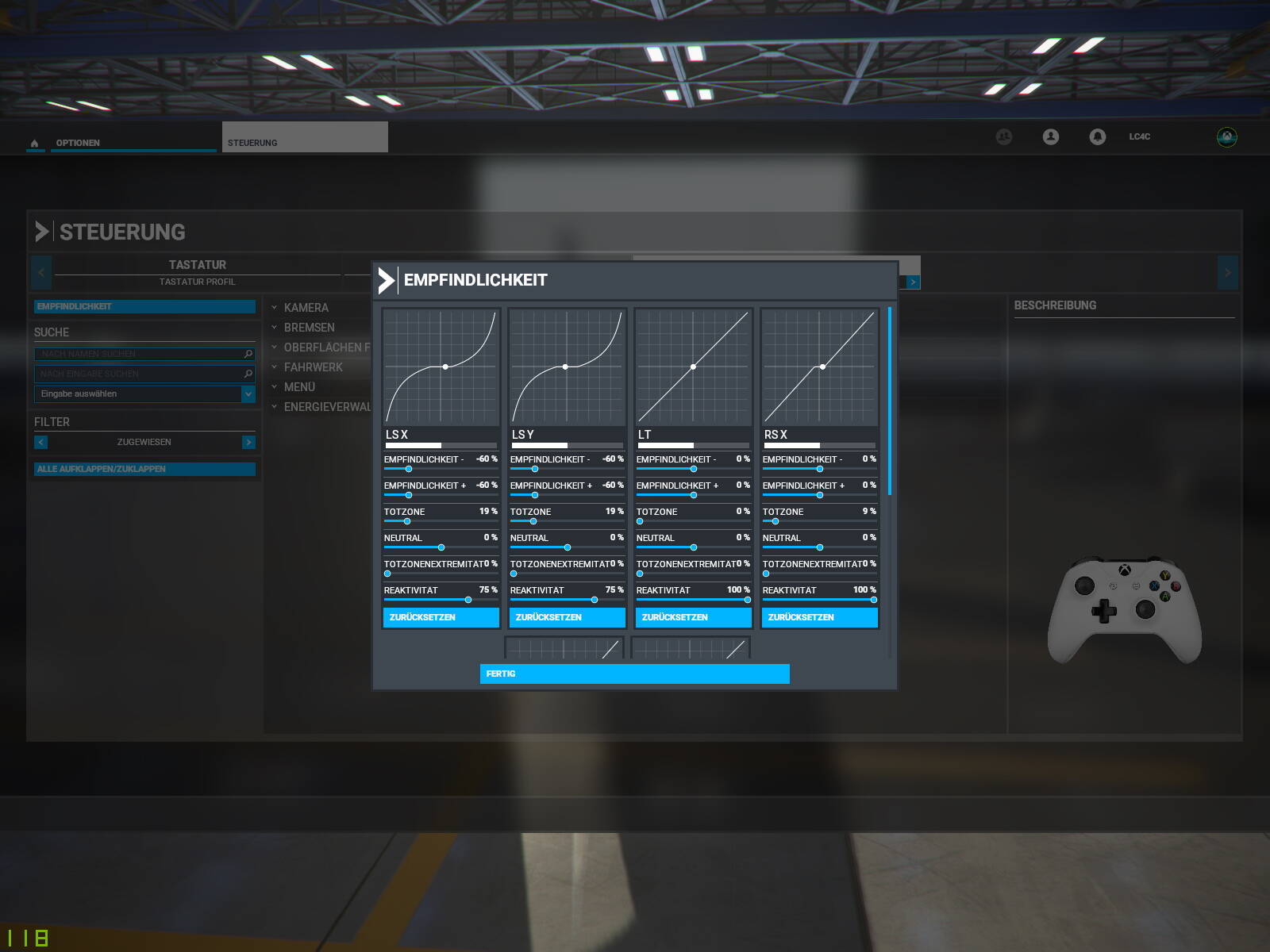
Yes, it is strange that they have the sensitivity configuration options but nothing works - maybe a future update. The triggers act like digital on/off on the configuration page yet the triggers are analog - the left/right rudder can be gradually applied.
I’ve found the xbox rudders much better in flight since they set them to be assigned to the axis rather than the increase decrease rudder. But they were still too sensitive on the ground. A few days ago I set reactivity to 75%(like what lc4c shows for x and y) and set the extremity deadzone at 5%. Seems much better on the ground and in the air now for me. Not nearly as twitchy on the ground and much easier to use with opposite aileron to slip or crab in the air.
1 Like
I’ve tried three different controllers. One of them a genuine 360 that I’ve had for a long time. It has major drifting issues with the sticks, unplayable. I have a 360 style wired controller I bought years ago but never used but once or twice, the sticks are tighter and an improvement overall but I can’t seem to find the right sensitivity settings in game. I just bought a wireless xbox one style controller. There is no drift issue but there is a massive deadzone and sensitivity that isn’t the same in both directions. It is IMPOSSIBLE to fly the plane with this controller. No matter how much I fiddle with the sensitivity settings for all three controllers, I can’t get them to an “okay” state (the new one isn’t tolerable at all). I understand a gamepad probably isn’t appropriate for a simulator but they should at least be playable if not as luxarious as having an actual hotas, especially since this is to be released on XBOX. Rudder is awful too, anytime I try to change the sensitivity or reactivity for that the setting doesn’t save. This is my first flight simulator experience, I just wanted to try it out, I wasn’t ready to spend hundreds of dollars. The game is fun up until the moment I have to control the yoke myself, thus I spend the majority of the time in autopilot.
I’m probably one of the few that perfers using an Xbox One (wireless) controller for MSFS2020. I actually purchased the HoneyComb Alpha Yoke and Honeycomb Bravo but ended up returning the Alpha Yoke. I didn’t feel it helped me much over my XB1 controller and lacked the buttons I have with the controller. Yes, a good yoke can add to the immersion but in my case I’m a casual flight sim guy. My control with a controller is very close to that of the yoke and I don’t have the large yoke in my way when I want to switch between MSFS and some other game or work. I do love the Bravo though, its off to the side so doesn’t get in the way and having a good trim wheel and physical button/knobs for adjusting autopilot is great. My $.02
Note, I also have a wheel/pedals/shifter setup for sim racing so I do appreciate the immersion aspect of suitable hardware. I can’t race a car with a controller like I can with a wheel setup but can fly a plane with a controller.
As for rudder control… I have LT/RT assigned to left/right “axis” and for me it is fine - LT/RT triggers are analog so control is proportional.
1 Like
I came from an Xbox One controller as well, but love my Honeycomb Alpha yoke and haven’t touched the controller since I got it. Currently paired with Logitech G rudder pedals that I got while waiting for the original Xbox controller rudder fix. 
I find the rudder control very stiff. It could be a sensitivity issue. What would you recommend?
I realize you weren’t asking me but I find the rudder control with the LT/RT triggers (Xbox1 controller) to be OK. It just requires a very light touch. If you don’t use a controller much then it could take some time to adjust.
With the latest version I get a rudder which advances in “notches” and never resets to its neutral position. This makes takeoff really difficult, and I can’t find an option to make the rudder use an axis whether it be lt/rt axis or even the right stick. In previous versions this worked fine.
2 Likes
Assign “Rudder Axis Left/Right” to the Xbox triggers LT/RT (analog). I use an Xbox One controller and with this assignment rudder control is proportional, and it returns to center as soon as you let go of trigger. There isn’t a sensitivity adjustment but triggers work fine for me as long as you use a “light touch”.
Note: In the controller sensitivity setup the LT/RT triggers act like digital buttons (on/off) but in use they’re analog (proportional to amount pressed).
2 Likes