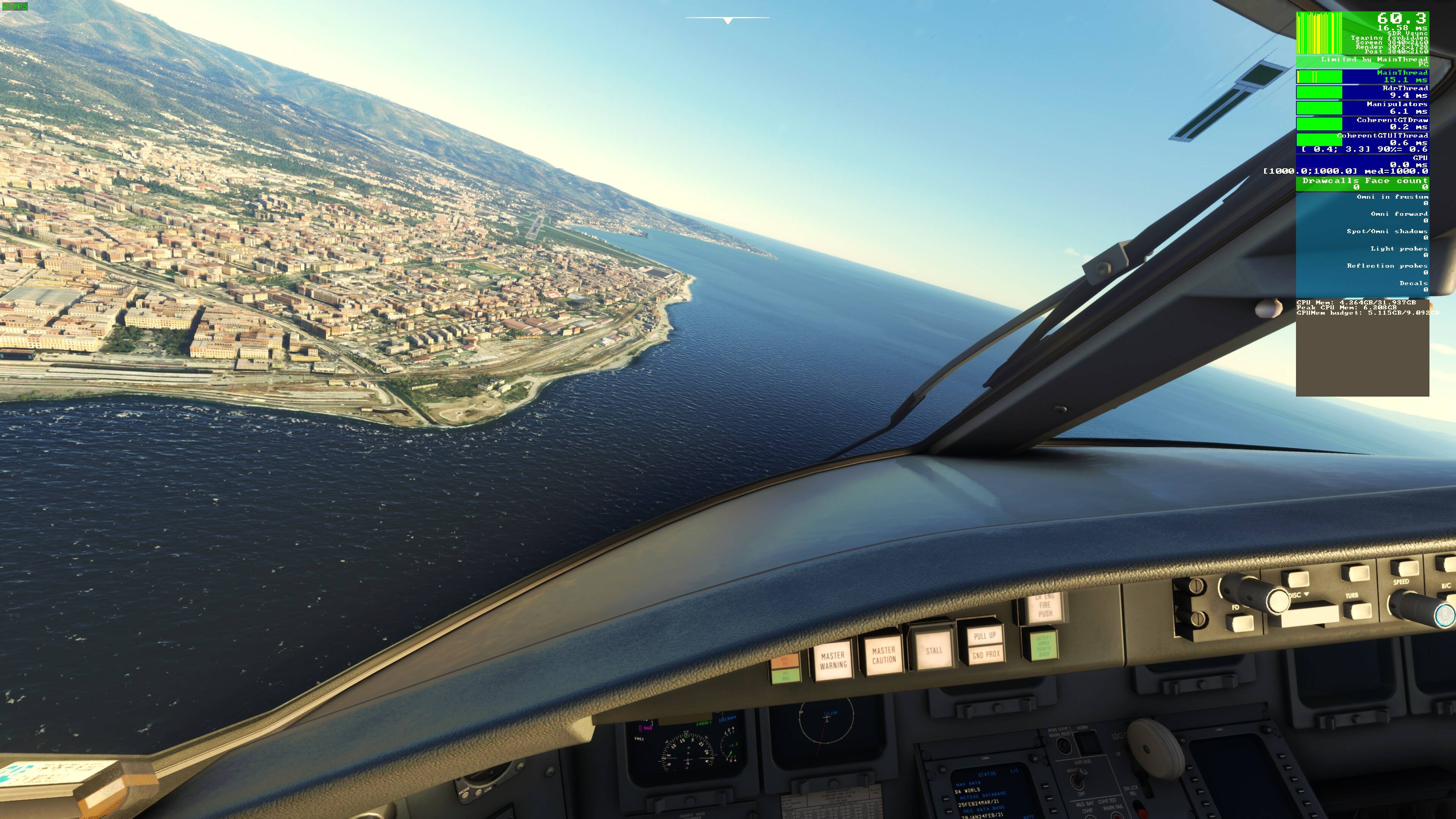
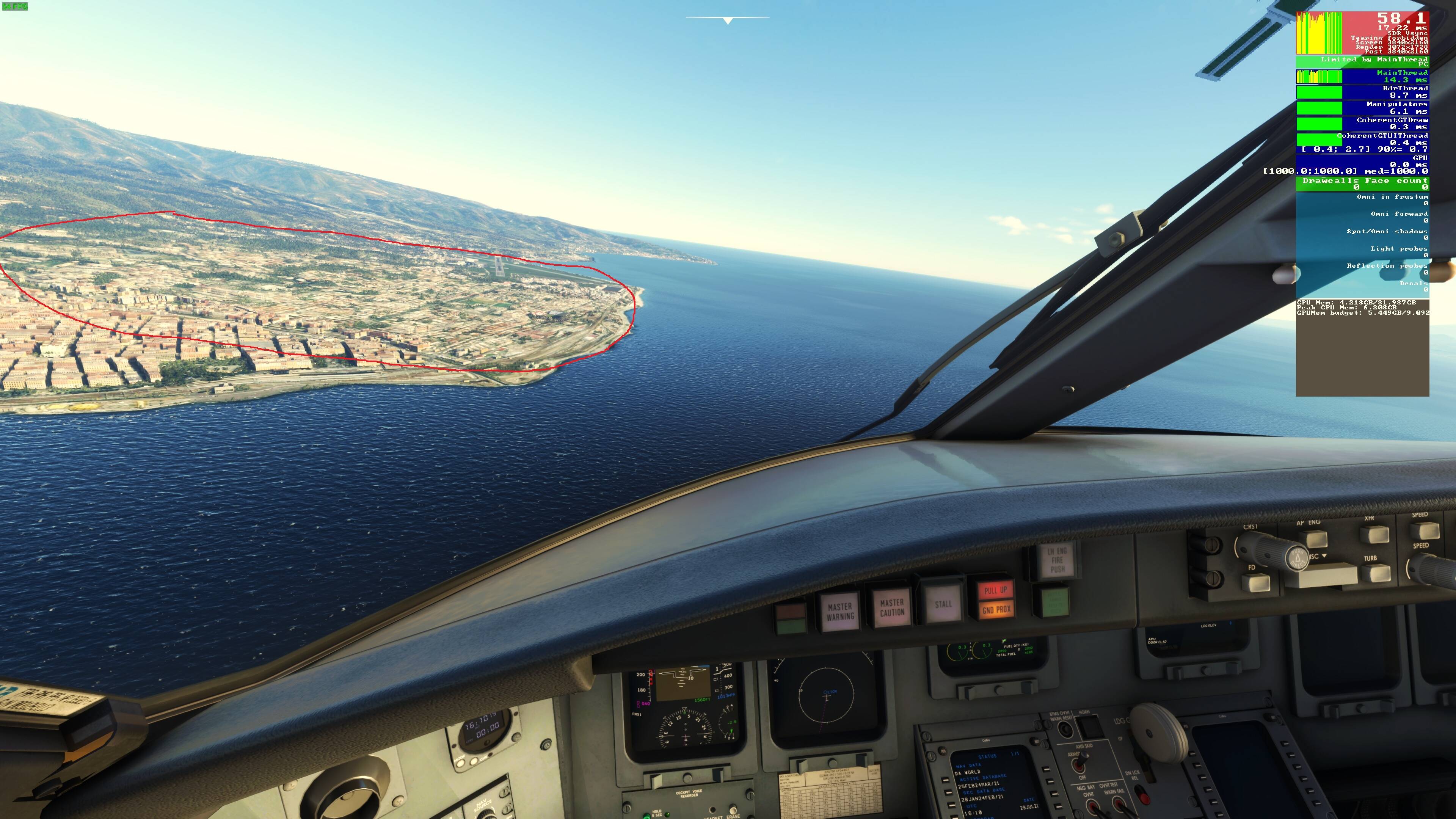
I totally understand your frustration as a Track IR user myself.
I’ve toned down my SNAP looks left and right - in fact, I had a good afternoon at my local airfield - really thinking about how I look in the sim and how I do Real World (I’m a real world pilot) and I made some adjustments as a result.
No, whether we get this LOD pop-in addressed or not in the imminent HOTFIX - is, after my activities today, irrelevant - because after addressing my aggressive Track IR requirements - and toning them down as a result to more reflect the way I scan and look around in the cockpit in real life has made me realise - the Lod pop-ins don’t need to be there in the virtual airspace.
Think about what you do real World - and bring it to the sim in the way that you configure Track IR.
And I know, I know, and I know, when you’re on Short Final - it feels like you’re looking everywhere at once - but really, take a look around - put the Sim on Active Pause and experiment with how you really look around. You might well be very surprised. The most you’ll do is scan through 40 degrees of vision to check left and right and above and below. Load up Track IR and see what angles it’s giving - are they necessary? - those extreme angles? - because those are the angles that are making the Sim reload the scenery.
If you re-callibrate your own Track IR to more fit with the way you REALLY look around for SA - whether on Short Final or at FL140 you’ll see no pop-ins - caused by Track IR at least.
I’m just finishing a Track IR MSFS2020 Profile which I’ll happily post here for those who wish to Download.
The amount of performance gain I’ve gotten for the overall experience, I’ll happily pay the culling cost twice over. For me it doesn’t really matter because it doesn’t annoy me. The pop-in is fair quick (under a second) and by time my eyes adjust, everything’s popped in. There is no popping on panning which is what I mostly do inside the cockpit.
You can’t make every one happy but I’m willing bet there are a LOT more happier people now with huge jump in performance than those that care about pop-ins…think about that. Do you want Asobo to go back and take away the performance gains that the MAJORITY is enjoying so they can please the small fraction? I don’t think they’ll do that and that pretty much has been their thinking when making choices. That’s the same thinking that most everyone in development/manufacturing world has to do, do I make a design change that helps 90% of the people or do I help the 10% because they have loudest voices on the internet?
Also, when you’re on short final, you shouldn’t be snapping around looking at the horizon to see if you’re getting pop-ins haha jkjk
My point is, during normal use and if you’re focusing on things that matter for the leg of flight you’re in, you’ll likely not even notice the pop in that’s happening way out there on the horizon.
I bet there’s a good chunk of people who didn’t eve notice it until it was mentioned and now it bugs you enough to come complain about it. It’s like when someone points out something to you like a mark, a scratch, a dent that never bothered you before but now it’s bothersome to you..
I don’t know if you’ve seen reddit, these forums and some streamers (PC) many are actually quite annoyed by the severe pop-in. (and various other issues)
Its also completely unecesary, its not an on/off thing. they could easily create a slider that allows users to increase lod ranges..
And besides that, its not only LOD pop in, the draw distance is literally a fraction of what it once was. Something actually controllable by sliders, seemingly not working properly currently.
You don’t have to be defensive, no one is coming to take your performance gains away..
A lot of people do notice. It’s already one of the most upvoted requests in the ‘wishlist’ category. Please stop trying to downplay other people’s issues and make assumptions. It’s not constructive.
Why do some people speak about LOD 200, 400, 900? I mean, how does it affect the sim, if I configure the code to more than 200? How is the software able to deliver more details than programmed for the max suitable setting of 200?
I’m not being defensive. I’m just saying some of these visual quality things are SUBJECT as opposed to bugs/issues/FPS those are things/data that can be measured and doesn’t rely on opinions like perceived quality.
I think SU5 looks GREAT! I love the new lighting, the new contrast. I think it looks better than before. You might not… but that’s my opinion vs yours but an opinion none the less. neither of us are right or wrong. Asobo made the decision that my opinion falls in the majority and they decided to go that route. That’s just how things are.
The quality complainers, though the loudest on the internet, make up a very small userbase. If 90% of the users of MSFS are just going by their day and flying away… there is no need to take drastic measures to satisfy the 10%. Like it or not, that’s reality.
I agree that PC users should have more control over options and maybe we’ll get it. I still think this launch was more of a combined update and going forward, now that they have a similar base between Xbox and PC, they will target each one separately working off the same base. This was just a step that was need to bring it all into the same bucket per se.
Pop-in is not the same as the colors, contrast and lighting..
Pop-in can factually be verified to be an issue now, and not 3 days ago..
You don’t even have to pan your camera - just approach, and buildings, trees and even airport objects will pop from thin air.. But you made up your mind it seems.
The thing with pop-in is, once you see it, you can’t unsee it
Honestly didn’t even notice it unless I was looking for it. This video was made because he was clearly looking for it. under normal usage, you’d probably never even notice it unless you specifically changed view to look for it.
I’ve never seen things pop in front of me so not sure what you mean just approach and objects start popping in front. I don’t have that issue at all. I keep my trees on low, there’s too many trees to freaking begin with.
Sorry, I don’t have the popping in front of me as I fly issue. Once a scenery/objects have loaded in from of me they don’t pop in and out. I don’t even notice them loading in the first view change because as I change views, I’m usually looking down at the instrument. When I look up, everything’s loaded and they don’t pop in again.
not being fecious or anything but are you sure you don’t have that issue if you tried to to recreate my movement in video (presumabely in noncached location)
because not noticing this is one thing, it happening being other
“We have temporarily reverted the LOD selection mechanism to its previous state on PC. However, because it is important that you can check the state of your add-ons with the Xbox LOD selection mechanism, we have added an “Xbox LOD Selection Mode” option in the DevMode.”
Mind you this is the SDK, so not in-game yet. But this tells me the Xbox LOD method is active on PC now as well. Seems they are already reverting it for PC SDK.
This is good news for everyone, as it means its probably a toggle they can introduce to the PC version graphics settings later.
“You don’t even have to pan your camera - just approach, and buildings, trees and even airport objects will pop from thin air”
That’s the issue I was replying to. I don’t see this issue without panning or switching cameras. I only see it when I move the camera, things do pop in at distance. I’m not saying it doesn’t exist, but is not bothersome to me.