There’s absolutely no reason not to cap fps to slightly more than you can achieve while flying. No reason whatsoever.
First limit your fps as recommended above.
Second watch your vram junction temp. 3090 tends to overheat its vram especially on the backside. This also affects watercooled cards because only the front side is well cooled, the backside is inadequate cooled by almost simply an backplate. I put an vintage 3,5“ hdd cooler on the back of my card and get about 20 degrees lower temps.
With that and an conservative UV/OC to 0,875mV/1875Mhz I am almost out of ctd‘s now. But have still some strange hardcrashes with freezes/reboot once a week.
I had a 2070 Super in a Dell XPS 8930 SE case, not known for great ventilation. The 2070S would run in MSFS at 83 to 84 deg C with a thermal limit on the GPU of about 89 deg C. Now I have a 3090 FE that’s too big for my case so it sits outside in a riser stand. In a room that’s 81 to 86 deg F (27 to 30 deg C), it’s hard to get the 3090 above 61 to 65 deg C in MSFS (it’s thermal limit is 93 deg C). At the 3090 use temperatures, its fan is only running about 1,000 rpm whereas, IIRC, the 2070S fan was running close to 4K rpm. If I’m not simming, the 3090 fan never runs (0 rpm) whereas the base speed for the 2070S fan was ~1K rpm. So I would agree if a 3090 conked out, if it’s otherwise well-ventilated, there was likely a built-in hardware defect.
Edit_Update: I noticed the OP’s emphasis on unleashed frame rate. I don’t think I’ve set any framerate limit and I can do 90 to 100 fps in an Icon A5 over Mann Gulch, MT - a low or non-existent photogrammetry region. 60 fps at 1500 ft, ~100 kts over Manhattan (a high photogrammetry region) - I’m running at ~97% GPU usage according to the Xbox Game Bar stats using ~all ULTRA settings at 1440p. So I’m close to maxing out the GPU as I should be doing and it’s not burning up.
@JALxml
The never-ending frame rate is only for the install process and monitors without a fixed frame rate (use without vsync., G-Sync / Freesync).
Known bug since August 2020
Never had that issue with my 3090 or though it is water cooled never get over 40c and 20% usage at ultra.
New worlds is also known to cook poorly cooled cards and cases.
Cheap fans make things worse
20% usage? GPU or memory?
For GPU this would be weird…
My 3080 also uses approx 20-30% in average of memory in SIM.
When EVGA announced that the soldering was faulty, they gave no evidence to back it up. Don’t believe everything you read on the internet.
go to nvidia control panel > 3D settings > Max frame rate set to your liking..
i have my gtx1080Ti at 40 FPS and doesn’t get hot or run at 100% the whole time.
the ingame Frame limiter does nothing… got broken by Asobo in the persuit of max FPS…
I found this works very well, especially in the menu section. I found my system running at high levels even in menu section. Setting a limit on the fps stopped this.
Actually, Duh Me! I guess I’m so excited to finally get a 3090 I’m not thinking about my monitor and what fps might mean. My monitor is a relativity aged Dell U2713H with a fixed vertical 60 Hz display rate. So if the Xbox Game Bar claims MSFS is generating 90 to 100 fps over Mann Gulch, MT, the monitor must be dropping a bunch of frames! Does what happens when you exceed the refresh rate of your monitor depend on the monitor technology, etc., ???
Dell U2713H
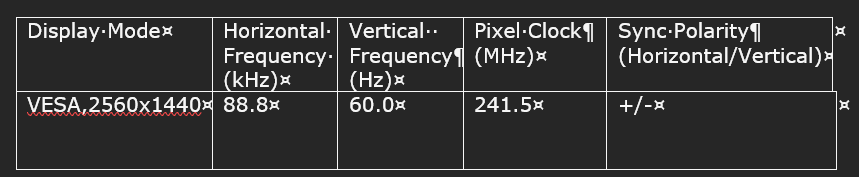
Edit_Update: And then I found the following, which will take awhile to fully digest. Why set framerate higher than your display’s? - Arqade (stackexchange.com) and Does more FPS than Screen refresh rate really make sense? Myth busting of all the confusions and more about different sync technology (calloftechies.com)
Not at all..
I’m still waiting for my retailer to send me a new GPU… and can’t do any changes in my PC doing to lag of GPU…
So..do me a favor.. Don’t delete my post…
Greets from the Canary islands
Tx for all your recommendations… 
Btw… I miss flying 
they have fixed the installation / update error.
Only 35% GPU load for me. 
It’s still ramping up GPU usage at the main menu while updating the content manager packages.
right.. but the first update is now ok..
time xD
can’t update without GPU… 
my Samsung 4 k monitor is 60hz but my VR Headset 90 up to 120HZ

xxxxx xxxxxx xxxxx
Because it renders. It’s normal
I’m grateful that you’re ok after spending 6 weeks in hospital.