ISSUE DESCRIPTION
Description of the issue:
Starting the aircraft using Auto-start (Cnrtl-E by default) does not select a fuel tank. The engine will be started with the fuel selector lever in the “Off” position. This will not change once the engine starts. After a short while (~ 1 to a few minutes), depending upon throttle use, the engine will die due to fuel starvation.
FREQUENCY OF ISSUE
How often does this occur for you (Example: Just once, every time on sim load, intermittently)?
Every time
REPRODUCTION STEPS
Please list clear steps you took in order to help our test team reproduce the same issue:
- In free flight, select the CAC Boomerang (any livery). Spawn at any airport parking spot during daylihgt hours (for ease of visibility)
- Switch to cockpit view.
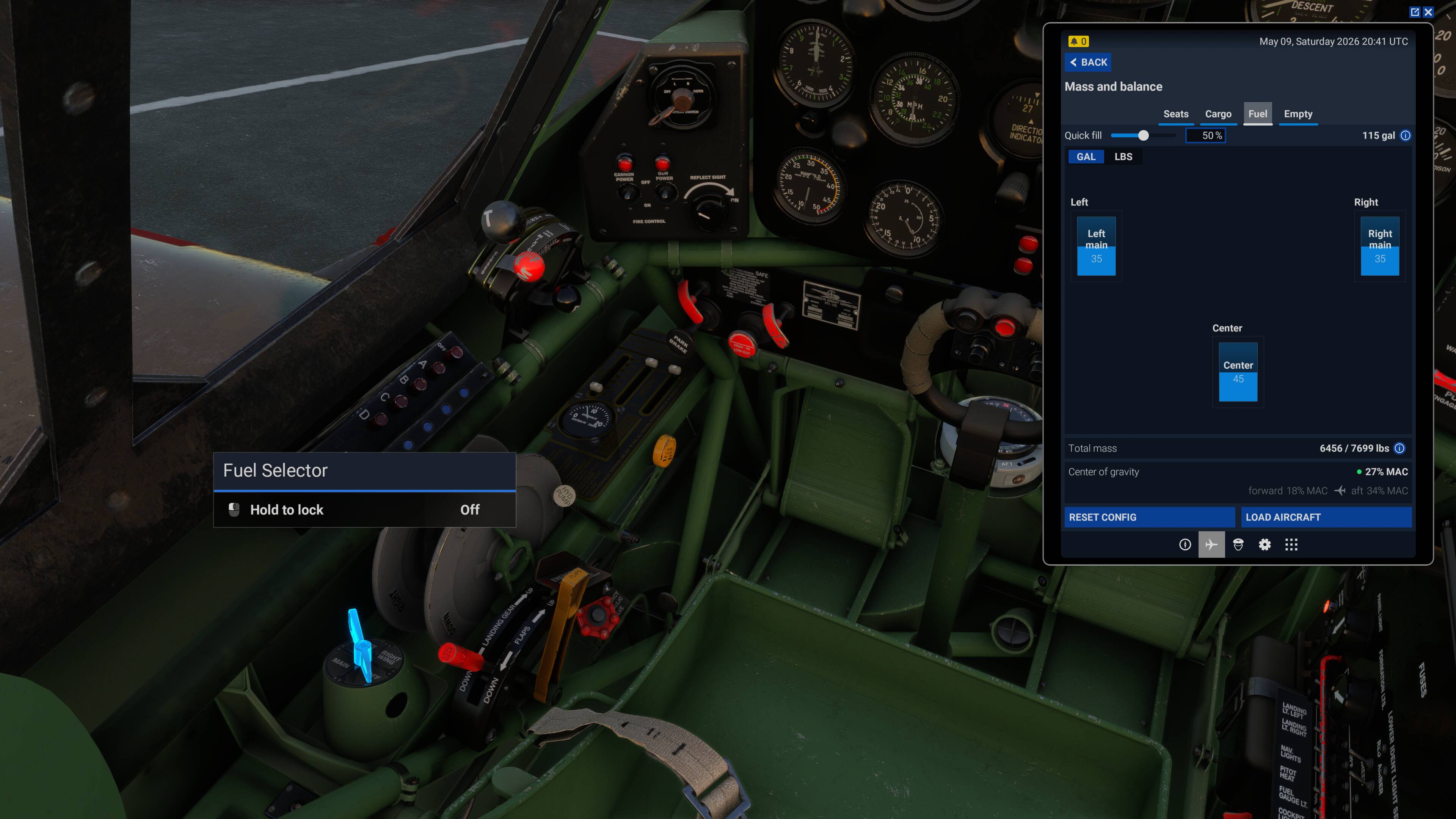
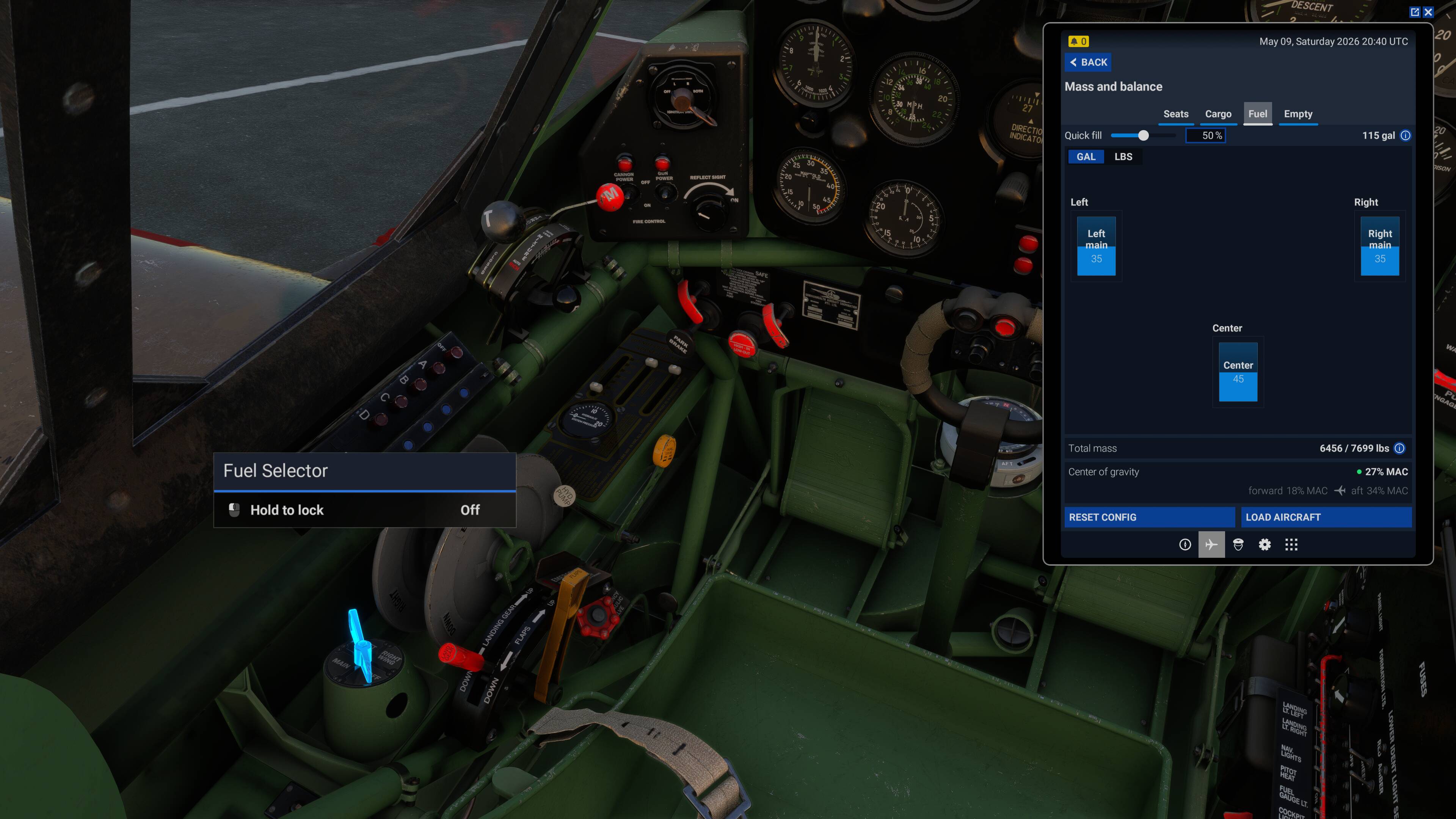
- Open the ESB and select the Mass & Balance Fuel Tab. Note the L & R tanks have 35 gallons, & the center tank 45 gallons. Leave the EFB open on this tab.
- Look at the fuel selector lever - notice it is in the “off” position.
- Start the engine using CTL-E or whatever you may have mapped the autostart binding to.
- Notice the fuel selector lever is still in the “off” position.
- Increase the throttle to increase fuel flow - for example to ~ 25-25%
- Wait for a minute or two. The engine will die. The amont of fuel shown in the EFB will still show 35 / 35 / 45 gallons.
Expected behaviour: Upon Auto-start, the fuel lever is set to the main (center) tank, as per the pre-flight “Before starting engines” cheklist item.
YOUR SETTINGS
What peripherals are you using, if relevant:
N/A for this issue.
[PC Only] Are you using Developer Mode or have you made any changes to it?
No / No
[PC, MSFS 2020 Only] Are you using DX11 or DX12?
N/A
[PC Only] What GPU (Graphics Card) do you use?
AMD Radeon RX 9070 XT (16GB) Driver v26.1.1
[PC Only] What other relevant PC specs can you share?
Expand to see my basic PC specs:
| Item | Setting |
|---|---|
| CPU | i7-12700K (no overclocking or undervolting) |
| RAM | 32 GB 5200 MHz DDR5 CL40 RAM |
| GPU | AMD Radeon RX 9070 XT (16GB) Driver v32.0.23017.1001 (Adrenalin v26.1.1) |
| Rebar BIOS Setting | On |
| OS | Windows 11 Pro 25 H2 v26200.8246 + all OS updates. |
| MSFS 2024 Edition | MS Store Aviator + all WUs & CUs |
| Current Build Version | SU5 v1.7.27.0 |
| Downloaded Core Content | None (i.e., all Streamed) |
Expand to see my graphics settings
| Item | Setting |
|---|---|
| Display Mode | Full Screen |
| HDR10 | On |
| Exposure Compensation | EV-1 |
| Full Screen Res | 3840 x 2160 |
| Anti-Aliasing | TAA |
| Render scaling | 100 |
| AMD FidelityFX Sharpening | 200 |
| Max Frame Rate | On |
| Max Frame Rate Value | 60 |
| Frame Generation | AMD FSR 3 |
| Framerate Multiplier | 2x (N/A) |
| VSync | Off (N/A) |
| VSync Interval | Monitor refresh rate (N/A) |
| Dynamic Settings | On |
| Frame Rate Target | 40 |
| - | - |
| Global Rendering Quality | Custom |
| Terrain LOD | 400 |
| Off Screen Terrain Pre-Cache | Ultra |
| Displacement Mapping | On |
| Buildings | High |
| Trees | Medium |
| Plants | High |
| Rocks | High |
| Grass | High |
| Object LOD | 200 |
| Volumetric Clouds | Ultra |
| Texture Resolution | High |
| Anisotropic Filtering | 16x |
| Water Waves | High |
| Raytraced Shadows | Off |
| Shadow Maps | 2048 |
| Terrain Shadows | 512 |
| Contact Shadows | High |
| Windshield Effects | Medium |
| Ambient Occulsion | High |
| Cubemap Reflections | 256 |
| Raymarched Reflections | Medium (reduces windshield reflections) |
| Light Shafts | Ultra |
| Depth of Field | Ultra |
| Motion Blur | Off |
| Visual Particle Effects Quality | High [NEW SU5] |
| Glass Cockpit Refresh Rate | High |
| Characters Quantity | Low |
| Characters Variety | Ultra |
| Characters Quality | Medium |
| Airport Services Quantity | Low |
| Airport Service Variety | Ultra |
| Parked Aircraft Quantity | Low |
| Parked Aircraft Variety | Ultra |
| Aircraft Traffic Quantity | Low |
| Aircraft Traffic Variety | Ultra |
| Road Traffic | Ultra |
| Sea Traffic | Off (Using Seafront Simulations Global Shipping 24) |
| Fauna | Ultra |
| Seatbelt Visibility | On |
MEDIA
Cold-n-dark:
Engines started: