ISSUE DESCRIPTION
Description of the issue:
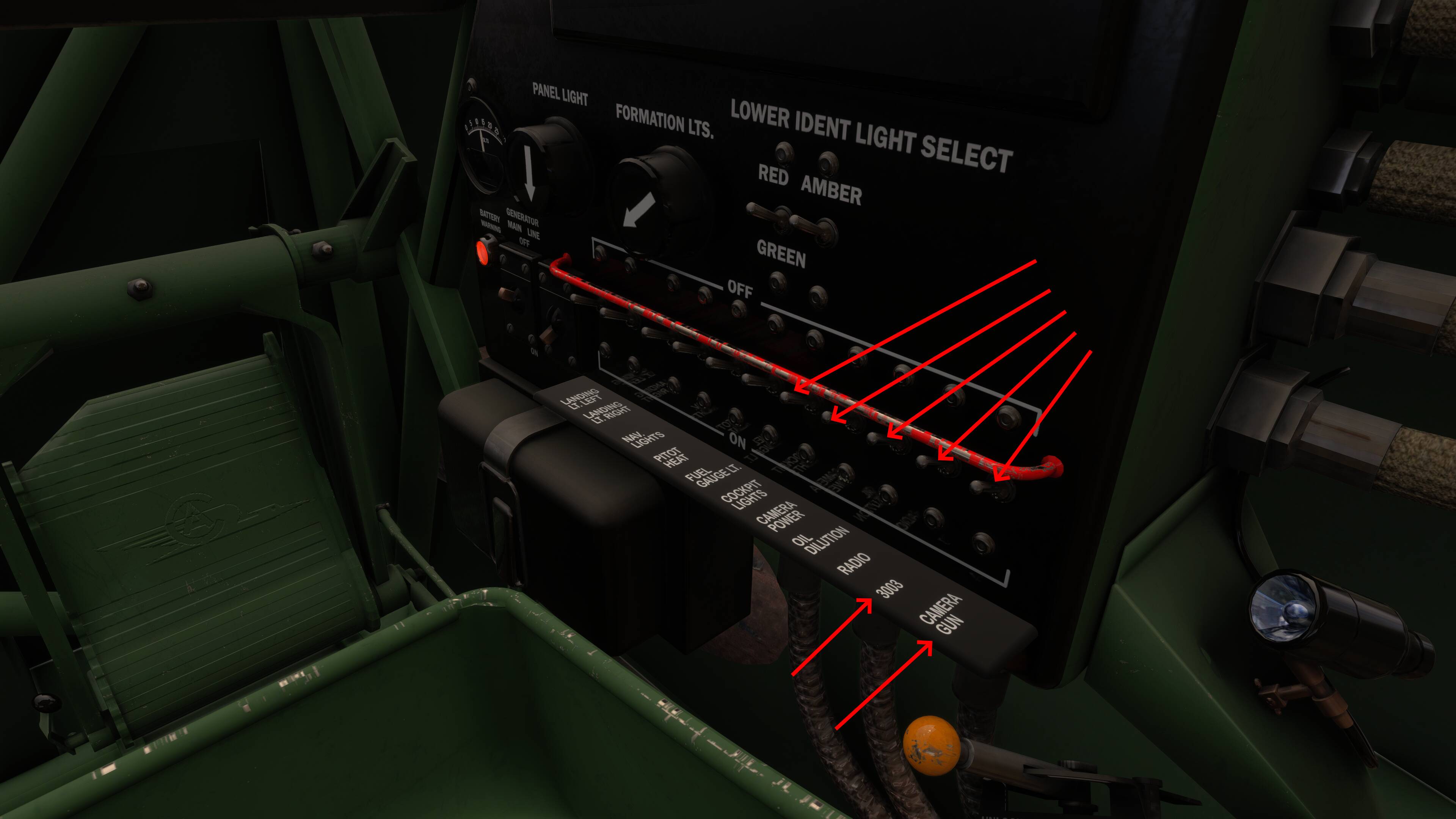
The following two switches have no animation, though their tooltip text does show them toggling from on to off. It may be that these two switches are INOP by design, in which case perhaps the tooltip text needs to be modified to say INOP rather than On & Off:
- Camera Power
- Oil Dilution
The Toggle Radio Switch has no animation, though it does toggle the additional two gauges in the cockpit.
The Wheel Chocks Switch (Marked as “303”) does not remove the chocks and has no animation.
The External Power Switch is marked as “Camera Gun” (see screenshot).
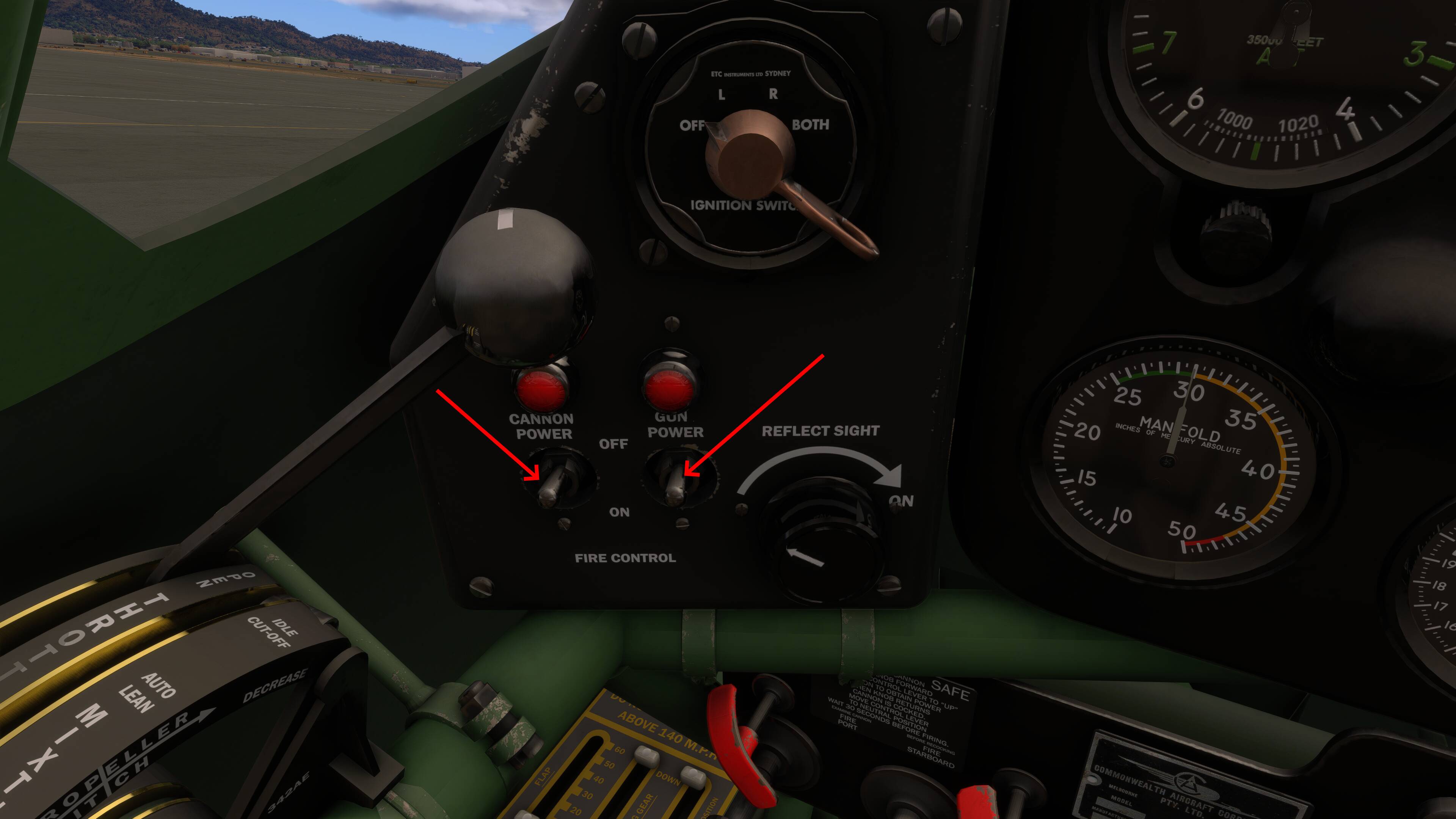
The following two switches are animated, and their tooltip text does show them toggling from on to off, but do nothing. It may be that these two switches are INOP by design, in which case perhaps the tooltip text needs to be modified to say INOP rather than On & Off (see screenshot)
- Cannon Power
- Gun Power
FREQUENCY OF ISSUE
How often does this occur for you (Example: Just once, every time on sim load, intermittently)?
Every Time
REPRODUCTION STEPS
Please list clear steps you took in order to help our test team reproduce the same issue:
- In free flight, select the CAC Boomerang (any livery). Spawn at any airport parking spot during daylihgt hours (for ease of visibility)
- Switch to cockpit view
- Look at the switch panel on the right-hand side of the cockpit. Use your peripheral (mouse, etc) to highlight each of the switches shown in the first screenshot below, and note their actions as described in the text above.
- Look at the switch panel on the left-hand side of the cockpit. Use your peripheral (mouse, etc) to highlight each of the the switches shown in the second screenshot below, and note their actions as described in the text above.
YOUR SETTINGS
What peripherals are you using, if relevant:
N/A for this issue.
[PC Only] Are you using Developer Mode or have you made any changes to it?
No / No
[PC, MSFS 2020 Only] Are you using DX11 or DX12?
N/A
[PC Only] What GPU (Graphics Card) do you use?
AMD Radeon RX 9070 XT (16GB) Driver v26.1.1
[PC Only] What other relevant PC specs can you share?
Expand to see my basic PC specs:
| Item | Setting |
|---|---|
| CPU | i7-12700K (no overclocking or undervolting) |
| RAM | 32 GB 5200 MHz DDR5 CL40 RAM |
| GPU | AMD Radeon RX 9070 XT (16GB) Driver v32.0.23017.1001 (Adrenalin v26.1.1) |
| Rebar BIOS Setting | On |
| OS | Windows 11 Pro 25 H2 v26200.8246 + all OS updates. |
| MSFS 2024 Edition | MS Store Aviator + all WUs & CUs |
| Current Build Version | SU5 v1.7.27.0 |
| Downloaded Core Content | None (i.e., all Streamed) |
Expand to see my graphics settings
| Item | Setting |
|---|---|
| Display Mode | Full Screen |
| HDR10 | On |
| Exposure Compensation | EV-1 |
| Full Screen Res | 3840 x 2160 |
| Anti-Aliasing | TAA |
| Render scaling | 100 |
| AMD FidelityFX Sharpening | 200 |
| Max Frame Rate | On |
| Max Frame Rate Value | 60 |
| Frame Generation | AMD FSR 3 |
| Framerate Multiplier | 2x (N/A) |
| VSync | Off (N/A) |
| VSync Interval | Monitor refresh rate (N/A) |
| Dynamic Settings | On |
| Frame Rate Target | 40 |
| - | - |
| Global Rendering Quality | Custom |
| Terrain LOD | 400 |
| Off Screen Terrain Pre-Cache | Ultra |
| Displacement Mapping | On |
| Buildings | High |
| Trees | Medium |
| Plants | High |
| Rocks | High |
| Grass | High |
| Object LOD | 200 |
| Volumetric Clouds | Ultra |
| Texture Resolution | High |
| Anisotropic Filtering | 16x |
| Water Waves | High |
| Raytraced Shadows | Off |
| Shadow Maps | 2048 |
| Terrain Shadows | 512 |
| Contact Shadows | High |
| Windshield Effects | Medium |
| Ambient Occulsion | High |
| Cubemap Reflections | 256 |
| Raymarched Reflections | Medium (reduces windshield reflections) |
| Light Shafts | Ultra |
| Depth of Field | Ultra |
| Motion Blur | Off |
| Visual Particle Effects Quality | High [NEW SU5] |
| Glass Cockpit Refresh Rate | High |
| Characters Quantity | Low |
| Characters Variety | Ultra |
| Characters Quality | Medium |
| Airport Services Quantity | Low |
| Airport Service Variety | Ultra |
| Parked Aircraft Quantity | Low |
| Parked Aircraft Variety | Ultra |
| Aircraft Traffic Quantity | Low |
| Aircraft Traffic Variety | Ultra |
| Road Traffic | Ultra |
| Sea Traffic | Off (Using Seafront Simulations Global Shipping 24) |
| Fauna | Ultra |
| Seatbelt Visibility | On |
 :
: