ISSUE DESCRIPTION
Description of the issue:
[PC Only] Did you remove all your community mods/add-ons? If yes, are you still experiencing the issue?
Fresh install
FREQUENCY OF ISSUE
Always, but a few days ago when I first tried MSFS24 it did work, maybe the patch broke this? Or I messed something up in settings, but this should not break like this
REPRODUCTION STEPS
Please list clear steps you took in order to help our test team reproduce the same issue:
- Launch MSFS2024
- Switch to VR mode with Alt-TAB (doesn’t matter if in menu or in a flight
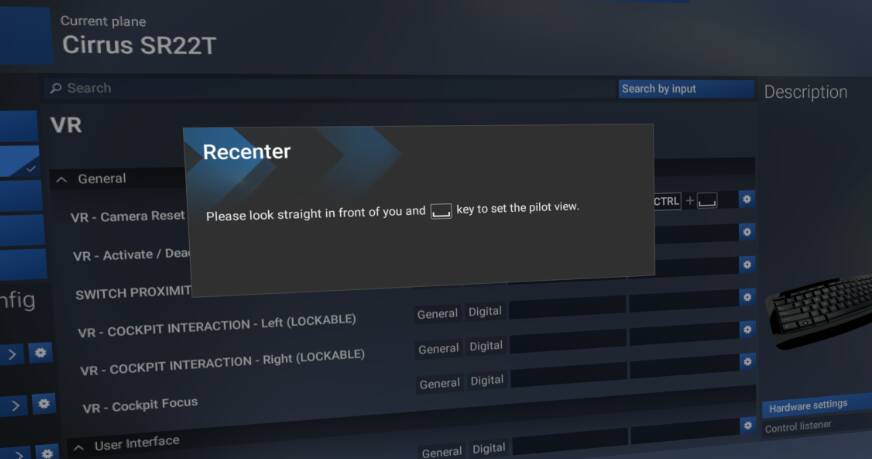
- Recenter pop-up appears, advising to press space bar to set pilot view
- Nothing happens, in fact no buttons work at all anymore (eg. Esc, or Alt-Tab again to switch out of VR mode, nothing has any effect, I can still look around with the headset, and the VR controllers show, but again no buttons or anything have any effect)
- Kill flightsim in task manager and be sad
Ok, switching back to default control bindings, it advices to press shift to center the view, and this does work, so I guess you just can’t change the default binding? Very annoying
YOUR SETTINGS
Using Reverb G2
[PC Only] Are you using Developer Mode or have you made any changes to it?
No
[PC Only] What GPU (Graphics Card) do you use?
Irrelevant
[PC Only] What other relevant PC specs can you share?
Irrelevant
MEDIA
[END OF FIRST USER REPORT]
 For anyone who wants to contribute on this issue, Click on the button below to use this template:
Do you have the same issue if you follow the OP’s steps to reproduce it?
•
Provide extra information to complete the original description of the issue:
•
If relevant, provide additional screenshots/video:
•