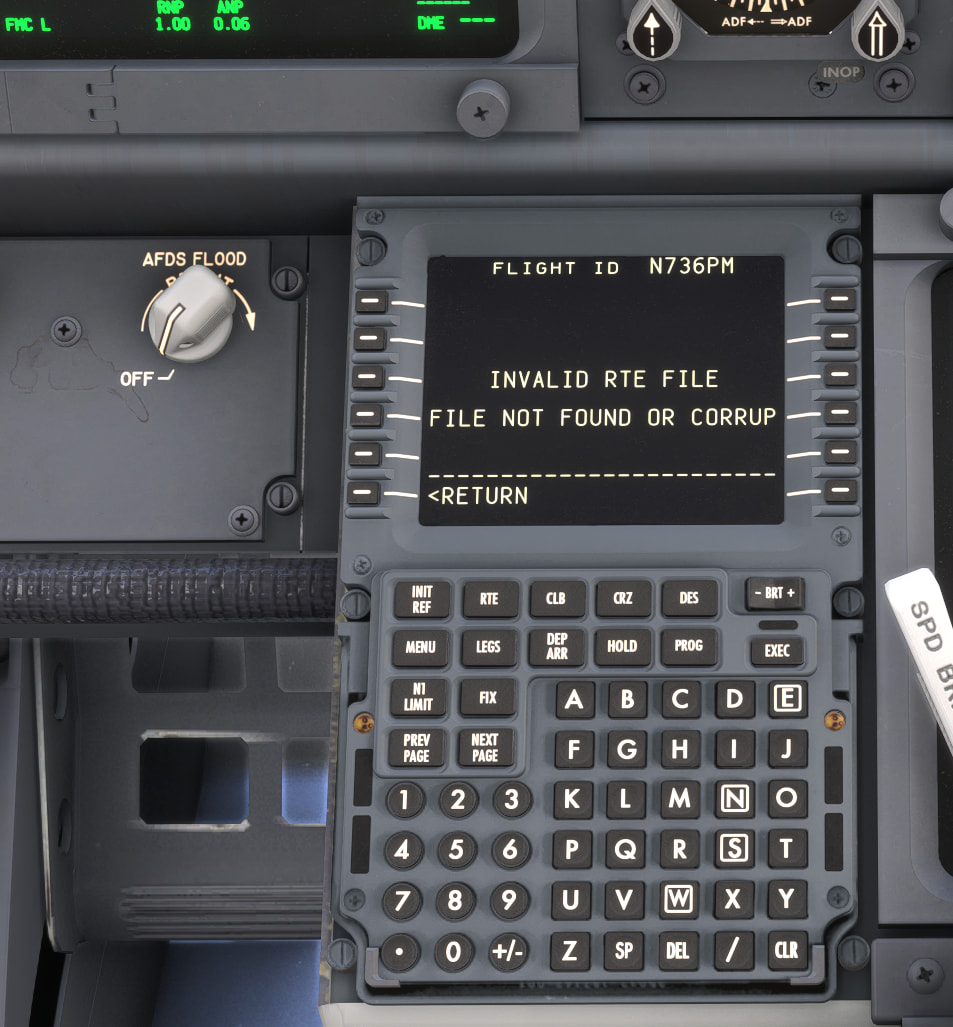
I am just getting rolling with 2024 after 2020 where I used Simbrief dispatch all the time. Now, with the same planes, Citation X or Vision jet so far, I cannot get a Simbrief Flight Plan into the fmc. I can get it to show on the simulators efb and I can hit send but it doesn’t input into the FMC. When I go to route in the FMC there is an option to select Simbrief but when I do that and try to recall the plan or request the plan it shows that it failed and I have to create it in the plane’s FMC from scratch each time.
Most aircraft have a slightly unique implementation of the feature, if it’s available at all. In 2024, the best route (pun intended) for getting SimBrief imported into an aircraft is to use the SimBrief EFB app, then pressing “Import Route” and “Import Weights” within that app once the flight plan is generated or opened within the app.
Many 2024-native aircraft will have been built with avionics that are compatible with this import function, however it’s not 100%. Can you clarify a few things with your issue:
- What version of the Citation X are you using (2020 or 2024?)
- What version of the Vision Jet are you using (the payware 2020 product from FFX or the default 2024-native version in the base sim?)
- How are you importing the flight plan?
Maybe a stupid question but you have input your Simbrief number in the FMC?
I would separate the sim EFB import from each aircraft’s own FMC import. In 2024 they don’t always behave like one universal pipeline, so Zadma’s question about the exact Citation X and Vision Jet versions is probably the key one. I’d also double-check the SimBrief pilot ID/account setting inside the aircraft itself, because some aircraft use their own SimBrief field rather than just the sim-level EFB login.
There was a small navigraph update today to a few avionics systems. One of which was the g3000/5000
Thanks for the responses. I am using the vision jet from FFX which I copied from my 2020 Community folder to the 2024 Community folder. The Citation X is the same one I used in 2020, I’m pretty sure.
Now when you suggest the Simbrief efb, I am not sure what that means. There is an efb in 2024 at the top menu, and of course some planes have their own efb. Is there a separate Simbrief efb that I should be using?
The 2020 versions of those aircraft will not have any compatibility with the default EFB and the “Send” function it has. Your only option with those aircraft connecting to SimBrief would be if they have a dedicated SimBrief import function built into their avionics, or if you can use an avionics plugin provided by Navigraph.
I checked and their are 2 Vision Jets in my Airplane menu- One says Working Title… which I assume is the default 2024 Vision Jet and the other is the one I installed since it says FlightFX. I assume the default one will connect (?). But, if the FlightFX is a better aircraft, and it’s abvailable for 2024, I will buy or upgrade from their site.
The Citation X is the same situation- one that is default (Working Title…) and the one I installed. I read that both planes were compatible with 2024 (Google AI) or I wouldn’t have bothered. Maybe the developers say “compatible” but obviously not totally compatible? I don’t mind spending a few more $ at this point if the default planes are not up to the addons.
I also fly the PMDG 737 and that one, I knew beforehand, I would have to buy the 2024 version. Haven’t tried it yet.
I just want to import Simbrief easily like I did in 2020.
Should I assume if the Citation X is in the Marketplace and marked “owned” that what I have is the 2024 version? And, if so, why isn’t it importing the Simbrief into the FMC???
I’m a bit bummed that 2 prop planes I really love- the Tecnam P2012 and C414, is not compatible with 2024. They say they are working on the P2012.
Which one is better is subjective, I guess - Working Title will argue that they’ve added systems depth to the aircraft that isn’t present in the original FFX version. The FFX version is also only 2020-native and will not be updated to 2024-native, so if you want a 2024-native Vision Jet, you’ll need to use the default offering (which is derived from the Vision Jet you own, but with 2024-native features added).
For that one, the below Import functions from the SimBrief EFB app will send over both route and fuel/payload data into the aircraft instantly. It will also send the route to the default Planner EFB app for easy access to Lido/FAA charts, where applicable.

For both the 2020 FFX Vision Jet and the 2024 Working Title one, you have the option of installing the Navigraph plugin for the G3000/G5000 avionics, which will also give you this option directly in the aircraft:
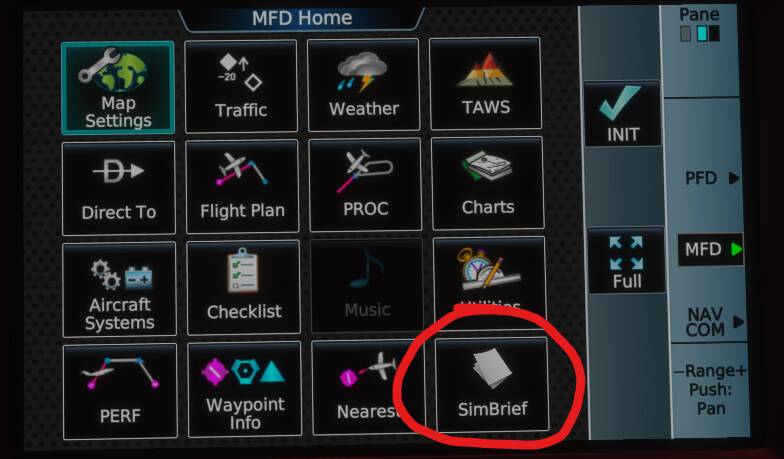
However this option will only import route and not import the planned weights for your flight unlike the SimBrief EFB option - though, again, that will only work for the 2024-native Vision Jet.
I cannot speak to the capabilities of the 2020 Citation X, but I can confirm that the Import Weights function from the SimBrief EFB app works but the Import Route does not. I believe FFX have acknowledged this as a bug and will be fixing with a future update. This means that, for the time being, your only option for SimBrief import into the Citation X is to use the built-in import functions within the FMS:
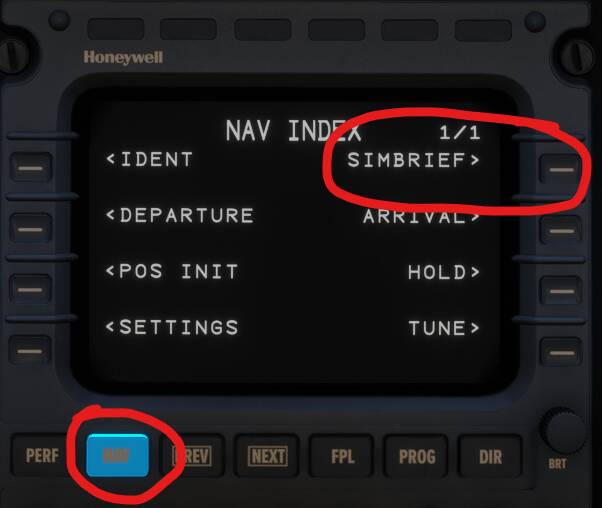
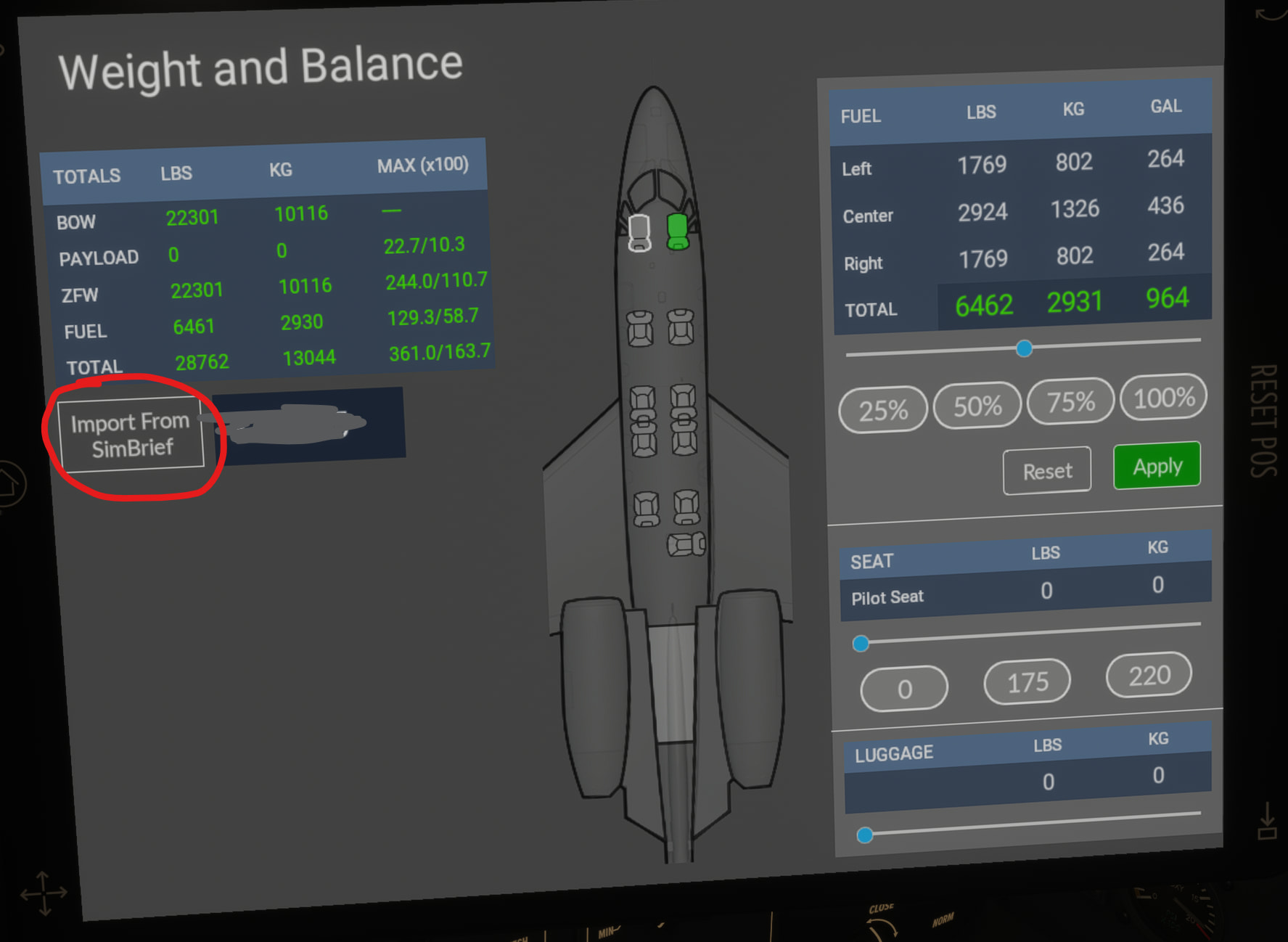
But, just as the G3000 import feature only imports route, so does this - you can, however, import weights into the 2024 Citation X via the FFX EFB found inside the aircraft.
Assuming you’re referencing the C414 developed by FlySimWare, it’s currently for sale in the 2024 Marketplace as a 2020 aircraft which is compatible with (but not yet native for) MSFS 2024. Not sure about the P2012, though most 2020 aircraft run perfectly fine in 2024, they just will lack access to 2024-specific features and benefits.

According to a staffer at PMDG, it is often the cause of problems if you have loaded 2020 code into 2024 via your addons.
Just be aware of this if you are having issues.
We don’t know which cause problems.
I’m not sure which edition you bought but there are a couple of twins within the 2024 editions.
Otherwise there are a few devs that offer the 2024 versions as a free upgrade.
Good to know. I keep all my addons in a separate addons folder and link them to the Community folder with an Addon Linker app, so any “problematic” planes will not be loaded into the sim by default. That should avoid the issue and if I see funky stuff after linking one I will know not to use it again. Yes, I just found out the C414 will work close to the same as 2020, according to their site.
So far, even though I fly mainly addon planes, the 2024 default ones seem a bit better overall than the 2020 ones and I am going to try a couple.
Today I have time to do a flight in the PMDG 737- 2024 version. I’ll try Simbrief with that… should work.
That PMDG 737 test is a good way to separate it. With the PMDG, I would use the aircraft’s own SimBrief import in the FMC/EFB side rather than expecting the MSFS flight planner or EFB send button to behave the same way as a 2024-native default aircraft.
If the PMDG pulls the route correctly, then your Navigraph/SimBrief account link is probably fine and the remaining issue is just per-aircraft support. I would also keep the copied 2020 aircraft disabled while testing, because it makes troubleshooting much cleaner.
Agreed. Like I said, the 2020 aircraft don’t get loaded by default since I use Afddon Linker.
Yes, with PMDG I would use the FMC to import Simbrief.
Thanks.
So… still not able to use Simbrief, even in PMDG 737.
What I did.
I installed the Simbreif Dispatch for FS2024 from their site. It’s in my Community folder.
(I have flown the 737 many times in 2020 so I know the startup and FMC setup routine)
When I open the PMDG EFB and hit Import from Simbrief, the route path shows it loading- there is a line cioonnecting departure and destination. So the PMDG EFB sees it.
But when I hit RTE and select the Simbrief option in the FMC, then FLT PLN REQUEST, it says invalid or file ccorrupted… Yet it shows in the PMDG EFB!
I then tried the default generic FS2024 EFB and created the same flight (we’re talking KBOS to KLGA, NYC to Boston…nothing strange..). Generated and Imported the plan. But still no luck getting it into the FMC. I have tried several times. I don’t get it. These are the same steps that worked in 2020.