Hello, I need some advice on ILS approaches in career mode. When I fly a mission with my Cessna CJ4, the approach is already automatically coded. Could someone please explain to me in simple terms how to initiate such an approach and descent? I’ve watched a bunch of videos, but they all focus on settings rather than how to initiate it in career mode. I need an explanation for dummies, like “you fly to the airport after skipping the flight, descend to 2500 ft, click on NAV and change from the purple arrow to the green one, press VNAV, and it will happen.” 
There is no autothrottle, so that part is down to you.
Make sure you have baro minimums, destination runway alt. your FAF alt to descend to.
Approach is is in FMS and no discontinuities
Do your approach refs, destination weather etc, remember must be magnetic winds, add dest temp.
Of course the ILS frequency ready and waiting
Know your TOD, activate VNAV before TOD
know your descent speed for VS to capture ILS safely
No faster than 160kts at FAF
Hopefully you have already cancelled ATC if in Career mode otherwise it is nigh on impossible to start your descent!
If you can, add runway HDG to course 1 ( For some reason it does not work for me)
On your final turn towards runway and ILS activate Appr mode having made sure you can capture the ILS because you are at the correct altitude
Ensure you click on LOC1 (green not purple) as well for HSI
Throttle 60% N1 at final turn to land
Flaps 35
Speed Vapp +10%
200ft, yaw damper off and AP off
There is no reverse thrust, use spoilers and brakes.
If I have forgotten something someone else can add to it.
I’m having trouble too with the CJ4. When on final, strange things happen, like nav mode changing to roll, or the plane starts to turn away from the course, or it descends to a given altitude and then stops descending (with vnav on and the altitude correctly selected).
It happens with ils and rnav approaches as well.
I can’t manage to land as planned and always end landing manually.
1 Like
That usually happens if there is a discontinuity in your flight plan. A lot of Arrivals don’t share waypoints with nearby approaches so when you load an arrival and approach often there is a discontinuity in there. Once you reach the discontinuity if you don’t direct to a fix on the approach, receive vectors from ATC or delete the discontinuity before reaching it so the FMC will draw a path between your last waypoint on you arrival and the first waypoint on your approach; the autopilot will default to ROL if you don’t tell it what to do.
I’ve noticed this will happen if you activate an approach if you’re already past the IAF. Haven’t flown the Cj4 in a hot minute so not sure if this applies but just a thought
This might happen if the altitudes in the FMC is an “at or above” altitude. If your approach has an altitude programmed for example “at or above 2500” and your at 3000’ then you are “at or above 2500” and it won’t see a need to descend as the conditions are met. What I do it usually change my altitude constraint for my FAF to an “at” altitude so that it has to cross that waypoint at that specific altitude not just above. That will give the VNAV a target to descend too.
In the end it was a much simpler solution. In career mode I just switch the NAV signal to LOC1, press APPR, the DS icon lights up, if I am in the vicinity of the airport and heading towards the runway, a diamond appears. Then I try to get it to the center of the altimeter, once it’s there, I turn on the autopilot, it latches, the DS turns green and I start to approach. As soon as I see the runway, I turn off the autopilot and take control.
You had the AP off before getting to IAF? Then manually get ILS path by switching on LOC1 and APP? That’s before switching AP back on again?
How is VNAV, NAV or HDG mode working with AP off?
Maybe I’m misunderstanding the process??
I agree that the CJ4 acquiring the ILS is tricky so I’m willing to try any and all workarounds.
That happened to me once with another plane and learned my lesson. So it’s not the case this time. I always check the flight plan before taking off and delete any discontinuity.
That might be the problem. So I should activate the approach BEFORE the IAF? I didn’t know. And just to be sure, the IAF is the first waypoint of the approach? That includes the transition if there is any?
Not sure how to change the constraint altitude from “at or above” to “at” in the fms. But I assumed that if the approach is activated and the GS is catched, it shouldn’t just stop descending
Thanks for the answers!
Correct, I’ll double check the Cj4 I’m not sure if you have to sctivate it as it’s been a while since I’ve flown it. I know in the Garmin stuff you have to activate it, not 100% sure on the Proline 21 avionics.
Usually the altitude in the FMS will have an A next to it ie 2500A. Just typing in 2500 and clicking the soft key next to the altitude you want to replace on the FMC will replace it with an “at” altitude that will just show the number ie 2500. Again I’ll double chd k later or if someone else knows for sure they can help.
And yes if the approach is active, and the glideslope is captured it should start descending on the glide slope if you have hit the APR button on the autopilot. You should see on the top of the PFD LOC and GS in green for an ILS approach if they’re not green then it’s not captured
2 Likes
Excellent! I’ll check later when I get back home.
Thank you!!
Ok, did a quick flight in free flight as I don’t have the time to do a full career mode flight int he Cj4 (they really should add shorter flights for all aircraft)
you DON’T need to activate the approach, loading the approach and runway into the FMC was enough for it to auto tune the LOC frequency and final approach course.
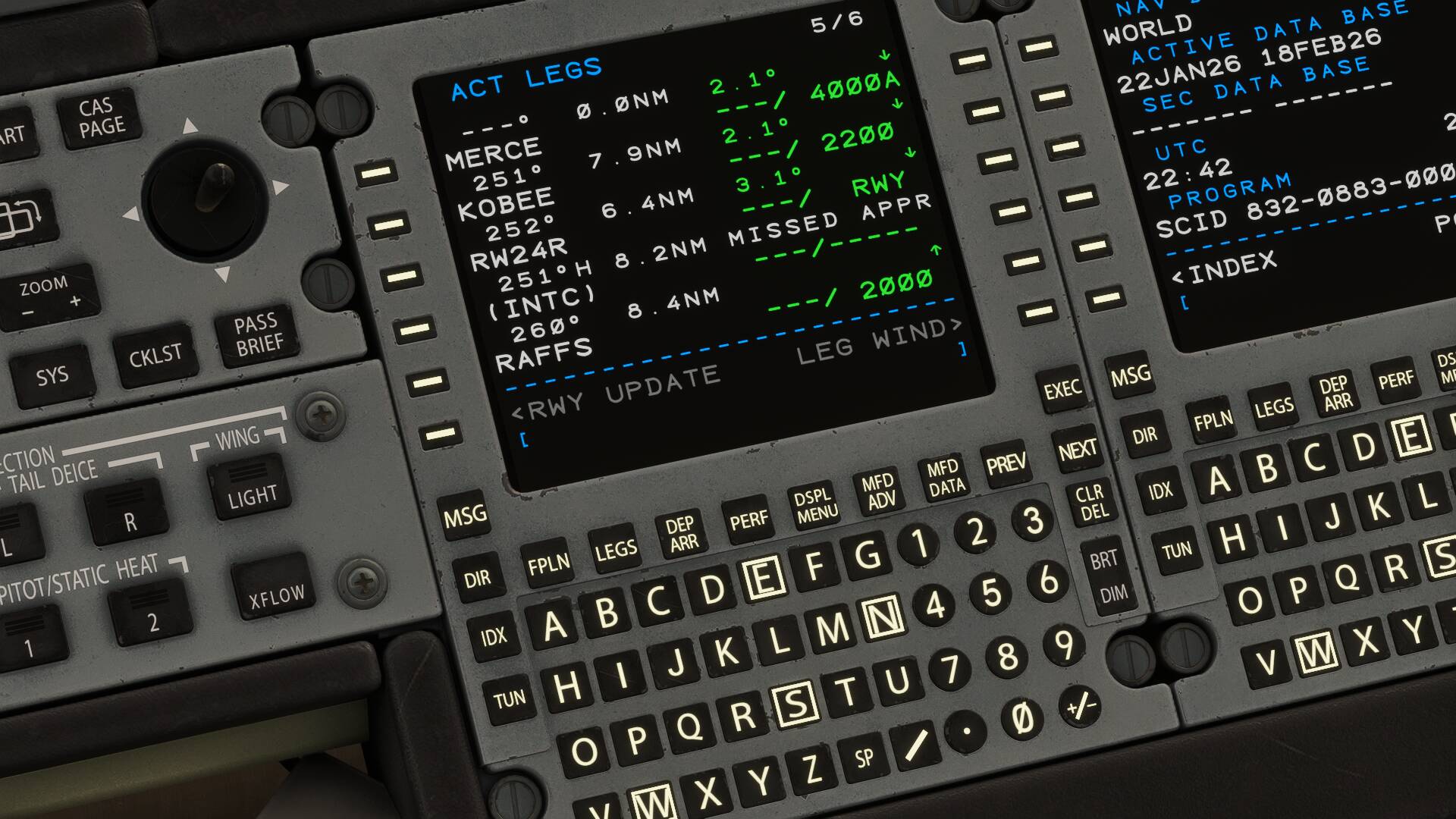
looking at the FMC for the approach RAFFS was originally set to 2000A (at or above) I changed it to 2000 by typing in 2000 and clicking the soft key next to the 2000A on the FMC. which got rid of the “A” and set it as an “AT” altitude.
KOBEE was set as 2200 when I loaded the FMS so no need to change that and I got a TOD and it descended nicely

The FMC automatically loaded the LOC frequency (111.90) for the ILS 34L into KSLC and the final approach course was auto set as well

I had my flight plan set up to go direct CAMRI after takeoff as it was a short flight. those two dashed light blue lines on the PFD are showing me my final approach course and Localizer in the background while still tracking NAV and the FMS to CAMRI
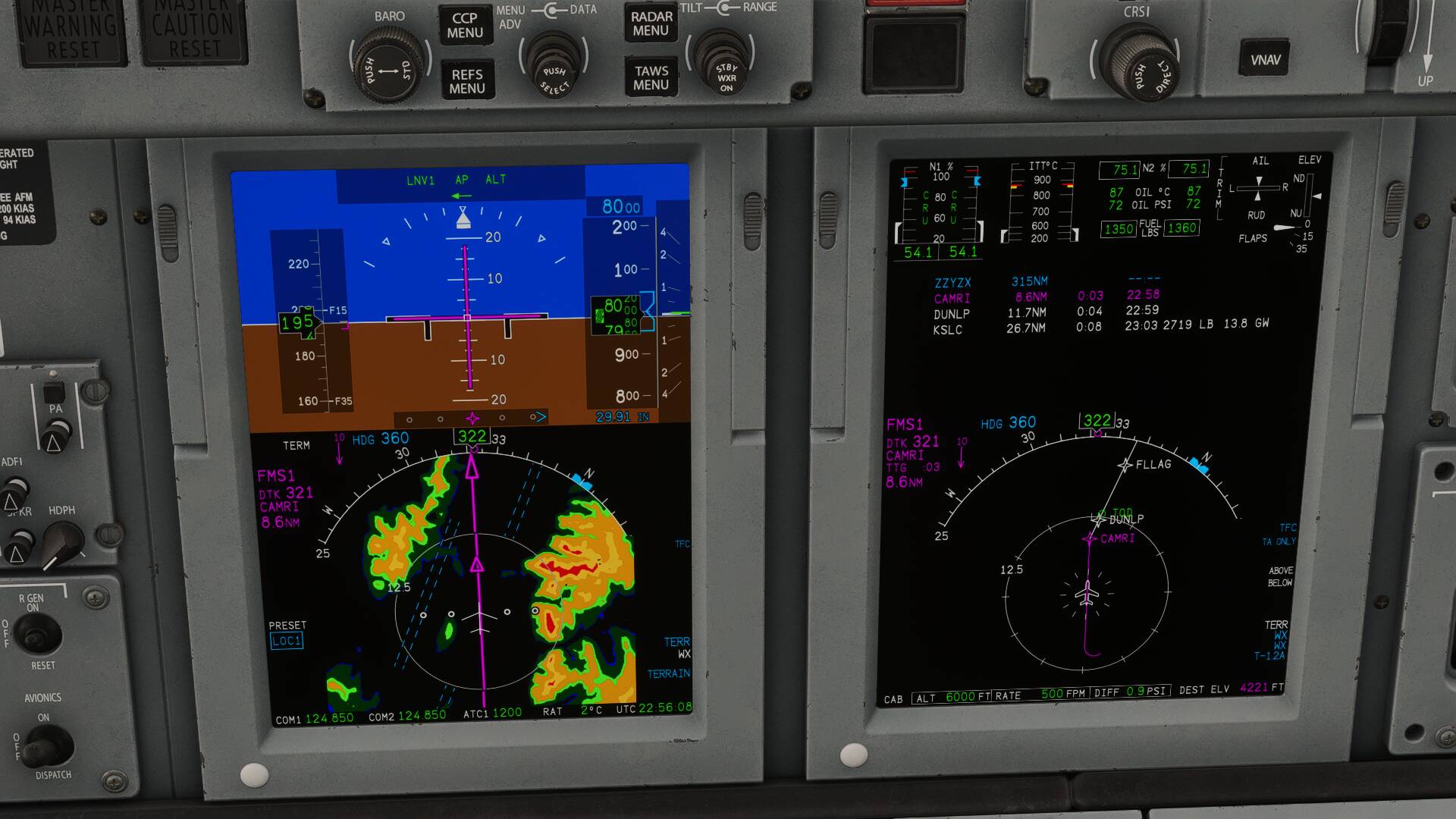
once I made the turn at CAMRI I clicked on APR on the autopilot panel until I got the green CDI needle and the autopilot panel on the top of the PFD was showing LOC and APPR in green (Captured) and GS in white (Not yet captured)… not it wont capture the glideslope if you are already above it, you’ll have to descend to intercept it from below
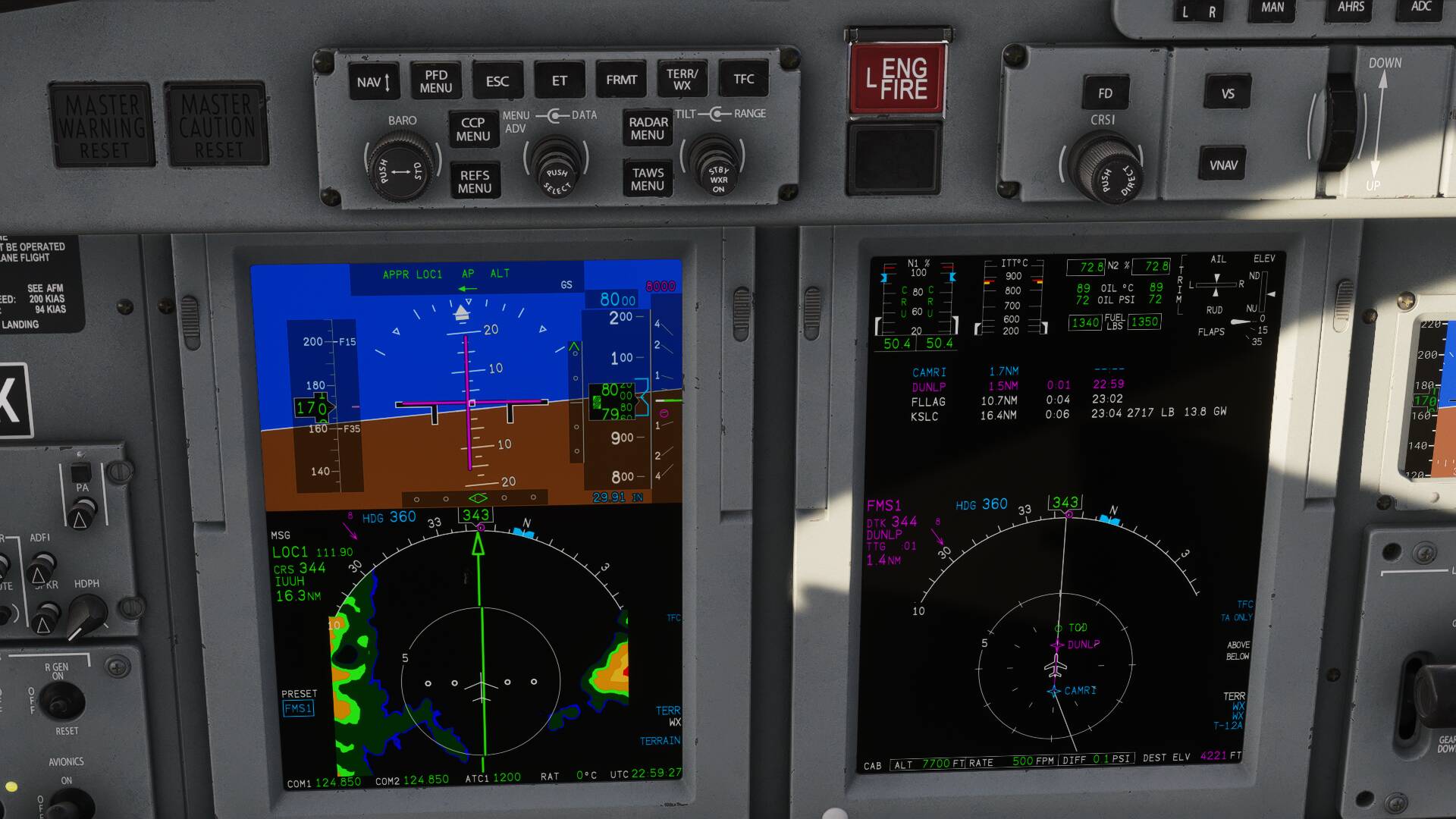
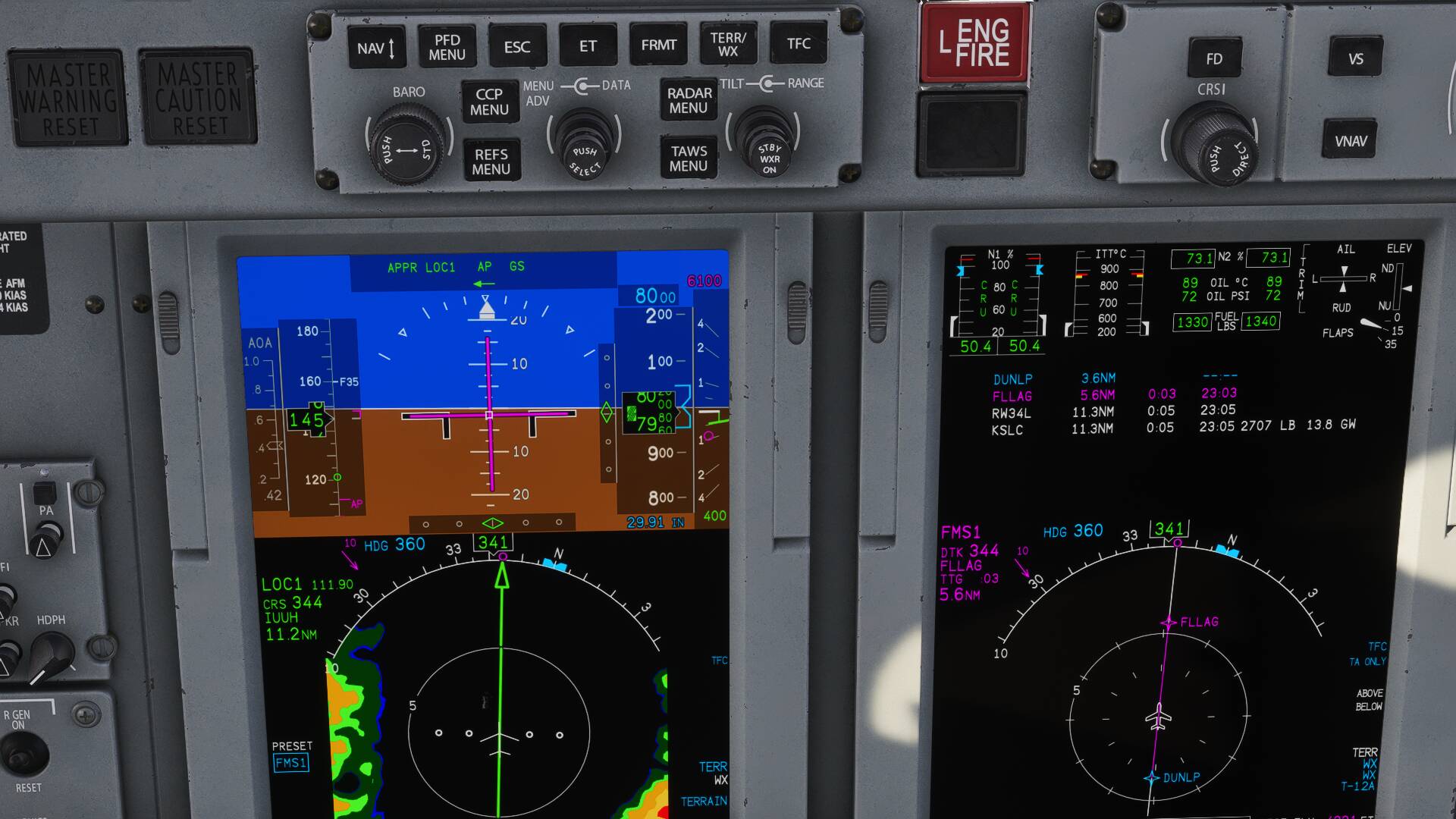
Glideslope now green means captured and it will descend on the glideslope
3 Likes
That was crystal clear. Thank you!
1 Like
The only thing I was thinking about is that some of the planes in career mode have bugs that free flight aircraft do not. IIRC the KingAir C90 the route and waypoints don’t show up on the MFD but in free flight it works fine, not sure if they fixed that or not.
So if you’re still having issues, it may be a career mode bug
1 Like
100% agree with that statement.
The last ILS I did in the cj4 didn’t autoload the ILS in a mission. I had to do a manual nav input.
1 Like