Career mode: Improve aircraft list

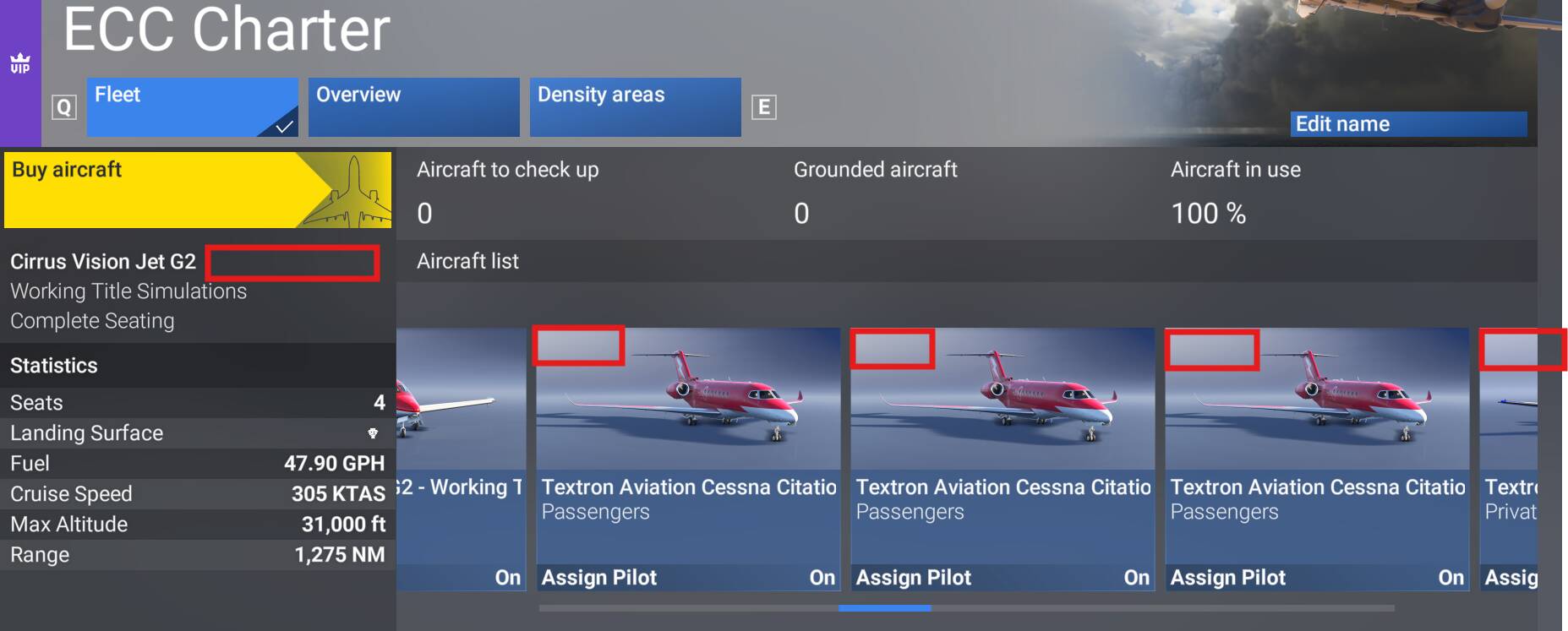
The list of aircraft of a company is very unfriendly. If you have more than 4 airplanes (very common) and all of them are of the same type, is very time consuming do the maintenance manually (that is cheaper) for each of them.

You must make visible the plane scrolling the list, but is very difficult to tell it from other planes of the same type because there is no way to identiy each one individually. You click on the aircraft, do the maintenance and, when you come back to the list page, the list of the aircraft resets its position and shows the first plane of the list. Then you have to scroll and look for the next one, but as there is no way to identify individually the aircraft maybe you get confused and click on a plane that you had maintained before, oh, hell, you come back and the list is reset again, oh, hell hell hell, and so on. Very very time consuming. And you could set the automatic maintenance, but doing it manually is cheaper.

Possible solutions to this:

  • Please don’t scroll back the list when you return to the list page. Then you’ll be positioned in front of the plane you’ve just maintained and it’s easy to know which one is next.
  • Allow a way to identify each plane individually. A simple autonumeric non editable field would do.
  • Also it would be great if you could see the list of the aircraft as a VERTICAL list, in form of a common grid, instead of this horizontal stack. Not so difficult to do this in XAML.
5 Likes

Making the overview useful might also be a way. Currently that list is completely useless and the details shown inaccurate and never updating.

5 Likes

I find this interface the big time-sink and unfriendly solution to the “virtual businesses requests”. The current state of aircraft list basically prevents aircompanies growth as it steals time from actually flying towards unnecessary complexity of aircompanies management tasks.

What I suggest:

Airplanes list should be table-alike with the ability to sort by the columns like:

  • service start (when the aircraft has been bought)
  • requires maintenance
  • last maintenance done date

Would be good if the table also includes this info:

  • total maintenance expence lifetime
  • total income lifetime
  • current maintenance price (including non-managed prices (managed maintenance does not do all the stuff))
  • current sell price
  • Tail number (!)
  • Current airport ac is based on

There should be one button “Maintain All” with the checkbox to confirm even maintenance out of the managed maintenance scope is done. Few clicks across all companies owned is better then ultra-micro-management task it is now.

Either checkbox or context menu item to maintain selected aircraft(s)

Leave the ability to dive in to the aircraft view with all the details for better details investigation / choice of components to maintain for “short of credits” situations.

The ability to set own Tail Numbers would be interesting.

5 Likes

As the pervious post also wrote, showing the tail nr. Better said aircraft registration is highly desirable.
In aviation everything is done with the AC registration.
So a simple label added to the screen with some plain text PH-ABC, N3175P, D-ABYL or whatever the registration of the aircraft is.
This is the only way to recognise an airplane in the list.

4 Likes

2 posts were merged into an existing topic: Add more airplane variety to the career mode

All, I mostly fly the Career Mode.
I have been doing it for awhile and have started accumulating a large fleet across multiple companies.
I use the Fleet overview and sort to see which planes need maintenance and sort by when they need it, i.e. plane needs maintenance in 2.5 hours. The Sim does a great job of telling me which aircraft, which company and what airport it is located, but nothing is clickable in this interface. I have to go to the company interface and look at the Aircraft List. If you have more than one type of aircraft they all look the same and you have to click on each one to tell if that is the one that needs maintenance.

MY Wish is that in the aircraft Listing, maybe near the top left it shows the Airport Identifier , I.E. KEWR, OR EGLL (Wherever the aircraft is) so you will know immediately that is the one that needs maintenance:

What do you guys think?

3 Likes

I still think the proper table with checkboxes for maintenance will do UI-wise much better than this weird solution a lot of people have to deal with. I’ve actually almost stopped playing in career mode as maintaining more than 5 Aircraft for an Aircompany is still (while this is not resolved) is like trying to guess which one you’ve been on. Just imagine walking through you hangars and you’re each time forgetting where have you been? I don’t think this has to be the part of game when you have to fight certain medical conditions (unfortunately, and, what is more important, induced by development decisions feeling) to maintain your fleet. Not sure why this has not beed addressed still. I hope someone from UI QA will look into it and give it a proper acceleration, until then, this is like the proper reflection of the features/bugs fixes. Just hope the tasks table for devs does not look the same!

3 Likes

There should be 3 maintenance choices globally. One, maintenance for planes already in the ‘red’ and needing maintenance. Two, maintenance for planes about to need maintenance. It would be nice if this had a pull down so one could choose how far in advance it would repair). Three, repair EVERYTHING (this will effectively bring every plane to like new status and likely won’t get used much).
Other thoughts:
If it didn’t jump back to the beginning after each maintenance it would help.
If we could change the livery on individual planes, or even just the colors, that would help a LOT.
There is no reason clicking a plane and doing maintenance should cost more than going into each individual part. I have no idea why the game never tells anyone that either.

While I completely agree with the things mentioned here, there are ways that us as the end user can work around it while waiting for them to come up with a solution.

  1. Don’t buy all the same planes within the same company.
  2. Don’t buy all from the same category/company, at least for a while.

I have over 250 planes, and most of them are big jets in only 2 companies (passenger and freight) since that is the only place the big passive money is paid. Even though I’d rather buy all Boeing planes, and mostly 747s since they pay about the most, I buy a mix of different planes at once. I’ll buy two 747-8’s, an Airbus A330-200, a 787, an a321, and occasionally even throw in a 707, ATR, or helicopter as a ‘place holder’ so when I am doing maintenance I can reset myself if I get confused where I am.

Since my planes are mixed, I can look at what surrounds the plane I am on as well as roughly where I click in the bar at the bottom to jump to it then look for the planes. In freight, I have at least 75 planes and I may only click on the same planes twice maybe 3-5 times per maintenance cycle. I’d much rather click one twice than have to go back through them and look for the one I missed.

I also break my maintenance into smaller schedules. I’ll do Ag, Fire, Passenger, First Flight, and VIP at once time which takes around 30 minutes now (used to take much longer but I am getting quick at this method). Then, I have the other half of my planes scheduled 12 hours apart. I used to have it divided into 1/3rds, but I was having a hard time hitting that schedule.

Those 250 planes are only my active ones. I have turned off the First Flight, Ag, Arial advertising, Search and rescue, They just didn’t make enough at this point to be worth the time. Most income comes from Freight, Passenger, VIP, Medical, Fire, and Aerial freight. (in order)

1 Like