Career Mode-"Landing lights on night landing" deduction triggers incorrectly

ISSUE DESCRIPTION

Description of the issue:

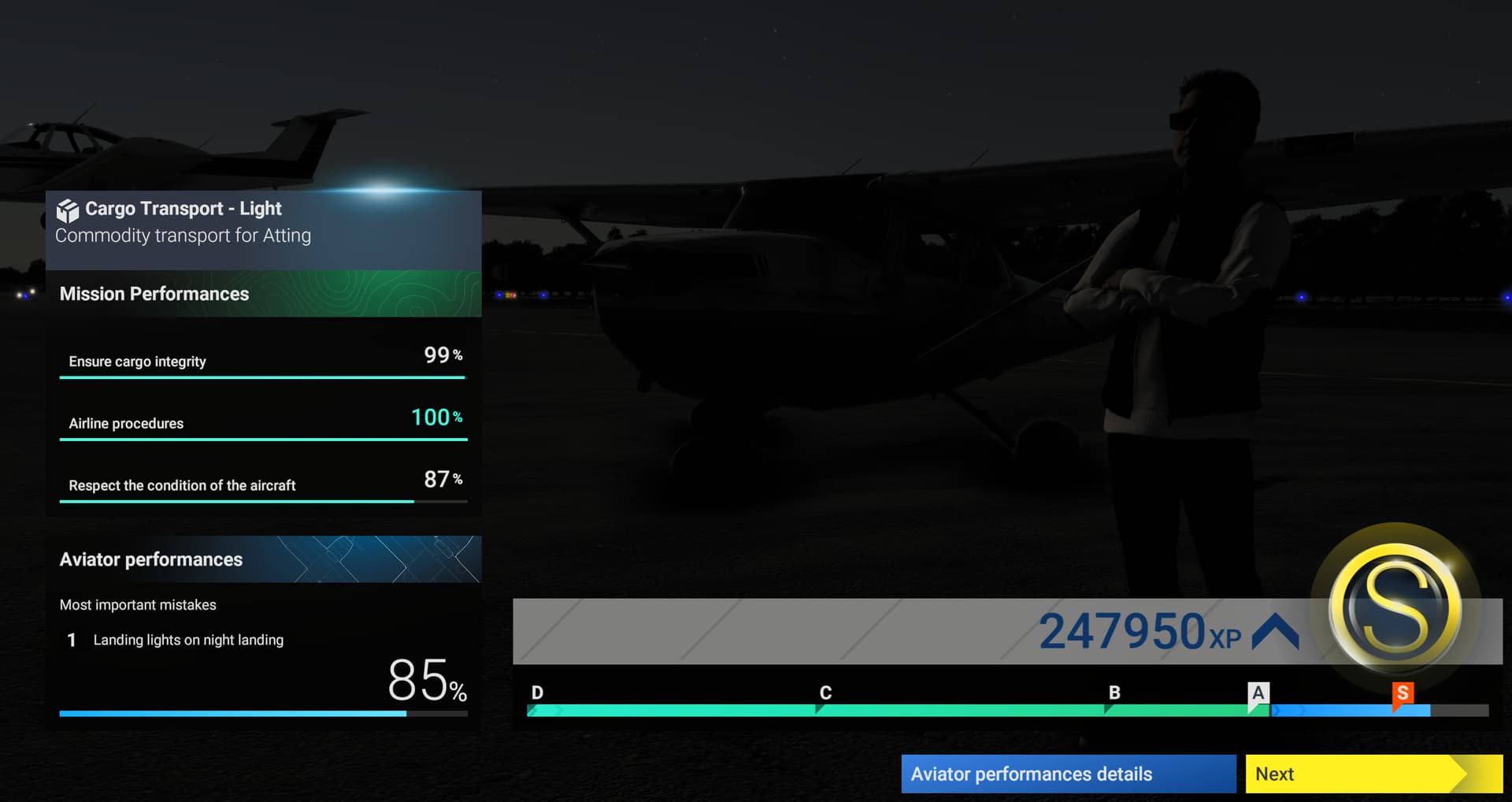
The “landing lights not on” deduction triggers waaaaaay too soon. In this case, I got nailed while 13 miles out from a non-towered airport. I was just about to begin my descent. I was doing the responsible thing of broadcasting on UNICOM that I intended to land at EDMS. I didn’t even finish the announcement before I got nailed for not having landing lights on.

[PC Only] Did you remove all your community mods/add-ons? If yes, are you still experiencing the issue?

no mods in use

FREQUENCY OF ISSUE

How often does this occur for you (Example: Just once, every time on sim load, intermittently)?

have only tried this once so we’re at 100% occurrence so far

REPRODUCTION STEPS

Please list clear steps you took in order to help our test team reproduce the same issue:

  1. Start a Career - Light Cargo mission, in this case ETSL to EDMS in a C172
  2. Don’t get in the plane or move your pilot
  3. Let the game idle while you do other things until sunset comes because it’s the only way to fly night missions right now
  4. Fly the mission as usual
  5. Enjoy the dusky nighttime scenery of Europe
  6. Enjoy being able to spot other traffic in the air thanks to their lights actually doing their job
  7. Cruise at 5000 feet MSL
  8. Use ATC menu to tune EDMS traffic at 13 miles from airport
  9. Select RWY 27 for full stop landing
  10. Announce position
  11. Get deducted for “Landing lights on night landing” even though you are nowhere near the airport yet
  12. Land normally, get an Aviator Performance deduction of 15%

YOUR SETTINGS

If the issue still occurs with no mods and add-ons, please continue to report your issue. If not, please move this post to the User Support Hub.

What peripherals are you using, if relevant:

Honeycomb Alpha
FlightSimStuff throttle and trim
Logitech pedals
TrackIR head tracking

[PC Only] Are you using Developer Mode or have you made any changes to it?

No

[PC Only] What GPU (Graphics Card) do you use?

Laptop 4080

[PC Only] What other relevant PC specs can you share?

Legion Pro 7

MEDIA

Video of deduction while 13 miles out and not even descending yet:

Deduction in summary screen:
Cessna 172SP POH showing landing lights are NOT part of the Descent checklist, but are in Before Landing:

That deduction really shouldn’t trigger unless you enter the Downwind, Base, or Final legs without landing lights on, but certainly not while 13 miles out and still at cruise altitude.

[END OF FIRST USER REPORT]


:loudspeaker: For anyone who wants to contribute on this issue, Click on the button below to use this template:

Do you have the same issue if you follow the OP’s steps to reproduce it?

Provide extra information to complete the original description of the issue:

If relevant, provide additional screenshots/video:

At present, your lights need to be on prior to making the landing request. Unfortunately, that is the way it is coded at the moment.

Can you use a workaround like:

  1. turn on landing lights
  2. make the announcement/request about landing
  3. wait for ATC window to finish updating
  4. turn landing lights off during descent
  5. turn them back on when you are about to enter the pattern
  6. make the next position/leg call

I ask because with the excess light bloom effect it’s really hard to see, even in clear skies, when the landing lights are on.

I could live with that for a while, I suppose.

Usually there would be sections in the descent checklist for when you reach the transition level and also when you reach 10,000 feet. By convention, landing lights should be turned on as you go below 10,000 feet to enhance your visibility to other aircraft.

I haven’t seen this in any aircraft I’ve flown in 2024 thus far. However, your copilot will callout “10,000 feet” so make sure to turn on landing lights before this callout.

When you say “usually”, I think you mean for aircraft that regularly cruise over 10,000 feet. A Cessna flying over that altitude is a rarity and if that advice was followed the landing lights would be on for the entirety of most flights.

Honestly in bugged out career mode best thing to do is leave them on for the entire flight, then you do not have to worry about it.

It you shut them off prior to parking you will get dinged again. Once the call is made, leave them on

Also its a general rule of thumb to have landing lights on within 10 miles of an airport and/at or below 10,000 feet.

1 Like

That’s helpful, thanks. I’ll do that from now on to be safe.

This issue is also mentioned in that main thread: List of bug avoidance measures for MSFS2024 Career Mode (So far) - #2

1 Like

OK, I’ll leave this thread though since Asobo wants bug reports in separate threads instead of in a mega-thread.

This functionality should be coded more like airspace transition penalties where it’s based on distances from airports rather than when a radio call is made. In my example, I was nailed at 13 miles out simply because I announced my landing intentions.

Also, Descent checklists should be reviewed and updated to include instructions to turn on Landing Lights within 10miles of an airport. I’d bet most GA aircraft lists don’t make mention of any “rule of thumb” recommendations. Otherwise, the only way people are going to figure this out is by making the mistake or searching the forums. The info on how to play the game should be in the game.

I just picked up a PC12 for my Cargo company and have received a couple of night flights and got dinged for this both times even though both times my landing lights were already on.

I just had the landing light deduction for the Vision Jet, but the lights were on.

Same happened to me with PC12 and PC 24. Landing light linked to landing gear in planes where problem is consistent as you wouldn’t want landing gear down at that far away from runway.

I got “below 10,000 feet” failure for no landing light despite being above 12,000’. I suspect the programming is not using the calibrated barometric altitude but is instead using true altitude or AGL. This results in getting penalized when the correctly-set barometric altimeter reads greater than 10,000’. The system should correctly calculate what true altitude to judge the 10,000’ checks (it won’t be 10,000’ true) and also apply both a time and altitude buffer so you can be 8 seconds late or 500’ off and be in compliance.

Always happen to me

new release - just got this when turning on the landing light - was at 5000’ in a 172 about to begin descent. Literally got dinged at the moment I switched it on.