Disabling Streamed Packages was my first Solution, no CDT on starting flight.
But after that FS was crashing during the flight, mostly after 35 minutes or so.
I would suggest you to fly around for a while and see if CDT is gone.
Disabling Streamed Packages was my first Solution, no CDT on starting flight.
But after that FS was crashing during the flight, mostly after 35 minutes or so.
I would suggest you to fly around for a while and see if CDT is gone.
yeah it was 100% FS trains, haven’t had a crash in 20+ hours of flying since then.
Super easy to recreate at any time though. Turn on FS Trains , load at KBUF = immediate crash. Turn it back off, load at KBUF no problem.
Edit: as i mentioned before, it wasn’t just me having the problem either. Several other members of our VA had the same issue at the same location, and it turned out we were all running FS Trains.
perfect.
I have all Streamed Packages enabled and have no CDT´s a KBUF.
It is something strange that some people have CDT, and other not.
I have CTD on EDDF, EHAM and EGLL.
At EDDF, it loads airport and cinematics, but once I click fly now than it crushes.
At EHAM it crushes moment when it starts to zoom in for, doesn’t even load a flight like at EHAM.
EGLL I managed to enter flight, clicked to fly now, but few moments whicle I was still standing outside of aircraft it crushed to desktop.
EDIT:
I tried to disable community content, loaded flight at EDDF with C172 and not CTD.
Than I enabled community, loaded with C172 and it worked.
Then I pick PMDG 737 and it crashed, even before I get to click fly.
I do not think PMDG’s 737 is the cause, because it works on LYBE.
EDDF was crushing when I tried with Aerosoft’s A346, Leonardo’s MD-80…
Did anyone find a solution?
Try disabling Photogrammetry .
Pelase let me know if your machine is AMD. Thanks.
No AMD, Intel CPU i5 13400F and RTX 5060 Ti.
I disabled Community content, loaded EDDF with C172 no crush. Than enabled Community, again loaded with C172 no crush. After that loaded a flight with PMDG 737, it did spawn the aircraft but after I click on fly, it crashed again.
So I don’t know does some other addon make conflict with PMDG or like you said it is photogrametry.
I doubt it is my VRAM or RAM amount. I have 32 GB RAM and 16 VRAM. None of it gets full.
I will try with disabled photogrametry.
And yeah, I first notice it with Aerosofts A346 on EDDF.
I havo no Add-On installed, my Community Folder is empty.
So, Vanila FS 2024. Fresh install.
For me, Photogrammetry ON is the only cause of CDT.
Well, I did some tests now.
I pick same aircraft PMDG 737-700, all addons in community are active.
EDDF
Photogrametry turned off, it loads the flight, after ready to fly it spawns me near aircraft.
Than I turned photogrametry on, all good. Enter cockpit, no problems.
After that I quit the flight, than load it with photogrametry on. It happened like few day ago. Flight loaded but crash after I click ready to fly.
EHAM
Photogramety, off, flight is loaded, spawned in front of aircraft. Photogrametry on, still good, but once I entered in cockpit (at least tried) it crushed.
So this crushes are photogrametry fault. We can only hope devs will solve this one day.
Well, I have this issue since Beta 4.
I did submit a Bug Report to Zendesk, they marked as SOlved at once.
I then request a Technical Assistance, there was a certain Jose ansewring and said my Laptop is not enough to Play FS 2024, I should buy a Gamming PC. Very well that Technical Assistance. Good is that I have far more knowledge and experience , so I did not run to the next shop buying a new Gaming Latop. 
Now, I think the CTD is related to the Sound Device, as it stops 2 times before CTD.
I have a Realtek chip.
Would you please tell me what is your Sound Device?
Thank you
Looks like, solution is virtual management. Set to auto for all hard drives you have.
I set that, now CDTs doesn’t happen.
Unfortunatly the Virtual Managment set Auto for all Drives did not help.
Now, with 1.7.28 flying from LIMC to LYBE it crashes few minutes after Take-Off.
I have tried everything I could imagine but no sucess, I am tired of that, so I will leave it at all and just fly with Photogrammetry Disabled.
Thank you anyway.
Enabling Photorammetry is causing CDT at EDDF or EGLL.
Everytime.
Please list clear steps you took in order to help our test team reproduce the same issue:
Start Free Flight
open Settings>Online> enable Photogrametry
Select Departure EDDF and Arrival EDDF
Start Flight
This is bug introduced in SU4 and is also presente in SU5.
In SU3, it just worked fine.
Same Hardware and Settings here sionce SU3.
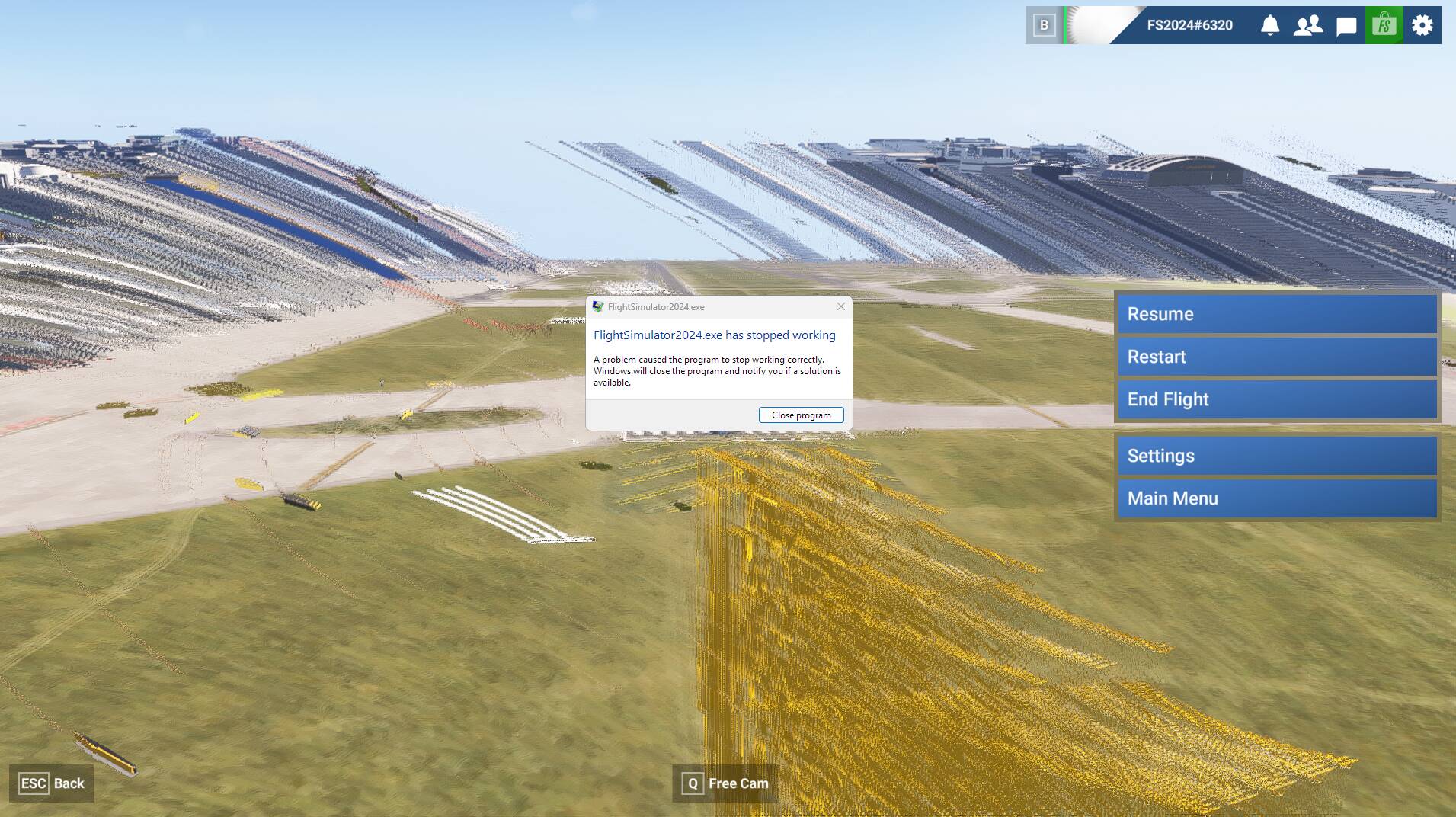
I got a special Screenshot that I am posting here, in the hoppe it helps people to figure out what is going on.
This problem has began at midle October 2025 and till now, there is no solution. I did all the efforts that someone take attetion to the problem, I posted some Bug Reports at Zendesk and in this forum, and nothing happened. How can it be???
I am asking myself what for is all that Bug Reports places, if none is taking any action?!
This a Print Screen from EDDF . Seems that tehre is a huge displacement os scnery elements.
In the Hunderts of CDT last 6 Monthes, this is a unique Screenshot were I can see the Graphics.
Everytime there is no image , CDT and back to Desktop without any Image.
I was very lucky to get this one.
Fresh complete Install FS 2024 1.7.27 through MS-Store.
Everything Vanilla, no Add-Ons, Community folder is Empty.
I using FS 2024 Premium Deluxe version, and EDDF is one Airport delivered with that version..
Please add a screenshot or video of the issue occurring.
I’m not able to reproduce this on my end.
Thank you.
That answer did not help me.
Meanwhile I have disabled all 3D Photometric Cities Streamed Packages and no CDT either EDDF nor EGLL.
But still CDT at EHAM.
Description of the issue: CDT when Photogrammetry is Enabled
Weather settings: Live
Every time
Start Free Flight
Choose Departue LFPG - No CDT.
Choose Departure LFPB - CDT
Choose Departure LFPG, Start Fly, then open EFB , fill Departure LFPG and Arrival LFPB , send to Avionics and ATC, short after CDT.
There is CDT also at EHAM, EDDF, EGLL, YSSY. That are Handcrafted Aiports, default ones that are include in the Premium Deluxe Edition.
This is not explanable for me, to have CDT at LFPB and not at LFPG, the airports are very close to each other, and exactly with same PC and exactly same settings.
Cannot replicate following OP steps.
SU5.1 Beta, ms-store, RTX2060, Premium Deluxe
Do you have any addons (community/Marketplace) installed ?. If so disable them and test again.
There is NOTHING wrong at my side.
FS 2024 is Buggy with Photogrammetry and Handcratfed Airports , and there is nothing people can do.
Hier my evidence of CDT , Departure LFPG, later on EFB setting Arrival LFPB - Photogrammetry Enabled.
Now, please show me the same Video evidence, specialy were I can see clearly that Photogrammetry is Enabled.
Go ahead!
Look also here:

CTD over Cork in the PMDG 737-800 flying from Tenerife South GCTS to Leeds Bradford EGNM
CTD over Saudi flying from Doha to Entebbe in Uganda in the PMDG 777-300ER. Xbox series X

First of all: I have no issues with resources. FS is using less than 50% of available resources.
CDT relates solely to photogrammetry; when enabled, it is present at certain airports such as EHAM, EDDF and EGLL.
As far as I can tell, CDT is also linked to the handcrafted airports included in FS 2024 Premium Deluxe Edition.
To reproduce CDT, you must be at a handcrafted airport.
You can recognise a handcrafted airport on the World Map by the yellow circle with a black star in the centre.
At EDDF (which, for me, is a handcrafted airport), simply zooming in is enough to trigger CDT.
Another way to reproduce CDT is to select EDDF as both departure and arrival, go to Settings > Online > Photogrammetry and enable it. CDT will appear at that stage.
Sometimes, CDT will appear immediately after pressing Start Fly.
Another way is to select LFPG as the departure point with photogrammetry enabled (there will be no CDT), start a flight and fly towards EDDF. After a while, near the border with Germany, it will crash.
To clarify that there is no issue with resources, I am getting around 29–30 FPS at LFPG.
I have an AMD system, Windows 25H2 and an Xbox controller.
I have Disabled all 3D Photmmetric Cities Streamed Packages, and CDT were gone with Photogrammetry enabled.
EDIT: I think the Photogammetry issue is related to changes made in Bespoke Airports
If there’s nothing wrong on your side, then why are you only getting 20FPS?
Very clever indeed.
With that kind of thinking, errors will stay for ever as they are.
That is the way is going, since middle October 2025 I was having CDT due Photogrammetry, reporting, afte reporting, and more reporting, and at the the answer is 99 Luft Baloons.
Until SU3 I had no CDT, same system, and settings and you want to talk about FPS. You must be joking with me.