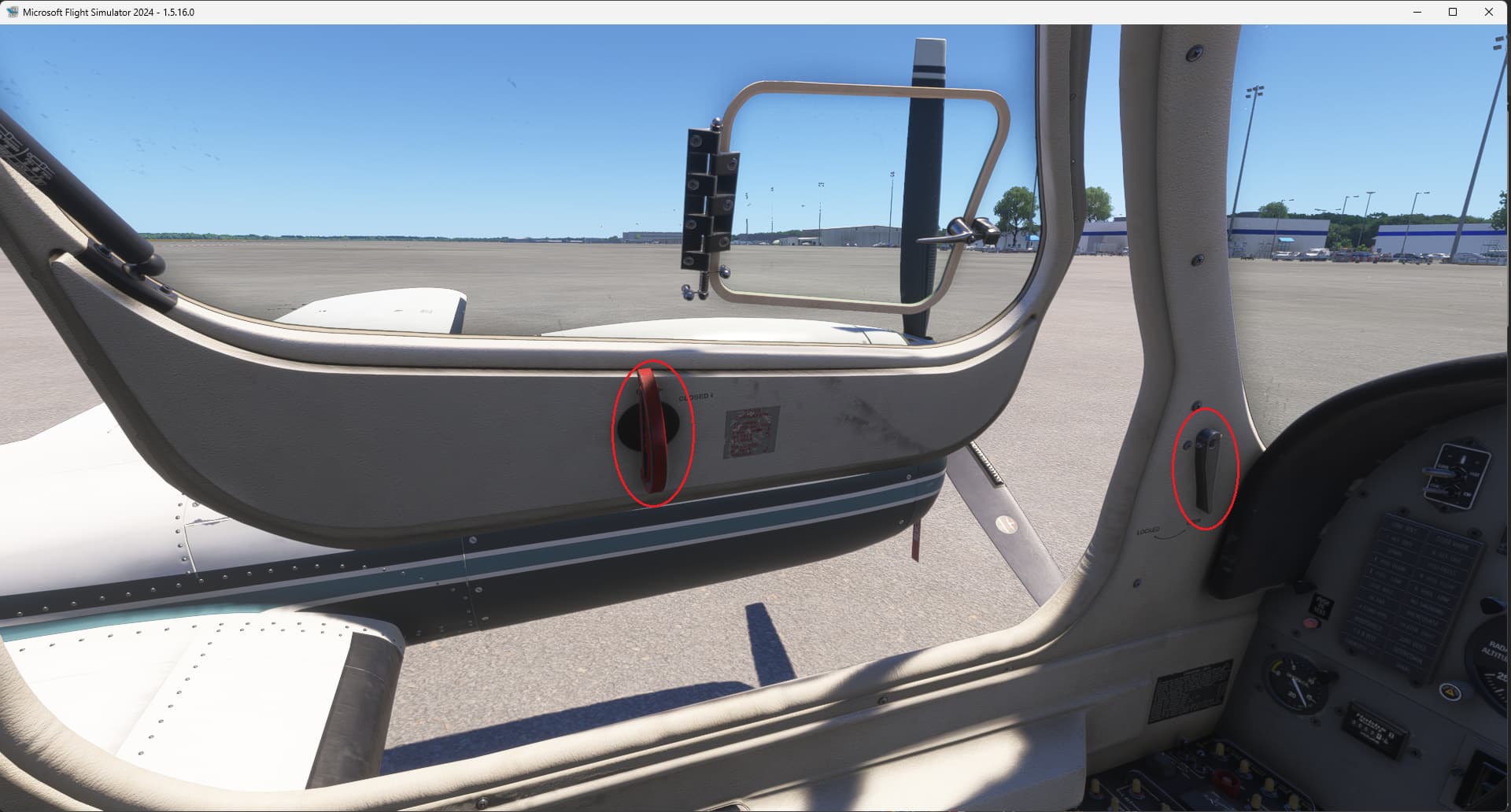
Note1: Although this issue was experienced in SU3 Beta build v1.5.16.0, it may occur in the release build, so is being reported in Bug Reporting Hub > Aircraft & Systems . If users report that the pilot’s door operates in the release build, then this would be a regression & I’ll move the topic to #su3:su3-aircraft .
Note 2: This bug is different from this aircraft’s main door, which was fixed in v1.5.15.0.
Edit: Removed references to cockpit view door handle as this does work as long as you unlock the door handle first, as per @DementedCorn327’s screenshot. 
ISSUE DESCRIPTION
Description of the issue:
The cockpit (pilot’s) door fails to open from the outside.
If applicable, which aircraft is experiencing this issue:
Cessna 404 Titan
[PC Only] Did you remove all your community mods/add-ons? If yes, are you still experiencing the issue?
No 3rd-Party or Community Addons (default installation) / Yes
FREQUENCY OF ISSUE
How often does this occur for you (Example: Just once, every time on sim load, intermittently)?
Every time
REPRODUCTION STEPS
Please list clear steps you took in order to help our test team reproduce the same issue:
- In free flight, select the Cessna 404 Titan, choose any airport parking spot, and just for convenience, daytime with clear weather. Start the flight
- Skip the walkaround, but walk over the the pilots door. Note that it has no click spot (screenshot 1).
Expected behavior:
- There is an operational click spot for the pilot’s door in the external view, as the door is operational from within the cockpit (see screenshot in @DementedCorn327 's post below).
YOUR SETTINGS
What peripherals are you using, if relevant:
Logitech 3D Pro joystick, Xbox 360 wired controller, Microsoft Intellimouse, Microsoft keyboard.
[PC Only] Are you using Developer Mode or have you made any changes to it?
Developer Mode is Off / No changes
[PC, MSFS 2020 Only] Are you using DX11 or DX12?
N/A
[PC Only] What GPU (Graphics Card) do you use?
Intel Arc 770 (16GB, v32.0.101.6314)
[PC Only] What other relevant PC specs can you share?
Expand to see my basic PC specs:
| Item | Setting |
|---|---|
| CPU | i7-12700K (no overclocking or undervolting) |
| RAM | 32 GB 5200 MHz DDR5 CL40 RAM |
| GPU | Intel Arc 770 (16GB, v32.0.101.6314) |
| REBAR BIOS Setting | On |
| Main MSFS monitor | 55" Hisense U7 4K TV @ 120Hz |
| Secondary monitors | Two 32" 1080p 1360 x 768 @ 60 Hz |
| Peripherals | Microsoft USB Natural Keyboard, Microsoft USB Wireless Intellimouse Explorer, Xbox 360 Wired Controller, Logitech Extreme 3D Pro |
| OS | Windows 11 Pro 24 H2 v26100.4351 + all OS updates. |
| MSFS 2024 Edition | MS Store Premium Deluxe + all WUs & CUs |
| Downloaded Content | None (i.e., all Streamed) |
| Build Version | SU3 v1.5.16.0 |
| 3rd-Party & Community Addons | None |
No performance-improving applications are installed (e.g. for CPU or GPU improvements).
Neither the Intel Arc Control Service or Arc Control App is running.
Expand to see my graphics settings
| Item | Setting |
|---|---|
| Display Mode | Full Screen |
| HDR10 | On |
| Exposure Compensation EV | -1 |
| Full Screen Res | 3840 x 2160 |
| Anti-Aliasing | TAA |
| Render scaling | 65 (Resolution: 2496 x 1404) |
| AMD FidelityFX Sharpening | 150 |
| Max Frame Rate | On |
| Max Frame Rate Value | 60 |
| Frame Generation | AMD FSR 3 |
| Framerate Multiplier | 2x |
| VSync | Off (N/A) |
| VSync Interval | Half refresh rate (N/A) |
| Dynamic Settings | On |
| Frame Rate Target | 60 |
| - | - |
| Global Rendering Quality | Custom |
| Terrain LOD | 400 |
| Off Screen Terrain Pre-Cache | Ultra |
| Displacement Mapping | On |
| Buildings | High |
| Trees | Medium |
| Plants | Medium |
| Rocks | Medium |
| Grass | Medium |
| Object LOD | 200 |
| Volumetric Clouds | Ultra |
| Texture Resolution | High (was medium in earlier builds) |
| Anisotropic Filtering | 16x (was 4x in earlier builds) |
| Water Waves | Medium |
| Raytraced Shadows | On |
| Shadow Maps | 2048 |
| Terrain Shadows | 512 |
| Contact Shadows | High |
| Windshield Effects | High |
| Ambient Occulsion | High |
| Cubemap Reflections | 256 |
| Raymarched Reflections | Medium |
| Light Shafts | Ultra |
| Depth of Field | Off |
| Motion Blur | Off |
| Glass Cockpit Refresh Rate | High |
| Characters Quality | Medium |
| Traffic Airport Quality | Low |
| Air Traffic | Medium |
| Road Traffic | Medium |
| Sea Traffic | Medium |
| Fauna | High |
Expand to see my other settings
| Item | Setting |
|---|---|
| Online Tab | |
| Photogrammetry | On |
| Aircraft Traffic Type | Real-Time Online |
| Air Traffic in Career | Off |
| Live Weather | On |
| Multiplayer | On |
| Multiplayer Servers | West USA |
| Show MP aircraft in close proximity | Off |
| Rolling Cache | On @ 16GB |
| Bandwidth | Unlimited |
| Advanced Options | |
| Developer Mode | Off |
| Flight Model | Modern |
MEDIA
Please add a screenshot or video of the issue occurring.
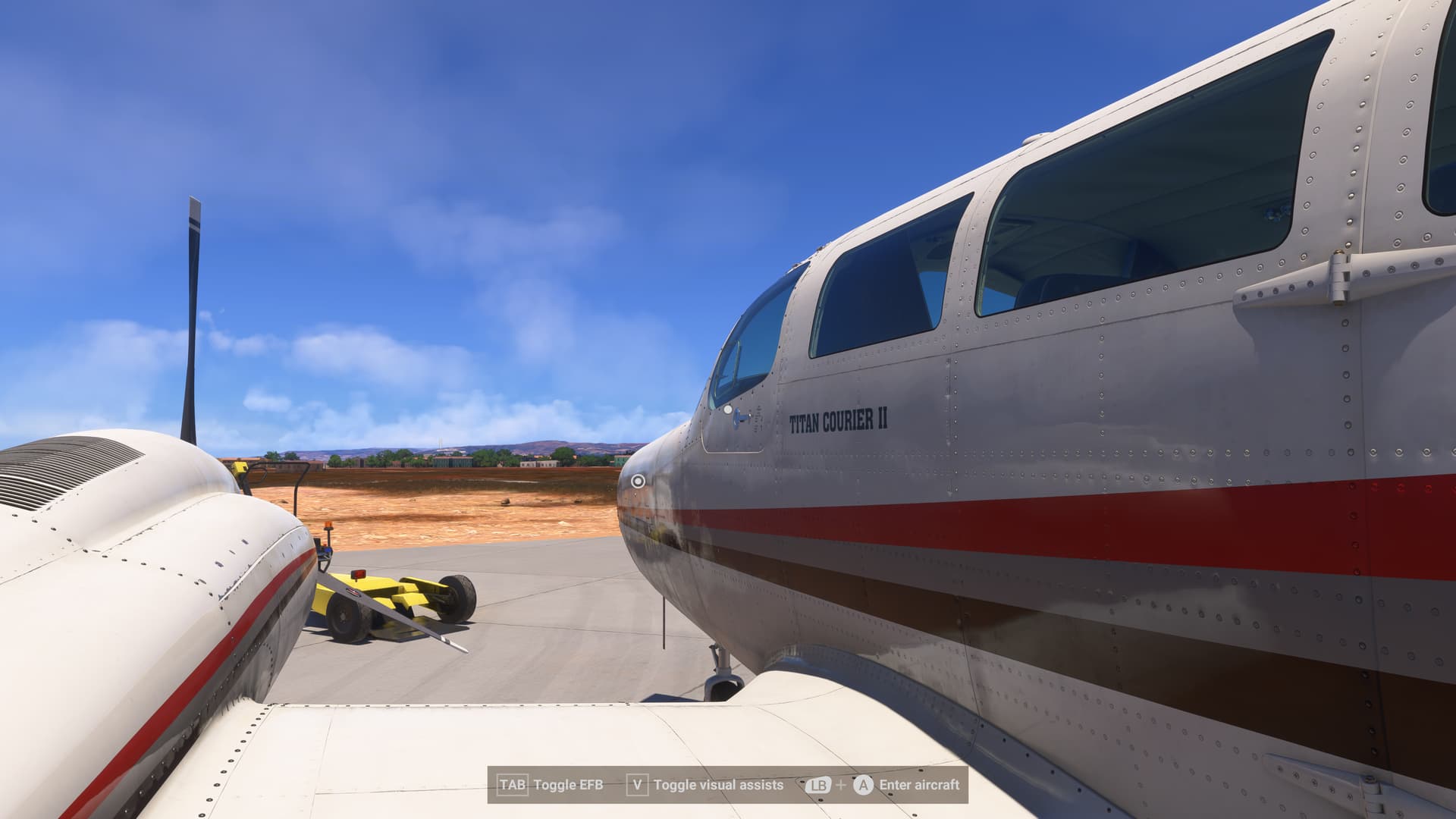
[END OF FIRST USER REPORT]
 For anyone who wants to contribute on this issue, Click on the button below to use this template:
Do you have the same issue if you follow the OP’s steps to reproduce it?
•
Provide extra information to complete the original description of the issue:
•
If relevant, provide additional screenshots/video:
•