Using the template below will greatly help the team reproduce the issue and ease the process of fixing it. Before posting, search for an existing report. If you are not sure it’s a bug, please first report in User Support Hub.
3 tags are required - add them in the tag section next to the title above:
- One for iteration (msfs-2020 or msfs-2024) msfs-2024
- One for platform (ms-store, steam, xbox, or xcloud)
- One for aircraft (start typing in your aircraft name in the tag section and pick correct option)
Cessna-400-corvail
Feel free to delete this quote section after adding your appropriate tags.
ISSUE DESCRIPTION
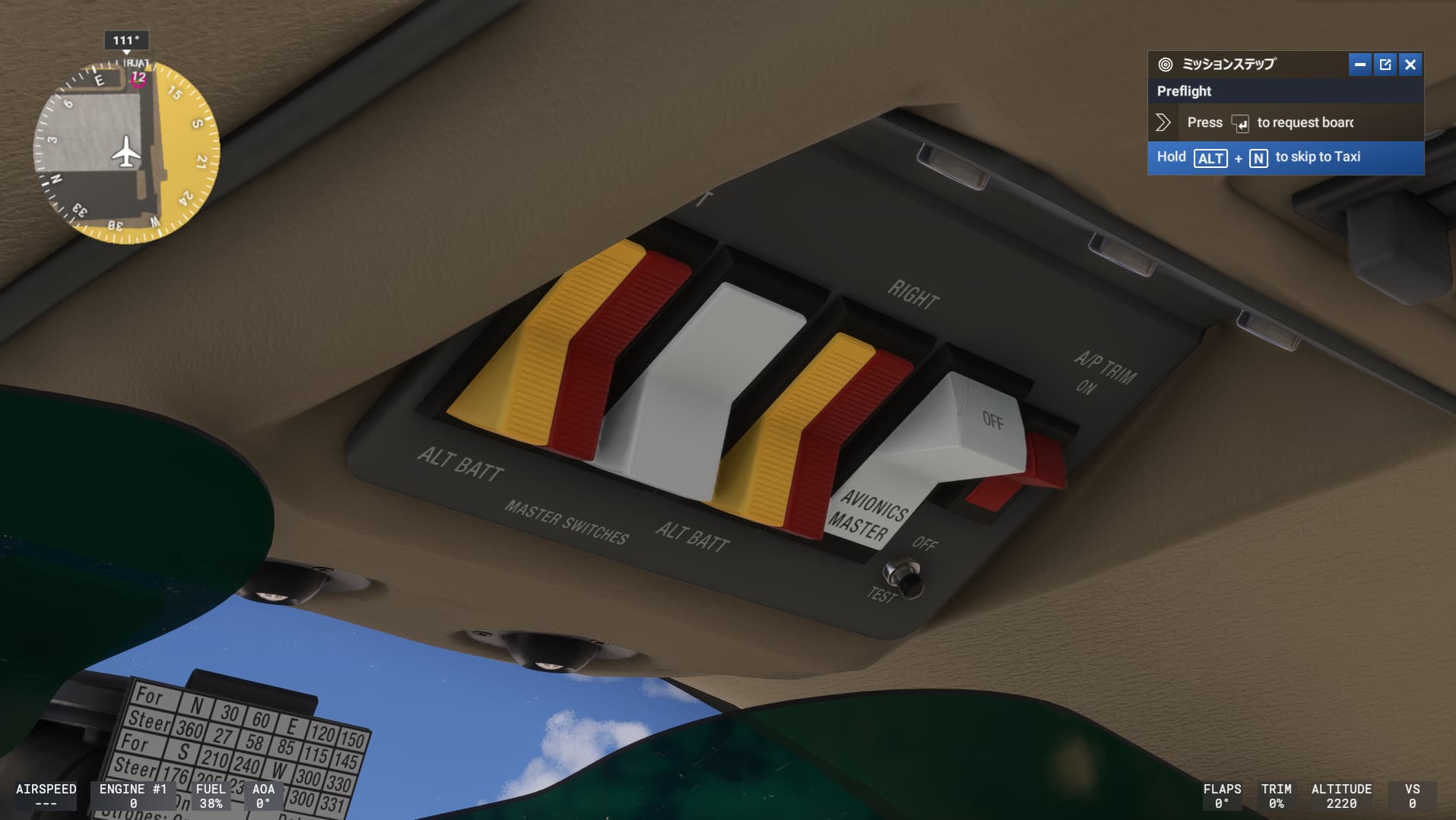
Description of the issue: I have assigned avoionics mater swich at my joystick but it cannot move it, and I need always click this swich in the screen.
If applicable, which aircraft is experiencing this issue:
cessna-400-corvails
[PC Only] Did you remove all your community mods/add-ons? If yes, are you still experiencing the issue?
Yes
FREQUENCY OF ISSUE
How often does this occur for you (Example: Just once, every time on sim load, intermittently)?
every time on sim load
REPRODUCTION STEPS
Please list clear steps you took in order to help our test team reproduce the same issue:
1.select air plane as this plane
2.ride on air plaine, and change cocpit view
3. move to to over head swhichs
4. Press assigned joystick button.
YOUR SETTINGS
If the issue still occurs with no mods and add-ons, please continue to report your issue. If not, please move this post to the User Support Hub.
What peripherals are you using, if relevant:
Honey comb alpha
[PC Only] Are you using Developer Mode or have you made any changes to it?
No
[PC, MSFS 2020 Only] Are you using DX11 or DX12?
DX11
[PC Only] What GPU (Graphics Card) do you use?
RTX2060 SUPER
[PC Only] What other relevant PC specs can you share?
AMD RYDEN 7 5700G
MEDIA
Please add a screenshot or video of the issue occurring.
[END OF FIRST USER REPORT]
 For anyone who wants to contribute on this issue, Click on the button below to use this template:
[wrap=template key=“Topic_template”]
Do you have the same issue if you follow the OP’s steps to reproduce it?
•
Provide extra information to complete the original description of the issue:
•
If relevant, provide additional screenshots/video:
•
[/wrap]youtube movie of this bug