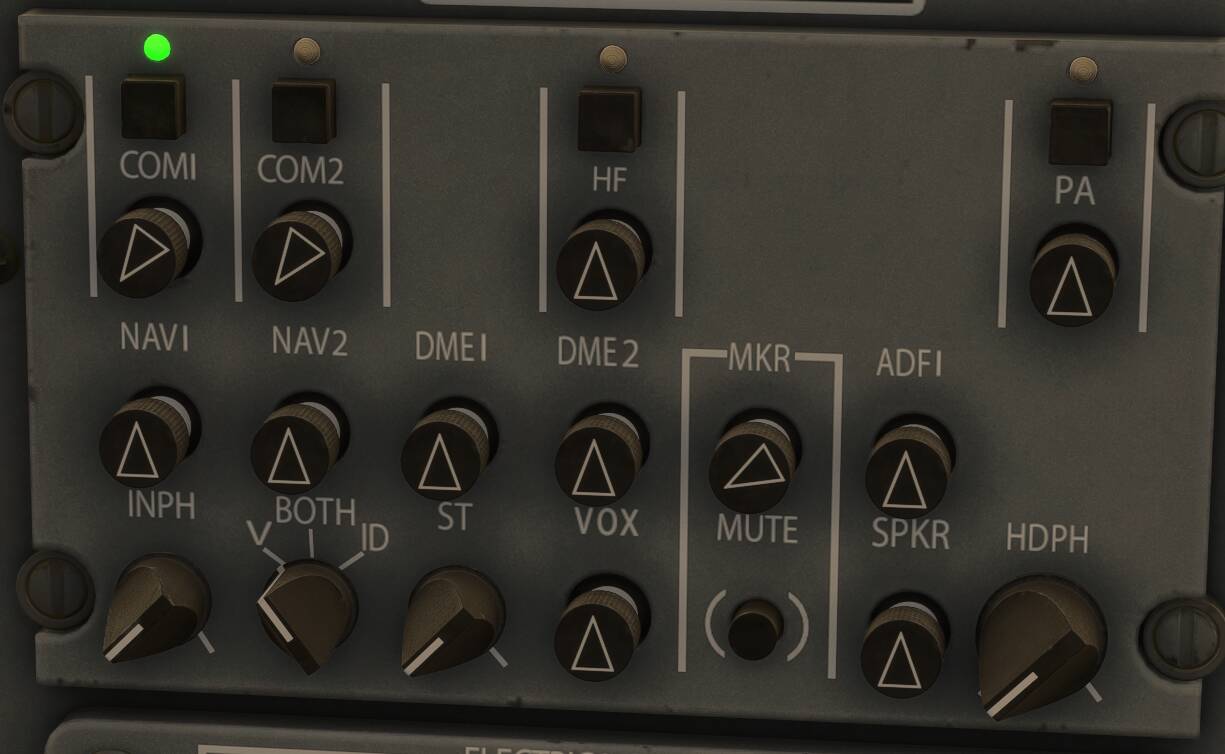
I’m struggling to figure out a way to actively monitor Comms 1 and Comms 2 simultaneously in the CJ4. For example, I wanted to listen to Centre/Approach/Tower on Comms 1 and Guard (121.5) or ATIS on Comms 2, whilst only transmitting on Comms 1.
I think they were turned up. I think they were on max in this screenshot as was the MKR volume. NAV 1, NAV 2, DME 1, and DME 2 etc were turned down.
I’ll have to jump back on it and check again. Maybe I was listening to both but nobody was transmitting. I’ll try Twr and ATIS at the departure airport and see if it works.
Okay so I figured out my issue. Both Comms volumes were turned up to max as I thought, however the Say Intentions App had disabled chatter due to me being parked and stationary on the ground. When I flew around the airport with Ground and Tower tuned to Comms 1 and 2 respectively, I could indeed hear both communications.
So I know this is old, but what do you use for a transmit binding? I’m finding that it’s not really using a mic switch where the transmitting is selected from the audio panel. Basically where you can use your yoke/joystick mic switch and it will transmit to whatever comm that is selected. I think it’s a binding issue for me; but I haven’t been able to figure it out