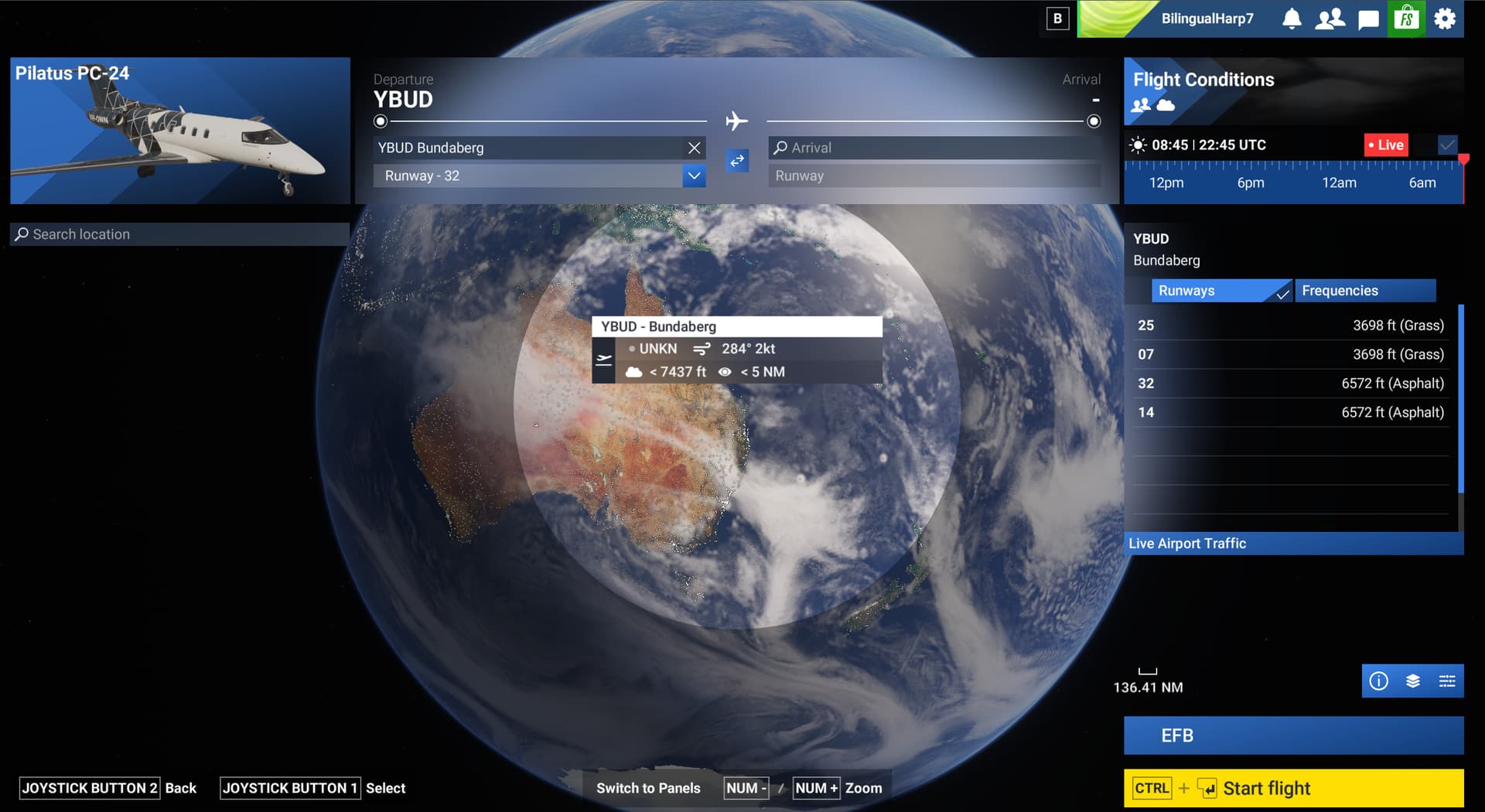
Chosing departure doesn't zoom in anymore

ISSUE DESCRIPTION

Description of the issue:
today I installed SU3 beta 1.5.3. After starting, using free flight and choosing an airport, the globe doesn’t zoom in anymore down to my airport. I have to zoom in manually now and sometimes it is hard to meet the point there the airport is situated. Is there a way to configure this zooming-behaviour?

Did you experience this issue before you joined the Beta?

[PC Only] Did you remove all your community mods/add-ons? If yes, are you still experiencing the issue?

FREQUENCY OF ISSUE

How often does this occur for you (Example: Just once, every time on sim load, intermittently)?

REPRODUCTION STEPS

Please list clear steps you took in order to help our test team reproduce the same issue:

YOUR SETTINGS

If the issue still occurs with no mods and add-ons, please continue to report your issue. If not, please move this post to the User Support Hub.

What peripherals are you using, if relevant:

[PC Only] Are you using Developer Mode or have you made any changes to it?

[PC Only] Many issues may be due to an outdated graphics card. Please state your Graphics Card Driver Manufacturer (NVIDIA, Intel, AMD) and Version:

[PC Only] What other relevant PC specs can you share?

MEDIA

Please add a screenshot or video of the issue occurring.

[END OF FIRST USER REPORT]


:loudspeaker: For anyone who wants to contribute on this issue, Click on the button below to use this template:

Do you have the same issue if you follow the OP’s steps to reproduce it?

Provide extra information to complete the original description of the issue:

If relevant, provide additional screenshots/video:

Do you have the same issue if you follow the OP’s steps to reproduce it?
• yes

Provide extra information to complete the original description of the issue:

Not that I know

If relevant, provide additional screenshots/video:

Do you have the same issue if you follow the OP’s steps to reproduce it?
• Yes

No I do not have the issue. Manually zoom just enough for the airport circles to appear, click the airport then click “zoom to details”. The map zooms down to airport level to the point that the airport fills my screen and I can select the runway without any manual zoom whatsoever. This just started working with 1.5.2 and continues to work now.

1 Like

This fix is from 1.5.2.0 release notes:

World

  • Fixed camera zooming issues when selecting departure or arrival locations

So perhaps it’s either an intentional change or a bug introduced by this fix.

1 Like

When setting up a new flight after choosing an airport it no longer zooms in

1 Like

Ditto here. No auto-zoom in on an airport when I select it on the world map.

It’s never zoom enough to take parking position. Why ? It was in 2020 and is must have.

This definitely isn’t fixed in the update 3 beta. This is what I get when I select an airport.

Still way zoomed out and there is no “Zoom to airport” option. You can zoom in using your mouse wheel but that takes forever and then often doesn’t centre on the selected airport. You then have to chase about to find the airport.

1 Like

Same problem here, on all airports - this is definitely not fixed.

Wouldn’t it be better (i.e.working properly for a cold & dark start) if you could:

  1. Select an airport using ICAO or name.
  2. Let the map zero in on the airport circle.
  3. Click the airport circle and let the map zoom in such that the entire airport fills the screen.
  4. Select gate/ramp/parking spot.

As it is you can do the first two things easily enough, but clicking on the airport circle does not zoom in nearly far enough, and you still have to use the mouse to ‘Zoom-Move Map-Zoom-Move Map-Zoom-Move Map’ until you can see the airport in enough detail to start the flight where you want to.

I’m no programmer, but it seems like it would be easy enough to make “Zoom to Details” zoom all the way in to the airport details…

Of course, if you want to start at a custom location (say, for a bush flight starting in a field somewhere) you’d need to start the process with ‘Zoom-Move Map-Zoom-Move Map-Zoom-Move Map’. It would be awfully nice if ‘Zoom’ kept the world map centered, but that may be a function of the 2D representation of a sphere.

Thank you for the bug report.

We have created an internal ticket to see if our team already has this logged, and if not they will attempt to reproduce the issue and create a new bug report. This item is now marked as feedback-logged. If there is an existing bug report or one is created, we will move this thread to bug-logged.