Cirrus SR22 parking brake works but doesn't move since SU4 final

ISSUE DESCRIPTION

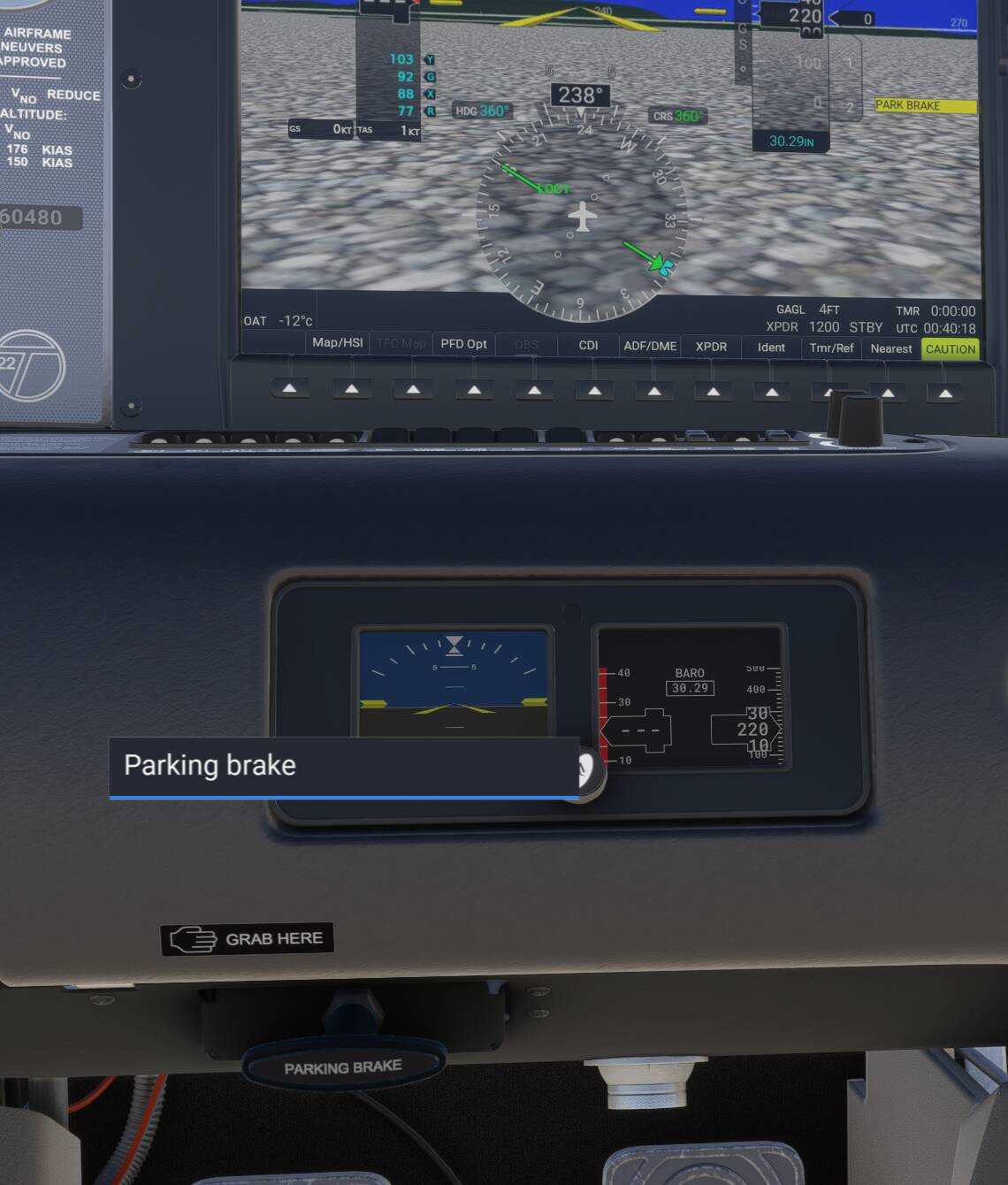
The parking brake doesn’t move when setting or unsetting. Works fine, but not visually. Worked in the beta, I guess, otherwise I would have notice it.

FREQUENCY OF ISSUE

All the time since SU4.

REPRODUCTION STEPS

Please list clear steps you took in order to help our test team reproduce the same issue:

  1. Loaded flight in SR22

  2. Toggled the handbrake, although it was visible from the default cockpit view.

YOUR SETTINGS

If the issue still occurs with no mods and add-ons, please continue to report your issue. If not, please move this post to the User Support Hub.

What peripherals are you using, if relevant:

[PC Only] Are you using Developer Mode or have you made any changes to it?
With and without developer mode

[PC, MSFS 2020 Only] Are you using DX11 or DX12?

[PC Only] What GPU (Graphics Card) do you use?

[PC Only] What other relevant PC specs can you share?

MEDIA

Please add a screenshot or video of the issue occurring.

Can replicate.

Just to clarify, we’re saying the parking brake handle doesn’t move. I’m seeing the pedals moving when it’s engaged.
Voted under that assumption.
Regards

That is correct.

Same in just about every GA aircraft. No handle movement and unable to set.

Which others 1st party GA aircraft are you experiencing the same issue ?

I just tested the 172 G1000 version, and it worked normally with both my assigned keystroke and using the mouse on the brake handle . Would you mind trying that one and let me know if you still have the problem? Trying to narrow down the issue.
Regards

I can confirm, as of tonight 22 Dec 2025, the SR22 parking brake animation does not work. The brakes do work.

Same here…. the animation does not work in the cockpit. The parking brake functionality does!

Confirmed this is still broken in SU5. Parking brake is enabled (as shown on PFD), but handle does not move. Tried with my key-bind toggle and with mouse, and handle did not move with either.

This topic has now been updated from feedback-logged to bug-logged after successful internal reproductions. Please note that we do not provide estimated timelines for bug fixes to be released.

Thanks for helping us to identify this issue by creating a Bug Report.
Update: This bug has been fixed, topic can be closed by author.