Clouds wobble and flicker using Foveated Rendering in Sim Update 4 Beta (1.6.27.0)

1 tag is required - add them in the tag section next to the title above:

  • One for platform (ms-store, steam, xbox , or xcloud)

  • One for aircraft if related (start typing in your aircraft name in the tag section and pick correct option)

Feel free to delete this quote section after adding your appropriate tags.

ISSUE DESCRIPTION

Description of the issue:

When flying in VR using Foveated Rendering, clouds jiggle and wobble together with weird visuals in Sim Update 4 Beta (1.6.27.0)

FREQUENCY OF ISSUE

How often does this occur for you (Example: Just once, every time on sim load, intermittently)?

Every time.

REPRODUCTION STEPS

In VR select Foveated rendering with eye tracking.

Please list clear steps you took in order to help our test team reproduce the same issue:

  1. Issue only occurs using foveated rendering.

YOUR SETTINGS

If the issue still occurs with no mods and add-ons, please continue to report your issue. If not, please move this post to the User Support Hub.

What VR headset and peripherals are you using:

Pimax Crystal Super.

[PC Only] Are you using Developer Mode or have you made any changes to it?

No

[PC Only] What GPU (Graphics Card) do you use?

RTX 4090

[PC Only] What other relevant PC specs can you share?

CPU 5800x3D, GPU RTX 4090, Win 11

MEDIA

Please add a screenshot or video of the issue occurring.

Link to video:
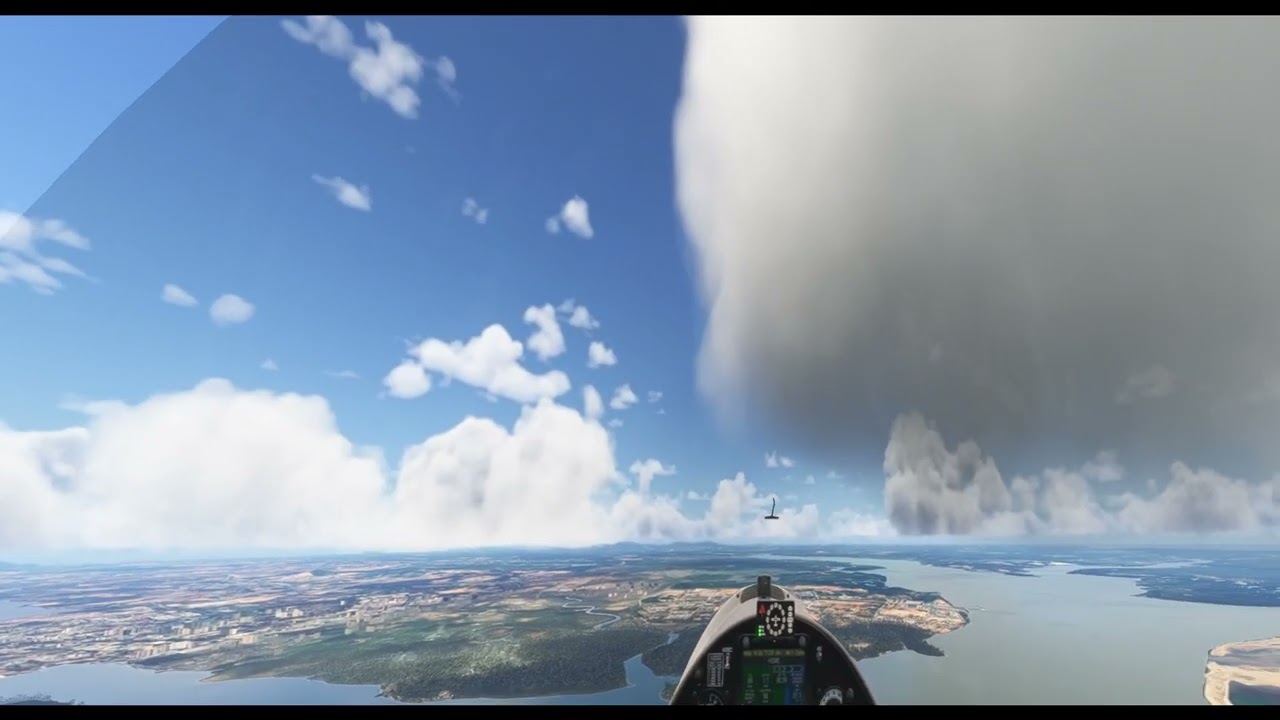
Exactly the same symptoms using Quest Pro, so not limited to Pimax.

1 Like

Unfortunatly Quad Views are unusable with this build for anything but a clear sky. I also tested various foveated scale settings without any improvement.

Also have flickering sky when foveated rendering is on regardless of the FR scale value.

Pimax crystal super 57ppd. Rtx 4070 ti super. I tell i9 14900k 64g ram. Latest win11

Same issue here with the Crystal.

Same here - Crystal Super. Unusable with foveated rendering

Same here - Original Crystal

Same here. Also, at night (with DLAA and foveated rendering), the wobble happens almost everywhere in the scenery.

Pimax Crystal Super

Can you confirm you are also experiencing this issue in the new .29 build?

1 Like

my clouds wobble and shake with or without Foveated Rendering. Most visilbe at night.

It got somewhat better with .27 but is still there and quite disturbing.

As .29 just dropped during my last flight, I had no chance testing it on that build, yet.

But nothing in the release notes indicate that anything was touched in that regard….

I reported it here 3 weeks ago, bu it did not get much attention:

Yes, I am. It didn’t happen before..

1 Like

This was with the 29 build.

Yes, I can also confirm this is a problem with the .27 & .29 builds. It is even more noticeable in a dark scene. This was not noted in the .25 build.

3 Likes

Exact same issue in a Pimax Crystal Super in todays latest Beta.

1 Like

Same issue with Pimax Super.. The only way i got it to stop was to turn off eye tracking

2 Likes

phew - thought it was just me. foveated rendering on=clouds wobble. turn it off it gone and so are my frames:(( .I have tried changing to nvidia driver (hotfix) 581.94 no change, so reverted back to .80 build. and have now come to here and found out it’s a SU4 thing instead:(( here’s to fixing the wobble with Foveated rending on my OG crystal. 9950x3d, .7171 win 11 build 64 gb, 5090

Getting this with a Pimax Super in its native Pimax OpenXR but it goes away with PimaxXR. Eye tracking doesn’t work in PimaxXR for me, but it is much smoother than Pimax OpenXR. TAA mode seems to get rid of the big warbles in Pimax OpenXR.

1 Like

Good catch. I’ll try it with TAA mode and FR on and see what happens. If it’s a DLSS thing the devs will need to know that. I was using DLSS Quality when I noticed it.

Ok, I just tried a variety of combinations using the latest Sim Update 4 Beta (1.6.29.0).

With eye tracking enabled on my Pimax Super, I get cloud wobbles using DLAA or DLSS Quality, Balanced and Performance modes.

I also get cloud wobbles using TAA mode with eye tracking.

Turning Foveated rendering off with eye tracking enabled fixed the problem.

The issue only occurs with eye tracking on plus foveated rendering on in-sim.

I can fly with fixed foveated rendering and no cloud wobbles.

Pimax Super, using PimaxOpenXR runtime.

So it definitely seems to be the eye tracking causing the issue with a Pimax Super and probably the Pimax Crystal OG. TAA or DLAA/DLSS is not the issue.

As to what causes the issue for non Pimax headsets I have no idea.

1 Like

The issue occurs for me using Quest 3, no foveated rendering, DLSS on. It is worse at night. It’s like the clouds are a separate overlay on top of the rest of the scene. They move independently of everything else.

1 Like