Cockpit/External View Mode does not work for assigned keys/T.16000 button

Using the template below will greatly help the team reproduce the issue and ease the process of fixing it. Before posting, search for an existing report. If you are not sure it’s a bug, please first report in User Support Hub.

2 tags are required - add them in the tag section next to the title above:

Feel free to delete this quote section after adding your appropriate tags.


ISSUE DESCRIPTION

Description of the issue:Assigned keys/joystick button does not work to switch cockpit/external views for any aircraft

[PC Only] Did you remove all your community mods/add-ons? If yes, are you still experiencing the issue? YES still does not work

FREQUENCY OF ISSUE

How often does this occur for you (Example: Just once, every time on sim load, intermittently)? everytime and after two reloads

REPRODUCTION STEPS

Please list clear steps you took in order to help our test team reproduce the same issue:

  1. Assigned buttons and keys to the function
    2.Started flight in Free mode
    3.No results when pressing backspace or function 15 button

YOUR SETTINGS

If the issue still occurs with no mods and add-ons, please continue to report your issue. If not, please move this post to the User Support Hub.

What peripherals are you using, if relevant:
Thrustmaster T.16000

[PC Only] Are you using Developer Mode or have you made any changes to it? No

[PC, MSFS 2020 Only] Are you using DX11 or DX12?

[PC Only] What GPU (Graphics Card) do you use?NVIDIA GeForce 4090 Laptop GPU

[PC Only] What other relevant PC specs can you share?HP Omen

MEDIA
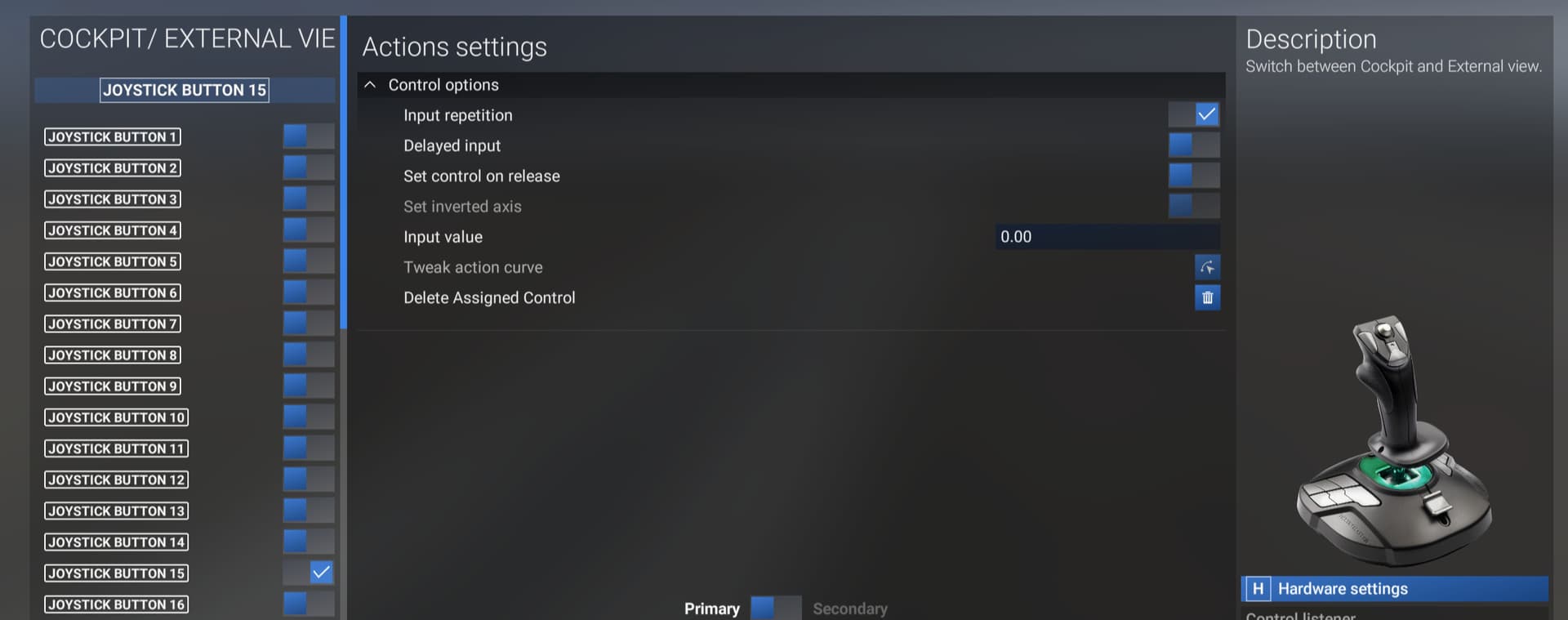
[END OF FIRST USER REPORT]


:loudspeaker: For anyone who wants to contribute on this issue, Click on the button below to use this template:

Do you have the same issue if you follow the OP’s steps to reproduce it?

Provide extra information to complete the original description of the issue:

If relevant, provide additional screenshots/video:

Do you have the same issue if you follow the OP’s steps to reproduce it?
• No (unless not using the same controller)

Provide extra information to complete the original description of the issue:
• That cockpit/external view function works as expected using the keyboard or the controller assigned button
Have you tried to assign to another button ?

If relevant, provide additional screenshots/video:

I am using the cockpit/external mode switching on my TM16000 throttle, not on my joystick, but I think the underlying issue that I experienced might be the same. I notice in your screenshot that in the “Actions settings” screen, the “Input repetition” option is checked. I initially had an issue with this as the repetition toggles between the two views VERY quickly. When I unchecked the repetition option, things worked fine.

A simple possibility to try: maybe it works, maybe not…

Thanks - I did try by unchecking repetition button and still does not work. When in external camera mode, I too get the very quick flickering of the cockpit when pressing and holding down the back space key (nothing on function 15 TM16000 button). I have to force my way into external camera mode through the tool bar camera select. Toggling from cockpit mode to external mode with backspace or button 15 does not work.

Do you have the same issue if you follow the OP’s steps to reproduce it? Yes same issue

Have you tried to assign to another button ? Yes - just assigned it to button 9 and still have the same issue - does not work at all. Also there are no conflicts on the buttons or backspace key.

Do you have the same issue if you follow the OP’s steps to reproduce it?
• Yes but this problem seems to be intermittent. After I wrote the first draft of this reply the toggle worked correctly both ways in my next FS session. And I have seen that happen in days past.
Be careful as to what functions you have assigned to keys - and I strongly suspect that Career Mode may add functions with some missions that interfere with your previous ones that worked.

Provide extra information to complete the original description of the issue:
• I assign END key to the function to switch between Cockpit and External Views.

If relevant, provide additional screenshots/video:
• Clicking END I can switch from Cockpit to External but going back to Cockpit View SOMETIMES works.

For the keyboard, are you using a custom profile ?, have you tried with the default 2024 profile (backspace key) or the default 2020 profile (end key) ?

I think this topic still has value because there is definitely an underlying issue. Perhaps it could have a Workaround tag added, though. The issue seems to be the command “Toggle External View” is buggy while the “Cockpit / External View Mode” command seems to work as expected.

As of today, I was in Free Flight with a C172SP loaded cold and dark, starting outside the aircraft. I wanted to do some camera set up so I can use the drone/showcase to go from standing next to the plane to quickly looking at the top of the wings and fuselage. This opened a whole can of worms due to how camera key binds don’t work when outside an aircraft, but that’s another story. I found the key bind for Toggle External View and set it to “CTRL + SHIFT + X”. I found if I got in the plane and hit the key bind, I could go into External view, but if I hit it again …. nothing happened. I was stuck in External view unless I used the mouse to select Cockpit view from the Camera menu.

Thankfully, I found this thread and discovered the alternative command and that works fine.

Asobo should at least know the “Toggle External View” command needs a look, even though it’s an incredibly low priority. If they wanted to be a bit cheeky, they could fix the whole issue by just renaming the key bind to “Enter External View” so folks know it’s not actually a toggle.

Cheers.

Personal comments:
I don’t know the original design but maybe the confusion is because you have “Toggle” in the name of the commands “External” & “Cockpit” views. So you are expecting the views to switch forth & back by just using one or the other view.
It would make sense to me to remove “toggle” from “Toggle External View” & “Toggle Cockpit View” and add it to “Cockpit/ External View Mode”.

1 Like

Yes, well said.

Something like

  • Enter External View, or Activate External View
  • Enter Cockpit View, or Activate Cockpit View

for the two commands at issue. And

  • Toggle Cockpit / External View Mode

for the one that truly functions as a toggle.

1 Like