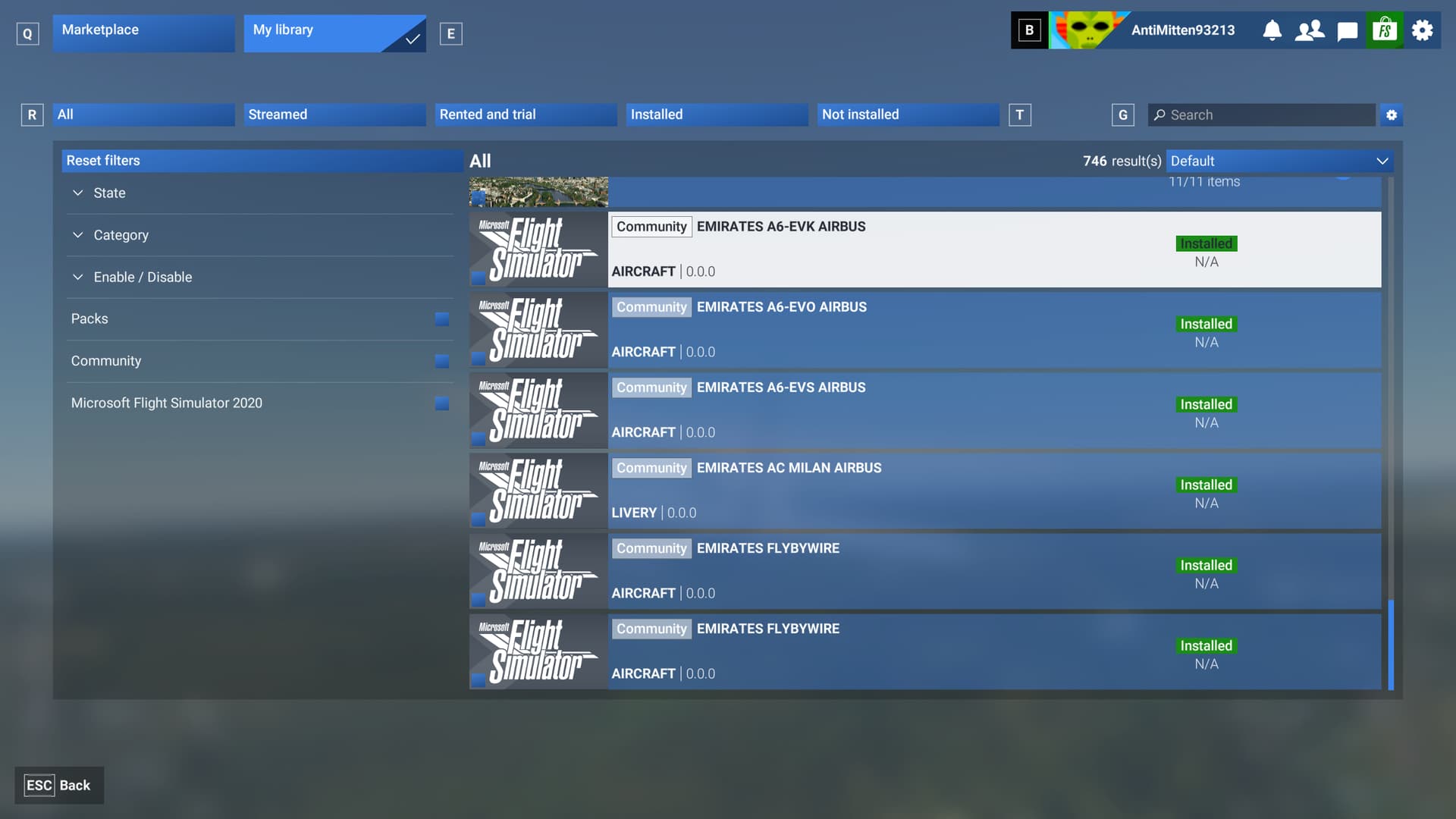
Description of the issue:
Items installed through the Community Folder (specifically aircraft in my test case) are not listed in the Community panel of the Library.
[PC Only] Did you remove all your community mods/add-ons? If yes, are you still experiencing the issue?
No; it’s the reason for the issue being reported.
FREQUENCY OF ISSUE
Every time.
REPRODUCTION STEPS
Please list clear steps you took in order to help our test team reproduce the same issue:
Add items to your community folder and launch MSFS2024.
Click on the green store item on the main menu.
Select the Community sub-category.
YOUR SETTINGS
N/A
What peripherals are you using, if relevant:
N/A
[PC Only] Are you using Developer Mode or have you made any changes to it?
No
[PC, MSFS 2020 Only] Are you using DX11 or DX12?
[PC Only] What GPU (Graphics Card) do you use?
N/A
[PC Only] What other relevant PC specs can you share?
N/A
Do you have the same issue if you follow the OP’s steps to reproduce it?
• Same - discovered this independently
Provide extra information to complete the original description of the issue:
• MSFS2020 community assets not showring, either via a shortcut placed in the community folder pointing to another source, or folders containing all of the data. Used a range of assets - airports, aircraft - but removing anything that may well conflict such as weather apps.
If relevant, provide additional screenshots/video:
•
Do you have the same issue if you follow the OP’s steps to reproduce it?
• yes
Provide extra information to complete the original description of the issue:
•
followed all instructions to point msfs 2024 at the community folder - still not recognized the contents even though it is correctly detailed in UserCfg.opt
If relevant, provide additional screenshots/video:
•
Do you have the same issue if you follow the OP’s steps to reproduce it?
• Scenarios (mounted) via dynamic link are not displayed in the community folder.
Provide extra information to complete the original description of the issue:
• The only one that shows up is the first one in the list as not installed. Clicking on it then the message “Installed” appears.
If relevant, provide additional screenshots/video:
•
Unfortunately using Addon Linker / using shortcuts doesn’t work anymore in FS2024. You have to copy the actual addon folder into the Community Folder. Only then it works.
I noticed a possibly related strange behavior to the original issue. 2 aircraft I had originally purchased through Marketplace were later purchased from the developer because they were military aircraft which were missing the gun barrels / fairings on the Marketplace versions.
After adding those to my Community folder, those packages are also not listed when the “Community” tick box is selected and instead the status of the “Microsoft Flight Simulator 20” (short title as shown in the interface) shows the 2 aircraft as “Installed”.
Do you have the same issue if you follow the OP’s steps to reproduce it?
Yes
Provide extra information to complete the original description of the issue:
Includes any items - manually put into folder or using a developer’s installer
If relevant, provide additional screenshots/video:
N/A
Do you have the same issue if you follow the OP’s steps to reproduce it?
•
Yes
Provide extra information to complete the original description of the issue:
•
It seems that the Community Folder is only read once. As a scenery developer for 2020, I copied several packages into the community folder, and those that had a correct Title String in the Manifest seemed to work fine. The others needed to be corrected, but correcting them did not cause them to update.
Adding new packages did not appear to work either. However, creating a new Community location and placing all my packages in that worked fine.
There is a but. Creating the new Community Location, generated Official 2020 and Official 2024 inside the Community Folder. However, they are empty. Just the OneStore Sub-directory.
If relevant, provide additional screenshots/video:
•
For me the same:
Community-installed items are listed in my MSFS2024 library without names nor informations and as installed but unavailable / not available. This means sceneries too. It is possible to select such items but the only choice is to deactivate them, activating is not possible.
I installed them correctly too but as you see the list for me begins with a lot of antries without names and “n/a” but at the end there are too some entries, that are listed correctly. Because no name nor filepath is shown in the “n/a” entries it is not possible to check for installation or other issues.
The community-installed aircraft like FlyByWire A380, Fenix, TFDI-MD11 are working for me (Sim-Update 1 Beta).
I have started having problems with MSFS 2024 recognizing items in the community folder. I have selected the community folder in the library with no results. I have confirmed the community folder and restarted with no results. the userCfg.opt file has InstalledPackagesPath “C:\Users\johnc\AppData\Local\Packages\Microsoft.Limitless_8wekyb3d8bbwe\LocalCache\Packages” as the last line. sometimes is community multiple times. I have changed the line to add Community at the end again with no result. It was working before. Restarted several times. I now see unidentified items in the libary community foler that are disabled restart required but restart does not help.
any thoughs
thsnks
john

 For anyone who wants to contribute on this issue, Click on the button below to use this template: