You’ll want to do all your testing with a clean community folder, newly generated content.xml and newly generated scenery index files.
I would seriously stop adding and removing addons right now until you can make sure the base foundation is stable, we’ve gone from freezing in the exact same places over the UK to not even being able to load into a flight now, getting error at 80% blue bar like you wrote.
Access violations can come in different ways for different reasons. It is generally indicative of a physical memory issue, a virtual memory issue or bad blocks on your HDD or even bad sectors on an SSD/NVMe. So, it’s important to rules these out.These are the means your PC may access data, however there are also software components that as well may play a role in access violations. For instance, AV software and even software components like .Net and Visual Studio C++ are known to return access violations during debugging. Speaking of debugging or advanced error tracing, you could try using ProcDump with, procdump -ma -e FlightSimulator.exe. It will generate a dump file with more detailed info on any unhandled exceptions or access violations.
If you’re using an SSD type of storage device, do you routinely perform trim commands on the device through Windows Defragment and Optimize Drives utility?
Can you or have you scanned your drives to check for bad sectors or blocks using chkdsk? Can you scan the file system using the System File Checker tool?
To rule out any issues with .Net and Visual Studio make sure you have installed all of the following versions of it.
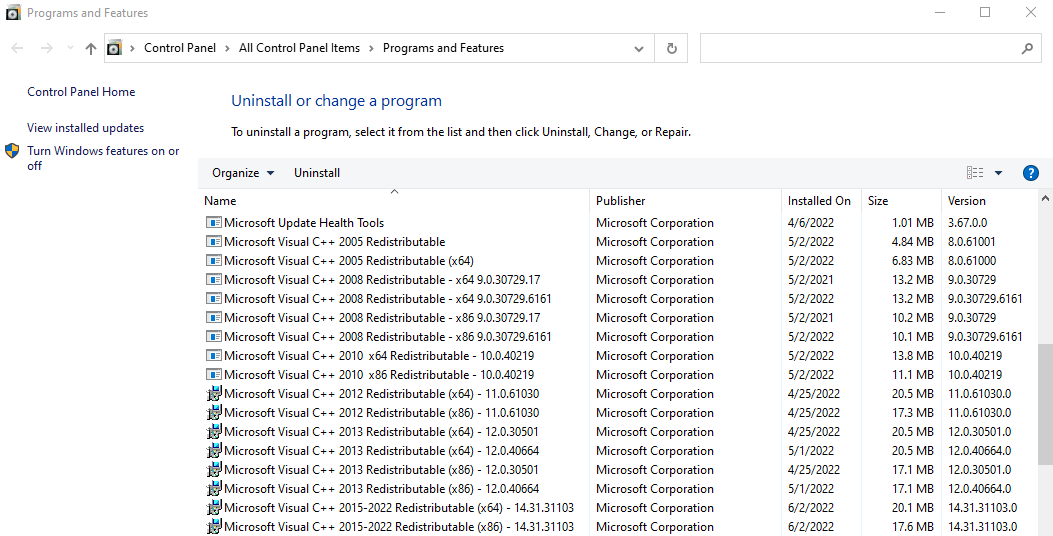
Make sure you also have both x86 and x64 versions installed!!! You can download them here. Even if you have some of them already installed it’s good to do a repair install on them then when done installing all of them reboot your PC and run windows update then.