Controller Profile Request, Upload and Sharing Topic

I’ve created this topic as a central repository for users to share their controller profiles.

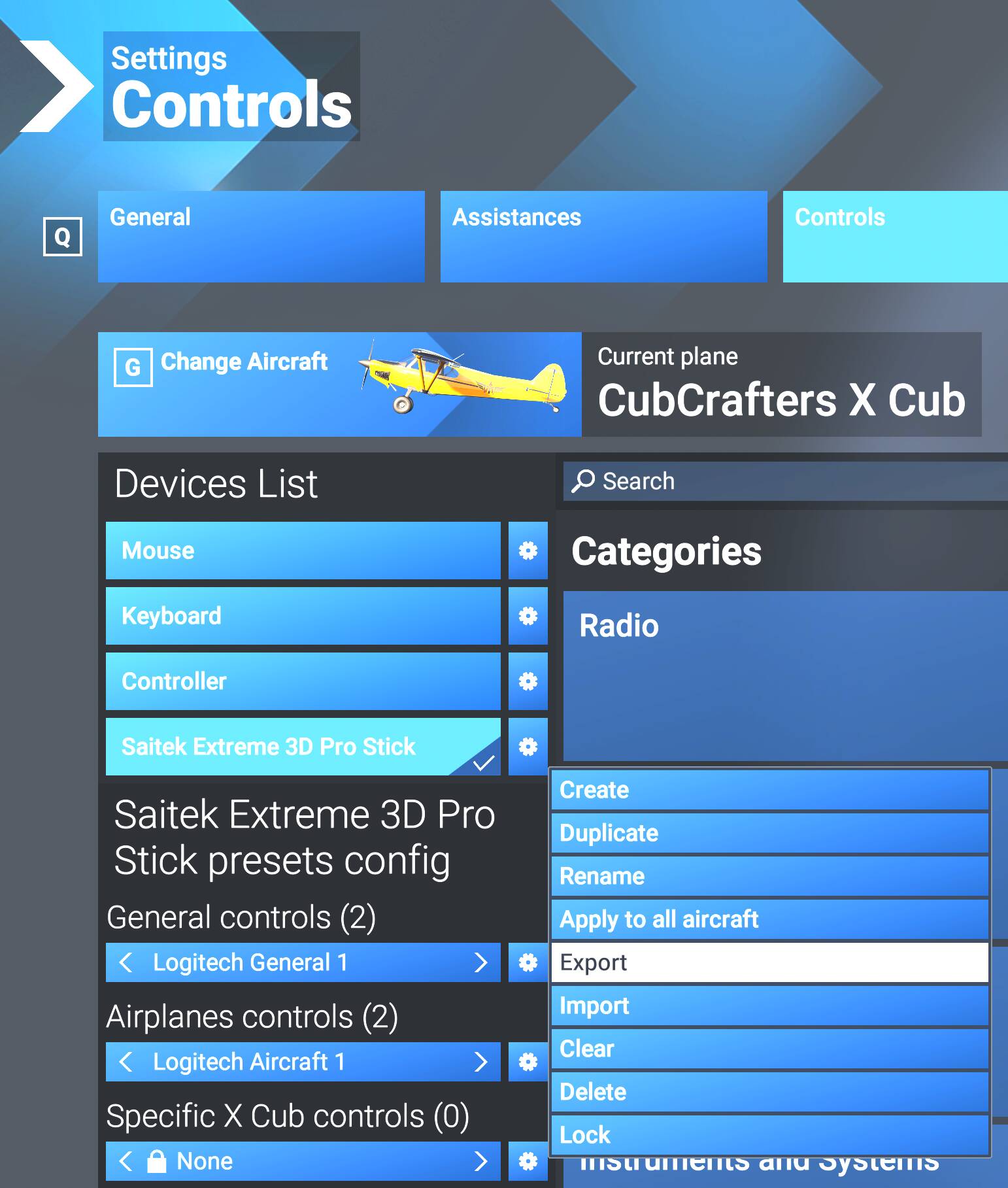
As some may know, it is now possible for PC users to export & import device profiles from within Settings |Controls by clicking on the gear icon & choosing “Export”:
[Note: I’m not sure if this functionality is available on Xbox, Xcloud or Playstation]

For each device, one can export the settings for General Controls, Airplanes Controls and Aircraft-Specific Controls as an .xml file, which is really just a specially-formatted text file.

The forums do not allow the upload of files with an .xml extension, but do allow the upload of text (.txt) files. Therefore, if one re-names the exported .xml file and adds a .txt extension, one can upload the file.

What I suggest is that a user who wishes to share one or more of their device profiles create a post in this topic that includes a table such as the example below that lists the profiles that they want to share:

Device Name General Controls Airplane Controls Specific Aircraft Controls
Name of 1st Device FileName(s) FileName(s) FileName(s)
Name of 2nd Device FileName(s) FileName(s) FileName(s)
Name of 3rd Device FileName(s) FileName(s) FileName(s)
etc, etc.

e.g., for the screenshot above:

Device Name General Controls Airplane Controls Specific Aircraft Controls
Saitek Extreme 3D Pro Logitech General 1 Logitech Aircraft 1 N/A

If you are not sharing one of the 3 types of controls, just fill the cell with an “N/A” (Not Applicable).

You then upload the file(s) that you want to share, e.g.:
Logitech General 1.xml.txt (161.0 KB)
Logitech Aircraft 1.xml.txt (132.9 KB)

Users can then download the file(s), rename the file by removing the added text (.txt) extension, thereby reverting the file to the .xml extension that can then be imported into their controls settings.

There is one caveat when doing this, which would be the responsibility of the person who downloads the file(s) to check:

  • Each control profile name should be unique. If a duplicate name already exists in their controls, the user would need to open the downloaded xml file and change the Friendly Name:
    e.g. from:
    <FriendlyName PlatformAvailability="1" Locked="false">Logitech Aircraft 1</FriendlyName>

    to:
    <FriendlyName PlatformAvailability="1" Locked="false">Logitech Aircraft 2</FriendlyName>

I’ve probably not thought of every scenario, so feedback on the process is welcomed.

Edit 12/04: Folks can also use this topic to request specific profiles - e.g. "Can someone share their profile for the Honeycomb Alpha / VelocityOne Flightstick, etc. etc.

5 Likes

Thank you for this @SmotheryVase665

Jeff

1 Like

Outstanding. Thank you Smotheryvase665. Where would the file be located to import a profile?

The .xml file that you want to import can be put in any convenient folder. When you choose the import option, it opens the usual windows “open file” dialog window that allows you to select the file, and then imports the new profile and saves it in the same directory as all the other profiles, e.g.:

(C:\Users\Your-UserName-Here\AppData\Local\Packages\Microsoft.Limitless_8wekyb3d8bbwe\SystemAppData\wgs\000901F2F116AAA5_000000000000000000000000604CC91B)

You can then delete the .xml file or store it in a backup location in case you need it again (I suggest the latter!)

Thanks again Smothery! Are we allowed to offer incentives for people to upload profiles? Or is that against the rules?

I don’t think offering incentives is required - I’d suggest asking the community for a controller profile for a specific device (e.g Honeycomb Bravo, Turtle Beach VelocityOne Yoke, etc.) and hopefully one or more folks will respond. :slightly_smiling_face:

I would love a properly set up profile for the Hotas One and a full keyboard for Xbox, especially if it came with a printable key map.

I took about 2 months off from the game, mostly due to work and also waiting for the stuttering thing to get figured out (shoutout to the devs on this latest build :heart_hands:t2:), but now that I’m back on I’ve forgotten half of the buttons. Yesterday I was trying to turn the parking brake off and I accidentally shut down the whole aircraft :rofl:

Would it be possible for a thread or topic for people to request, or to add profiles for different hardware? Or is there one I haven’t found yet? Or use this thread?

Folks can use this one - I’ll amend the title to that effect :slightly_smiling_face:

For those that are new to the Honeycomb Bravo, or setting up any new hardware profiles in FS 2024, I can’t recommend more highly the YouTube videos by Rmag. Well organized, step by step and easy to follow. I now have a much better understanding of the whole Settings process in FS 2024 for any device or other functions controlled by the settings process.

Hi. I am seeing some videos by RMAG, but I can’t seem to locate the one you referred to in your post. If you have a direct link, it would be awesome. Thanks. –Redeye

It was 1 year ago and titled ‘Honeycomb Bravo Throttle Quadrant 5 Configurations’. When I search Rmag in the search bar it is the first video that comes up

Only the first letter ‘R’ is capitalized, the ‘mag’ is lower case, if that makes a difference.

I need a setup for the Thrustmaster T.16000M + TWCS throttle. Thanks in advance…:zany_face:

1 Like

Previously I was on MSFS 2020 which was fine with Thrustmaster Airbus Sidesitck (only), for PC. MSFS 2024 was terrible when I tried it and no matter what I did, I could never get my config right. With the price of game Pass Ultimate going daft, I cancelled that and am considering purchasing the game.

Does any have a profile they could share, that works for sidestick only? I do not have the quadrant.

Thanks. This is just what I need. I’m just getting started with FS 2024 and this forum. I purchased used Alpha & Beta and an stumped with setting them up to a Cessna 150. I’m an old guy who flew a 150 GA a couple decades ago. I really need help with the profiles. Could someone upload this profile or point me to one already here, please.

Could you explain what your controls are doing, or not doing.

It would help the right person to support you.

And welcome to the forum :grinning_face:

When I check the controls sitting on the ground, the control surfaces move and throttle on the dash moves in & out. But when I go to Free Flight I don’t have control.

I would also like to use more quadrant controls, but they don’t seem to be responding.

I’d like a profile that I could learn & use. Is such a thing available for download?

In MSFS 2024, some controls need to be set up once in Free flight and once in Career.
This chap has good videos and since it is a latest one there is a profile which has changed so is not in the older ones.
The older ones sometimes go in more depth, so it is useful to watch all.

1 Like

Thanks for the suggestions!

1 Like

Absolute newbe to FS2024 but experienced with FSX and am lost in this new world. But ‘24 does not recognize my CH pedals even with unplugging and replugging the USB plug and I cannot figure out the Setup for my Microsoft Force Feedback joystick, and (finally) is there any printable list of keyboard controls any where? Man I’m even lost in this new layout of a forum. Maybe I’m even at the wrong page in this forum. Probably…need some serious help.