Has anyone got any experience with this setup? Or maybe seen a recent benchmark? I am thinking about an upgrade and not sure how well this one handles msfs 2024 in 4K
Thanks.
Problem is I need my PC to handle creative tasks as well and 9800X3D is suboptimal there. Since I game in 4K, 1080p performance does not interest me.
Do you have a link to that article please?
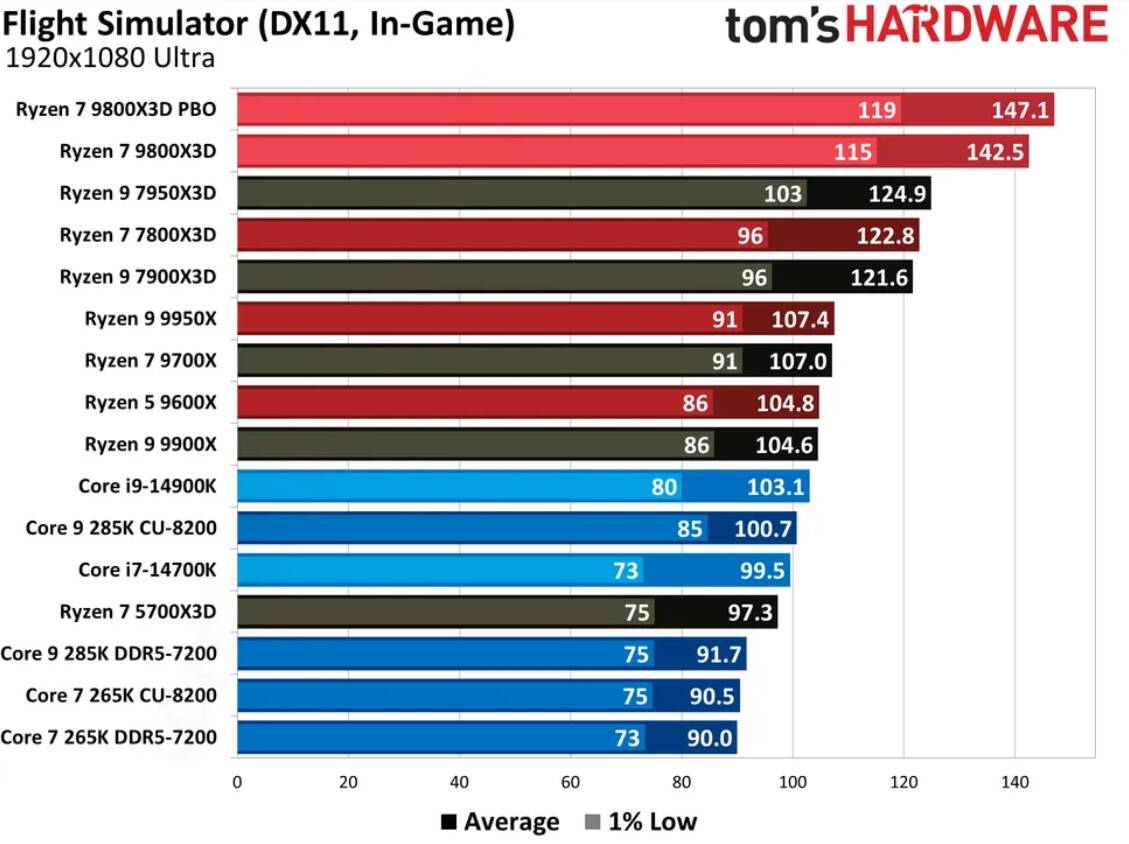
1080p performance is more indicative when testing a CPU. MSFS 2024 is more GPU-dependent, but 4090, as I said, is a beast that will not struggle with 4K.
If you need to make a tradeoff you’re mentioning then a different choice may be more prudent. However, 9800X3d is not uniformly worse in all creative tasks — in some, it’s on par with the Intel chips. I’d suggest you look at its earliest reviews at techpowerup.com where they’ve tested it in an extremely wide variety of applications. Perhaps, your exact needs will still be covered just enough.
Also, maybe waiting for the 9950X3D will worth it.
This is the article I was referencing in the previous post:
Here is the techpowerup review I mentioned. You can look for the apps closest to your task:
Thanks for that. Basically in 4k difference is so minimal CPU is irrelevant as long as it is powerful enough to handle whatever GPU is outputting. Am I getting this right? I observed 1-2 frame difference across the board.
That’s 2020 DX11, the 9800x3d is on par with the i9 14900 in MSFS 2024
Well, let’s start with a disclaimer that I am not a licensed expert in computer graphics or building PCs — just a curious amateur, but I have a feeling that your understanding of the rendering pipeline in a real-time application, like an MSFS, is not how I would describe it. As I’ve always understood, the pipeline indeed starts with the CPU preparing the physics and making draw calls, then supplying the GPU with the information and assets prepared. It’s then the GPU task to render the scene and output the final frame to the display. (Or it can be that I didn’t understand your wording properly.)
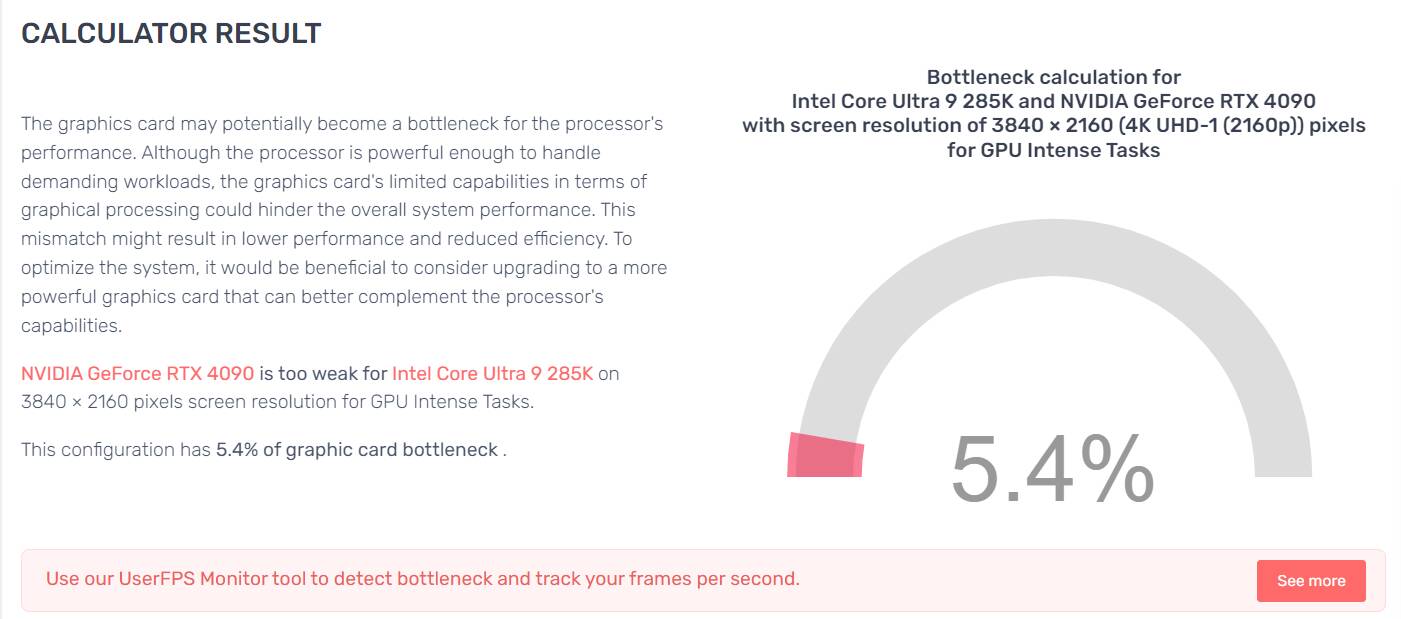
I think you can use this website to get an understanding of how different components would balance one another in different tasks. They have MSFS, too, so it can be illustrative. However, I wouldn’t use it as a buying advice.
When I installed a 4070ti into my old PC (i7-7700K) it would indeed produce only 30 FPS in the most complex scenes, but they would drop to 3-5 FPS when moving a camera or turning the head. I then increased the scaling factor (essentially doubling the rendering resolution) and it became stable 30 FPS in the same environment without those notorious drops. This would suggest that in the first case the system was heavily bottlenecked by the CPU (obviously) — that is, the GPU was ready to render a frame after a head turn, but it was not prepared by the CPU hence the stutter. Increasing the resolution rebalanced the load, essentially slowing the GPU down to where the CPU could keep up. However, in my current setup (9800X3D + 4070ti) the balance is not that fragile.
What @TONYDARKZERO is suggesting is true, however, other considerations, like cooling, can become more important with the 14900.
Oh, sorry, this website: https://pc-builds.com/bottleneck-calculator/
@OZtheW1ZARD
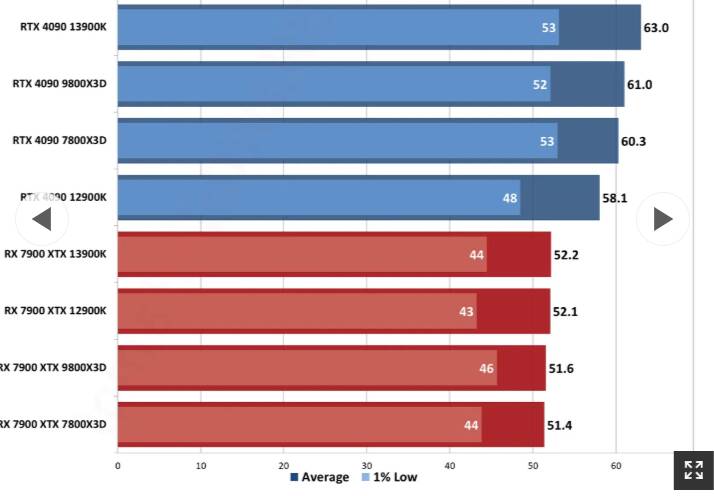
I think this review can be of interest to you.
They’ve tested numerous GPUs and different resolutions, and on MSFS 24, too!
5090, perhaps, then? 
haha. Would be nice, wouldn’t it 
No doubt. It would definitely give a lot of headroom. However, while GPUs are already way too expensive as they are, sticking to the 4090 may still be a good option unless you need the new features that 5090 offers. As I said previously, the site gives a good illustration, but I wouldn’t base my choice on it because it’s unclear what settings were used when they tested MSFS. This video is a good demonstration of how uneven is the impact of different settings on the performance and visual quality. I believe that by carefully and thoughtfully choosing every setting you can balance your rig and eliminate any bottleneck without sacrificing too much visual quality.
What did you end up getting? How do you like its performance in MSFS 2020 and MSFS 2024? I’m interested if the 285K is respectable enough when paired with a 4090 and run in 4K Ultra?
I just got a Dell Alienware Area-51, i9 285k, RTX 5090, 64GB Ram at 6,000, and 4GB SSD.
I can tell you that I was very disappointed. I don’t know if there was some kind of an issue with the hardware or setup (the testing didn’t reveal anything) but I got constant stutters at very consistent frequency/period closer to the ground and at the airports. I could see little bumps in the main thread (at a consistent frequency) but it wasn’t red or anything, just a little yellow bump in the chart (using dev. mode fps). The FPS was good (90-135 fps) with all ultimate setting, busy airports, everything, but stutters near ground which made it seem like a fast slide show, killed it for me. I am returning the computer. I tried many different things (TAA w/ Frame Gen, no frame Gen, Vsync limiting the FPS to 60, etc.), it was very disappointing (considering the cost). The Sim would also hang sometimes!
My older R13 system with i9-12900kf, RTX 3090, 64GB Ram at 4,400, and 2GB SSD is running much smoother. Yes the FPS is lower, but the Sim is smooth and that’s all I care for.
Thank you so much for this review. This is very disappointing but is exactly what I needed to hear. Unfortunately, this is the perfect storm of being a bad time to be a PC gamer at a time when the one specific game I like has very high PC requirements. I could have gotten an R16 with i9-14900kf, RTX 4090, 64GB DDR5 Ram at 5200, but I missed out on it waffling back and forth over the past week with all the shade on Alienware and 14th gen Intel, and all that is left is the new Aurora with 285k, 64GB DDR5 ram at 6400 XMP, and the 4090, while the 4090s still last. If the 285k is that bad, then I simply cannot afford to get something that works, and it will get worse with tariffs. I can still afford to get 9800x3d / 5080 prebuilts, but I keep hearing that 16GB VRAM is not enough. I’m beyond disappointed.
Since you got an Area 51 with 5090, I’m guessing you have a bigger budget. What are you planning to get?
The only thing I can think of is that the 5090 is such a GPU powerhouse that you were clearly CPU limited and the 285k doesn’t play nice when its CPU limited (my current 11800h also does the same) as it gets CPU limited a lot in MSFS 2020. I’m not sure if the 285k / 4090 combo would play nicer together, if I could make it GPU limited, and if it’s worth testing it and returning it, or if the 285k is simply a flawed CPU for MSFS gaming?
Did the same behavior occur in both MSFS 2020 and MSFS 2024?
Yes, since I am buying it through my company it’s more affordable for me to buy a good computer that will keep me happy (if possible) with the Sim. I am thinking of getting one with RTX5900 and AMD 9800X3d but I am not 100% sure yet. I am so afraid that I will have a similar experience with this system too. Or it could be that the Alienware Area-51 system or CPU wasn’t setup correctly or had some kind of issue.
I only did MSFS 2024 as I am not planning to use 2020. I should have probably tried the 2020 but I wasn’t willing to spend the time to set it up.
My current system (RTX 3090, 12900KF) is working fine. So I may ultimately decide to keep this for a year and then get a new system!
Thanks. I’ve heard really good things about the AMD 9800x3d. I have a local Microcenter in driving distance to me, so I’m thinking about just getting a 9800x3d / 5070 Ti combo to ride out the whole tariff ordeal. It’s extremely affordable, should play MSFS 2020 with ease, and MSFS 2024, I can live with using DLSS Quality and having TLOD, OLOD at 200 vs. whatever the maxes are to save $3-4k.