
What is the DH light mean? And does this impact the actual weather radar on board?
Thanks so much! The plane is B55 Baron by Carenado.
What is the DH light mean? And does this impact the actual weather radar on board?
Thanks so much! The plane is B55 Baron by Carenado.
The radar altimeter simply measures the height between the airplane and the terrain directly underneath it, so that’s what it’s showing. In the real world, radar altimeters also see buildings and such, but I can’t remember off the top of my head of MSFS/FS2024 models that.
The DH light is for “Decision Height” which is more commonly used for CAT II or CAT III ILS approach minimums, but it’s present on GA airplanes fitted with radar altimeters as a reminder on instrument approaches.
As for the relationship between weather radar and radar altimeters, they’re two completely different systems, so one shouldn’t impact the other at all.
Also, the knob on the lower left moves the orange bug, currently set to 500 Feet. When you’re on final descent and reach the bugged altitude, the light shines, and on some planes it beeps at you or gives you an aural “minimums”. As AZPilot says, If you’re doing an instrument approach in bad weather, you are required to see the runway lighting at that decision height to continue your landing. If you don’t see it, then you have to go around. 200 feet is a typical instrument approach minimum shown on ILS approach charts.
Thank you that’s super helpful!
Thanks so much!!
You can get some weird effects in the sim sometimes, where the needle will suddenly shift hundreds of feet, if not over a thousand. At first I thought this was due to differing terrain heights beneath me, but in some cases I noticed that it flipped to 0!
That could be fun to test actually. One way would be to find a plane that actually has one. The other would be to make one on my Logitech panels, assuming that any “bug” or effect is being caused by the same raw data, and not some bug in the instrument itself.
What I would do is find some flat area, with a large isolated building, like a shopping mall, with not much else around it. The taller the better.
The runway lights are one of several options. In the US, in all approaches except CAT II or III, you have to have visual contact with one or more of the following before descending below the DH/DA or MDA:
(ii) The threshold.
(iii) The threshold markings.
(iv) The threshold lights.
(v) The runway end identifier lights.
(vi) The visual glideslope indicator.
(vii) The touchdown zone or touchdown zone markings.
(viii) The touchdown zone lights.
(ix) The runway or runway markings.
(x) The runway lights.
Note that I omitted (i), which I’ll save for last because it has a special condition:
(i)The approach light system, except that the pilot may not descend below 100 feet above the touchdown zone elevation using the approach lights as a reference unless the red terminating bars or the red side row bars are also distinctly visible and identifiable.
Note that red bars are only available on certain approach light systems, ALSF-II being most common, ALSF-I, SALSF, and SALS in the military world only, plus the ALSF-I remaining at KLGA. The majority of civil airports (save for the larger airports) in the US only contain a MALSR at best, so continuing below 100’ above TDZE is a non-starter unless you have any of the other (ii thru x) in sight.
You also have to be in a continual position to make a normal descent to land using normal maneuvers and have the required flight visibility per the charted minimums.
See FAR 91.175 for more details
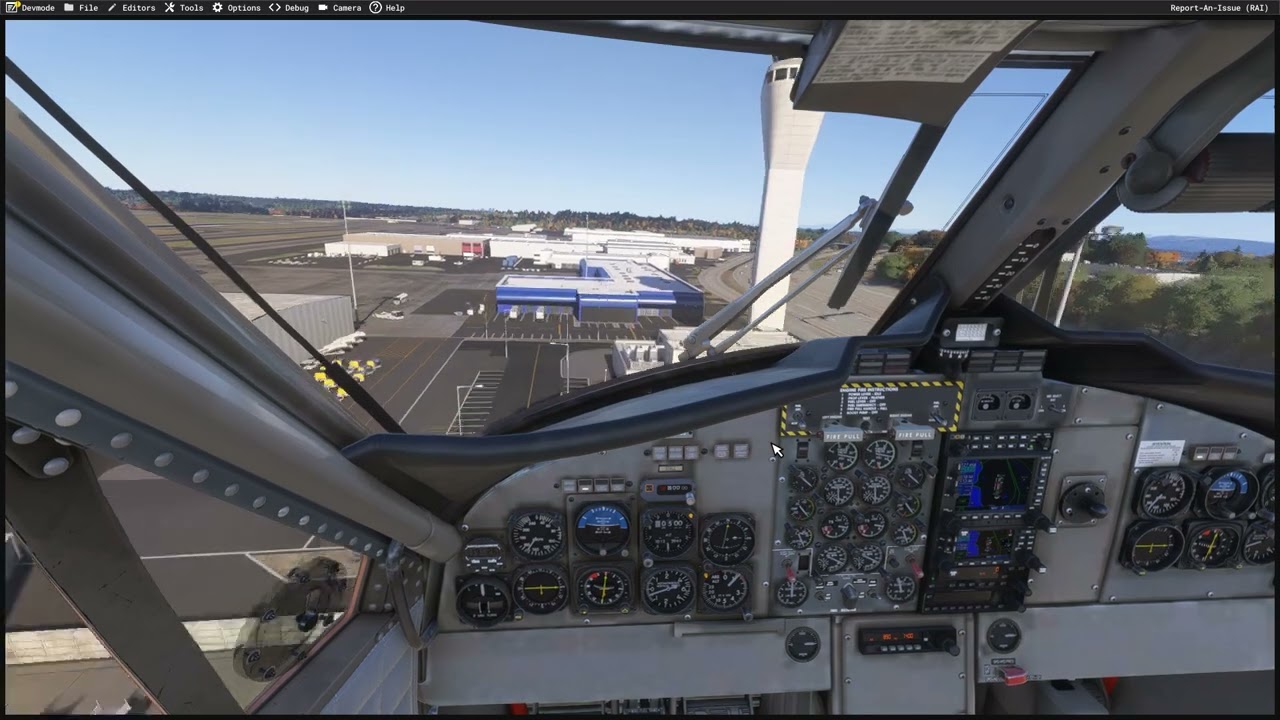
It turns out the RA in the Twin Otter does actually pick up buildings you are flying over. You can see it bouncing around as you pass over them. I think the animations for this could be better done, as it kind of snaps into position, but at least it does it.
Interesting! Another reason for me to love our Twin Otter even with its occasional glitches haha