Hi
Ryzen 7 3700 x
It’s happening to me too! My temp mostly between 68-75 but it now spikes everynow and then to 80’s and 90, since the update!
I’m going to higher my fan speeds but not done it before! Not sure it will help
Hi
Ryzen 7 3700 x
It’s happening to me too! My temp mostly between 68-75 but it now spikes everynow and then to 80’s and 90, since the update!
I’m going to higher my fan speeds but not done it before! Not sure it will help
yeah i did to begin with ( max’d fans out ) and monitored temps, but because its so quick and not gradually having full fans makes no difference so left em at auto and hopefully then fix it with SU6
Are you taking the risk and simming or are you waiting to su6 to play again?
oh im taking the risk lol as much as id love to say " nope aint touching it until SU6 " i just car its too addictive, temp wise im happy apart from the occasional spikes which aint too bad and simming wise, ive capped my fps to 30 which seemed to stop the eratic fps spikes which cause more temp spikes and in turn seems to have fixed my CTD, ive had three 4 hour flights with no problem and few mini trips also, the only thing i have noticed is in my windows 10 reliability monitor, when ever i exit out of flight sim it comes up as an error saying it crashed when it never  , but other than that im flying all good, how about your self
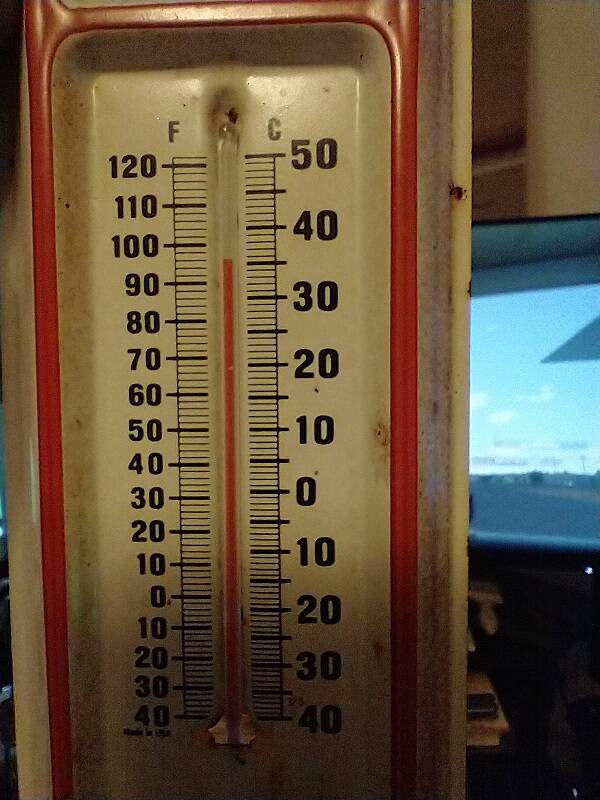
With a feels like of 39.5c/103f outside in my 1880 northwest facing room I took a quick half hour flight.
It felt like I was sitting next to a space heater, AC was quickly losing the battle, stuffed this high tech thermo-detector by my powersupply vent.
Room climbed a good 3f in 30 minutes. CPU temps mostly in sixties with spikes in the high seventies.
Think I’ll have a go at capping at 30 like you did! It’s far to addictive to sit there isn’t it ha
it certainly is ! it may not work but i tried all sorts, i thought i nailed it with turning windows defender of but after a while it came back, oh forgot to mention i also turn in game overlays off in geforce experience and in steam ( even thoni got the game running off microsoft ) them combined with capping my FPS ( both in Nvidia and flight sim menu options ) seems to have done the trick for me, good luck 
Heh, laptops does change overtime especially gaming ones. Some of them got their CPU and GPU injected with liquid metal to cool that hotbox down, and loads of vapour chambers.
but this meme is funny xD
I have i7 12700kf air cooled, quite often the temps for a second or so spike to 80-86, but almost always at 65, i dont get this with any other games/sims, is this normal?. Also my fans are running at 100% when this happens.
Thanks.
Perfectly fine as MSFS is using all your cores at max. If you want to drop a few degrees keep your case open and or reduce any overclock you might have active. I use AI overclocking with my 13900k, works quite well. One other thing I have done is setting CPU priority in Lasso to Normal. That helped with some stutter reduction.
Those temps are pretty good actually, I usually sit closer to 75 with spikes to 90ish if it’s really working hard. I have an I9-14900KF which is a hot CPU to begin with though
Thank you very much i appreciate it alot. Yeah my case is is the front to back fan style, and the front panel is not mesh but has two vents with little holes over it one on each side. I just installed Thermalright PS 120 e so just wanted to check. Feel free to keep posting your temps any way its interesting to know. Most of the time my temps now are 61 average but it was bit higher today.
Cheers!
Very similar here with my air-cooled 7950X3D
Watching the temps in HWMON64 I see the CPU spike to 75-80°C when the sim loads, then drop back to a nice cool 60-65°C during flight.
Perfectly normal. I know my AMD CPU doesn’t start throttling until 90°C, so 80-85°C doesn’t bother me at all.
Air-cooled 9800x3d, Phantom Spirit 120 with two Noctua NF-A12x25 G2’s in place of the stock Thermal right fans. Case is a Lian Li 217, stock fans removed and replaced with Noctua 140mm G2’s and two Noctua Chromax Swaps for the GPU intakes.
Came from a 14900KF on a Titan RX 360. Temps were 50-80 depending on the sim, type of flying, etc.
Anyways, on my 9800x3d, PBO enabled -30 CO +200mhz. Slightly aggressive fan curve;
Typically, 2020 runs at 45-55c with the occasional spike to 65-70c.
2024 is just a few degrees higher, 48-57c and spiking to 65-73c.
This is all GA flying, Cows DA40/42, Comanche, BS Bonanza/Baron. Been almost 2 months since I’ve flown the Fenix but temps were the same with the occasional 2024 load in spike to 85c if loading into LAX for example.
This weekend I will actually be swapping the Phantom Spirit out for the Noctua D15 G2. Not needed but needed to complete my “Noctua x Lancool 217” build.
9800X3D, water cooled with a top-mounted 360mm Corsair Titan RX, in a Corsair Frame 4000D case with 3x120mm intake fans and 1x120mm exhaust fan. CPU jumps to around 65-67C on first startup before the cooler and fans ramp up. Within a few seconds it drops to mid-50s during the rest of the loading process. In flight, depending on ambient room temps, my CPU drops to around upper 40s - upper 50s most of the time, though it can vary a few degrees either way depending on complexity of the aircraft, weather, etc.
I’ve got a 9800x3d with a Noctua NH-U12A chromax.black, 120mm Single-Tower CPU Cooler and on a 48 4k tv I rarely see over 55, it does spike some times to high 80s for strange reasons in the men u of all places and this can happen twice in a day or 2 times in 3 months. It’s very random
I also have a Ryzen 7 9800X3D cooled with an Arctic Liquid Freezer III 420 Pro, and I don’t even look at the temperature while gaming because I know it will stay reasonably low. It gets higher during loading and that’s completely normal. As long as it doesn’t exceed 95°C, there’s nothing to worry about - just play the game and fly around wherever you want.
FWIW I also have a water cooled 9800X3D. With the “traditional” principle of controlling both the pump and fans speed on the CPU temperature, I felt that there was a possibility of temperature bumps. To keep things more consistent, I decided to run the pump at essentially 100% - it really isn’t noisy - and control the fans on CPU temperature. It has been working very well for me.
You may want to reconsider that.
Pumps that constantly run at 100% can have shorter lifespans.
They are meant to react to temp changes using a temp/speed curve.
As an engineer I don’t consider it a sufficiently significant factor to lose sleep over it.