Crash to desktop without error message

And i expierienced a new way of CTD just today:

I am filying in the KingAir and had a CTD. I checked my Windows event log and this time it seemed to be a “normal” CTD, the crash was not in conjunction with the “Resource-Exhaustion” entry in the system log. So I restarted the flight twice, same route and every time at the exact same position on the map, it crashes? I do not know what the problem is.
The logfile says the affected and faulty module is called: “grammar.pggmod”?!

Just another example of why we keep going back to “System Related”

1 Like

So no ideas on the CTD on the loading screen when cloud sync happens?

About a dozen Croc. :wink:
Still researching the process. It may be something network related, or completely unrelated. Bit of a head scratcher.

New day, Just poured my coffee.
Let’s run through the checklist again.

  • System shut down
  • Router reboot
  • System restart

If ANY updates are done during the following steps, do a system restart, NOT a reboot. That means power OFF then restart. You may then do a MSFS test. If no updates, don’t waste your time with a test.

  • (new) Check for OEM MB Chipset/Bios update
  • Check Windows Update
  • Check MS Store Updates
  • Check Steam Updates
  • Uninstall XBox App / Restart / Reinstall XBox / Restart
  • Confirm NO firewall active. No Zone Alarm Etc.
  • No VPN
  • Confirm logged in to XBox/Steam?/MS Store?

MSFS Test. Let me know the results.

Good luck

Hi
Another flight 01:17 min done . Da-62 in Caribbea.
NICE.
I’m changing scenery to where i’ve been crashing all the time .USA and my Cessna Longitude.

Nice reading on the previous comments on this topic.
Thanks for the help .

1 Like

Many thanks for your ideas and inputs! I’ve gone through your list, and already did all you said-only the router restart is something I haven’t done yet. Will try that, once my lady is off the TV.
I saw I’m not the only one (2 or 3 more posts in this forum about it, all happened out of nowhere in the last days).
I appreciate your efforts!
Meanwhile I’m back to P3D. Man, if you haven’t seen it since MSFS release it really looks terrible and runs at half the FPS lol. But time to fly Maddog and FSL A320 now, so I can just grab a coffee and wait for a solution.

1 Like

Let me know how it goes. There is more… :slight_smile:

No apologies required. It is a good question. Answered best by users like this following the process.

@MCCl4rky92 this is why we start with the system. This is just a recent user since your post. If we go back, I could likely quote 50+ like this since the last update.
With any luck at all we can keep the tally going up until users start looking at there system first. Asobo has been pretty good about recognizing real bugs. Just take a look at the “Known Issues” list. The rest…? Well…

Few hundred? 675 votes and counting - and doesn’t account for the thousands upon thousands who don’t bother to register and vote. Remember there are enough workarounds on this thread and other forums to mitigate the issue for people not to bother with registering just to cast a useless vote.

On one hand you seem to really try and help the community, but on the other you seem to go out of your way to blame hardware, clearly the SIM is flawless.

1 Like

Hi again.
Flight from KTIW to CYLW. CTD just now. TBM 930
The lakes in British Columbia are all with elevation issues. As soon as i reach the first lakes CTD.
Don’t know if it is rellated or not the CTD.
Still can’t flight in USA.
Second flight from KLIT to KDCA - CTD Cessna Longitude.
No addons or mods. No payware addons .
MSFS 2020 default weather engine.
Just finish this afternoon 2 flight in the Caribbea. Come to USA same old same. CTD.
I even decrease the sceneries options from MAX to middle to see if could be the scenery impact ?
Any ideais ?

And this is constructive, how?
The work arounds you speak of are system fixes or adjustments that eliminate or reduce the instance of failure.

And so those users don’t have a reason to vote because they solved their problem as a result of the troubleshooting done by a handful of dedicated volunteers.

And it is posts like this that make we wonder why I bother. Thank-you for the pep talk.
Have a nice day…

Still on? I don’t have an easy answer why flights in Canada/US should be any different than your successful flights elsewhere. I was dealing with a user recently that was just the opposite. All their CTDs were while flying in the UK.
Server issues?

1 Like

Never had any issues with sudden CTDs before in the sim, but now it got me too. Just landed at Runway 25L at OPKC in a King Air 350i and turned on next taxiway left. Taxiing on Runway Delta to general aviation parking and boom there it goes => CTD without any warning or error message. Voted for this ticket.

this points possible to an issue with the map. If you have the cordinates where it happens , users can check whether they got same CTD. Then you can create ZenDesk Ticket.

You seen his most recent post? It isn’t fixed!

we like the clickable Hearts :wink:

1 Like

And this affects you how?
Notice my response to him? Obviously I saw his most recent post or would not have replied to him.
Don’t you you have something better to do?

Thank you for the replies - I don’t know how to respond to them all, but just to confirm my question was just in response to someone’s earlier comment (which I now can’t find) which stated that the majority of users don’t have the problem, which indicates it must be a system error. My point is that I would argue that the majority of FS users don’t fly in the same way, so to claim that the issue doesn’t exist on everyone’s PC could simply be due to the type of flying that they are doing.

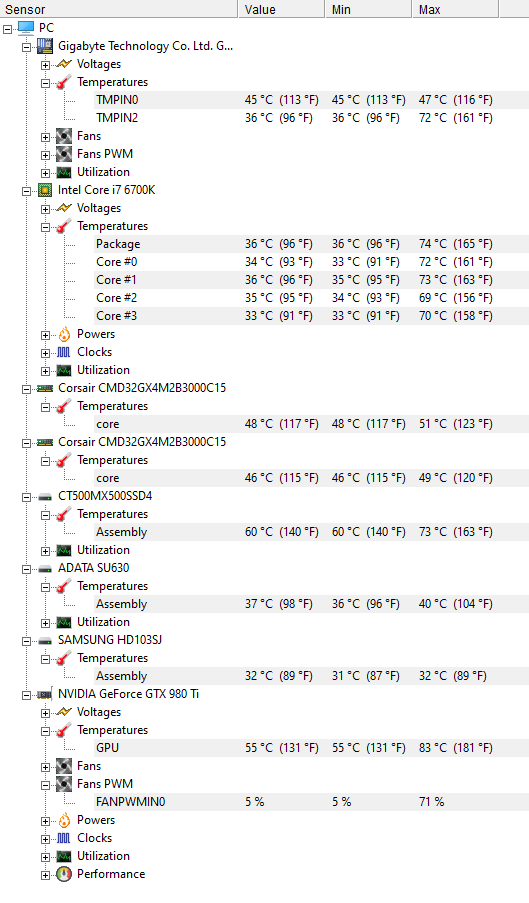
Anyway, more bad news… today I woke up at 6am to fresh install my whole PC, again. The only unnecessary programs I installed on it was Flight Simulator and CPU-Z HWMonitor; to keep an eye on my temps.

I repeat, this is a clean install of Windows, with nothing but essential drivers, FS, and CPU-Z HWMonitor.

I added all of the Premium Deluxe content to FS, which I paid for, which took most of the afternoon and I started a flight from Gibraltar to Gatwick in the Airbus A320neo. A different jet this time, my last post was a flight in the Boeing 787-10.

Upon reaching cruise at FL340, and the AP just levelling off the aircraft, the sim crashed again, with the error below:

Faulting application name: FlightSimulator.exe, version: 0.0.0.0, time stamp: 0x5fda32ba
Faulting module name: FlightSimulator.exe, version: 0.0.0.0, time stamp: 0x5fda32ba
Exception code: 0xc0000005
Fault offset: 0x00000000004c20bc
Faulting process ID: 0x1c98
Faulting application start time: 0x01d6ec526a7ef2f8
Faulting application path: C:\Program Files\WindowsApps\Microsoft.FlightSimulator_1.12.13.0_x64__8wekyb3d8bbwe\FlightSimulator.exe
Faulting module path: C:\Program Files\WindowsApps\Microsoft.FlightSimulator_1.12.13.0_x64__8wekyb3d8bbwe\FlightSimulator.exe
Report ID: bc491405-07ac-405d-b4ac-fab3a815bbb2
Faulting package full name: Microsoft.FlightSimulator_1.12.13.0_x64__8wekyb3d8bbwe
Faulting package-relative application ID: App

My temps are well within tolerances, please see below:

I still do not understand why the error references my C: drive, I reinstalled FS again today, making every step to ensure it was installed on E: - possibly a red herring but thought I’d mention it.

As mentioned before, I am willing to pay someone generously to resolve this issue for me.

you not read the former posts in this forum exactly :wink:

I repeat, in special for you, and about 50x this post:

Hi
Last one of the day.
Another flight done this time in Europe.
TBM 930 , LPFR LPCO , around 50 min flight.
This time i use TBM 930 mod improvement , Garmin 1000 and 3000 mod , LPCO airport freeware.
Payware i use my naviagtion tool.
Default weather engine.
No issues.
Tomorrow testing some flights in Africa and Oceania.
Till now i can’t fly in USA and Canada. CTD.