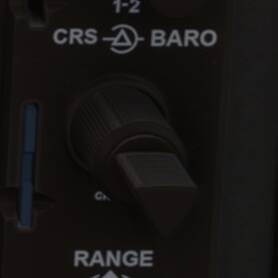
CRS knob - no control can be bound to it. Add it, please?

ISSUE DESCRIPTION

There is no way to bind this key (G1000 shows - but exists on many other avionics systems) in-sim. The BARO key is Ok - mapped and all. It’s the triangle portion (CRS) that I can’t find a way to bind.
I run MSFS 2024 on my “pretty decent PC” with a TurtleBeach VelocityOne Flight Universal Control System (the longest name in the industry, to be sure…) along with the VelocityOne Rudder and my low-budget-but-still-pretty-amazing Axair MILI-MIAP bundle.

Since I ran away from Xbox after realizing I would need to enjoy Minecraft-like graphics for too long, I actually got acquainted to VR with my MetaQuest 3 and Virtual Desktop. And it rocks! BUT… Each time I feel a bit lazy or when I did a ■■■■-poor job in flight planning with bad weather in VFR or simply if I cannot find the runway (grass-on-grass or…), I cannot use OBS. I need to break immersion completely to struggle with my mouse to turn this knob. I read a lot - through these forums but also on multiple Discord channels but there does not seem to be a solution.

Oh - and… THANKS for SU4!! This saved my simming experience!!

…and again (since it’s this time o’ year) : HAPPY HOLIDAYS!!!

FREQUENCY OF ISSUE

Everytime… There is NO binding possible.

REPRODUCTION STEPS

Please list clear steps you took in order to help our test team reproduce the same issue:

  1. Plan poorly

  2. Fly in rain

  3. Try to land with OBS… Struggle with mouse……

YOUR SETTINGS

If the issue still occurs with no mods and add-ons, please continue to report your issue. If not, please move this post to the User Support Hub.

What peripherals are you using, if relevant:

[PC Only] Are you using Developer Mode or have you made any changes to it? NEVER. I want to fly in the most authentic possible way.

[PC, MSFS 2020 Only] Are you using DX11 or DX12? [MSFS2024, so…]

[PC Only] What GPU (Graphics Card) do you use? NVIDIA 4070 (yeah, I know… But it’s still ok)

[PC Only] What other relevant PC specs can you share?

Device name	DellXPS8960
Processor	Intel(R) Core™ i9-14900 (2.00 GHz)
Installed RAM	64.0 GB (61.7 GB usable)
Device ID	F556A0E7-7CA5-43D8-97F4-44CB6E0004DF
Product ID	00330-80000-00000-AA901
System type	64-bit operating system, x64-based processor
Pen and touch	No pen or touch input is available for this display

Edition	Windows 11 Pro
Version	25H2
Installed on	‎2025-‎08-‎09
OS build	26200.7462
Experience	Windows Feature Experience Pack 1000.26100.275.0

NVIDIA System Information report created on: 12/18/2025 13:44:15
System name: DELLXPS8960

[Display]
DirectX version:	    12.0
GPU processor:		    NVIDIA GeForce RTX 4070
Driver version:		    591.59
Driver Type:		    DCH
Direct3D feature level:	12_1
CUDA Cores:		        5888
Resizable BAR		    Yes
Core clock:		        2475 MHz
Memory data rate:	    21.00 Gbps
Memory interface:	    192-bit
Memory bandwidth:	    504.05 GB/s
Total available graphics memory:	43851 MB
Dedicated video memory:	12282 MB GDDR6X
System video memory:	0 MB
Shared system memory:	31569 MB
Video BIOS version:	    95.04.3E.08.DC
IRQ:			        Not used
Bus:			        PCI Express x16 Gen4
Device ID:		        10DE 2786 513A1028
Part Number:		    G141 0345

[Components]

nvui.dll		    8.17.15.9159		NVIDIA User Experience Driver Component
nvxdplcy.dll		8.17.15.9159		NVIDIA User Experience Driver Component
nvxdbat.dll		    8.17.15.9159		NVIDIA User Experience Driver Component
nvxdapix.dll		8.17.15.9159		NVIDIA User Experience Driver Component
NVCPL.DLL		    8.17.15.9159		NVIDIA User Experience Driver Component
nvCplUIR.dll		8.1.940.0		NVIDIA Control Panel
nvCplUI.exe		    8.1.940.0		NVIDIA Control Panel
nvWSSR.dll		    32.0.15.9159		NVIDIA Workstation Server
nvWSS.dll		    32.0.15.9159		NVIDIA Workstation Server
nvViTvSR.dll		32.0.15.9159		NVIDIA Video Server
nvViTvS.dll		    32.0.15.9159		NVIDIA Video Server
nvLicensingS.dll	6.14.15.9159		NVIDIA Licensing Server
nvDevToolSR.dll		32.0.15.9159		NVIDIA Licensing Server
nvDevToolS.dll		32.0.15.9159		NVIDIA 3D Settings Server
nvDispSR.dll		32.0.15.9159		NVIDIA Display Server
nvDispS.dll		    32.0.15.9159		NVIDIA Display Server
PhysX		        09.23.1019		NVIDIA PhysX
NVCUDA64.DLL		32.0.15.9159		NVIDIA CUDA 13.1.112 driver
nvGameSR.dll		32.0.15.9159		NVIDIA 3D Settings Server
nvGameS.dll		    32.0.15.9159		NVIDIA 3D Settings Server

MEDIA

Virtual Reality GIFs | Tenor

I think the binding is named VOR1 OBS or OBS VOR1, something like that. I’m not anywhere near my sim, so I can’t check, but it absolutely can be bound, but has an awkward binding name.

There was this one guy in Discord who told me the same thing - but… He never came back!

Will you? :cry:

…and it’s no rush of course - but I would like to keep this report alive until I test with success.
THANKS for trying!!

I’ll be home around 00:00z. I’ll look it up for you.

1 Like

I tried all of them - except the “Fast”.
Don’t tell me……:man_facepalming:

Pfew! No. I just tried these ones - no sucess. My honor is safe. :salute:

To decrease/increase those 2 ones work for me. By default they are not assigned so just assigned a key without any conflict and they work as expected. You don’t see the knob physically moving but the OBS does.
The ones that say “Fast” don’t seem to produce any effect, maybe they have a specific use ?

Maybe try other keys combination or just a simple one making sure there is no conflict.

1 Like

My experience mirrors yours. I noted that the “Fast” bindings don’t seem to do anything that I could perceive.

1 Like

Let me just throw this in, since the first reading of your situation meant to me that you might be trying to use GPS OBS mode to get on a specific radial into a destination.
I select the “OBS” softkey once I’ve got a destination selected (I used the direct-to for my test).
Then I use the following unbound keys to set the course while in OBS mode:
I use “v” for “pfd course set”
then press “+” and "=’ to increase/decrease the course while holding “v” down.
Then set heading mode to intercept the GPS approach course I selected above, with “NAV” armed, and it will do it’s thing.
Realize that’s not very detailed, but if this is not what you’re trying to do, then doesn’t matter!! :grinning_face:

Regards

1 Like

This PFD Course Set is something I never tried. I’ll let you know - Thanks, @Habu2u2!

Actually, you had 2/3 for me. Here are the bindings I created.

I first put the GPS in OBS mode with the Softkey 5.

Then, your key bindings work like magic with my knob!

THANKS!!

1 Like

Good new !. So does @Habu2u2 post can be marked as the solution ?. If I understand correctly this is not an issue anymore right ?

I just tested the earlier bindings:

The two bound adjust this instrument, on a non-G1000 Steam 172.

Agreed that FAST bindings don’t actually seem to work, so perhaps a different bug report for those. From interacting with the mouse, scrolling the mouse wheel over it may be the “slow” method, and click dragging with the mouse, in lock interaction mode, allows for much faster turning of the knob, and that may be what the FAST binding is supposed to do but doesn’t.

The ones that do work don’t rotate the virtual cockpit knob like the mouse does, nor does it make the little click sounds that interacting with mouse does. Not sure if each of these would need a separate bug report.

Similar situation with VOR2.

FAST VOR2 bindings do nothing, regular work, but no virtual cockpit knob animation or sounds.

The animation/audio disconnect happens in other planes as well. I tried the Asobo 172. and the SWS GA8 Airvan.

The binding for VOR OBS doesn’t appear to do anything that I can see, and I tried a 750xi, and GNS 530 plane, thinking it would do the same as the PFD Soft Key 5 toggle of OBS mode.

Indeed - I forgot to mention this will ONLY work on C172 - since it’s a “Specific” binding.
I really hoped that “specific” would be airplane-bound - not avionics…. But hey! I’m not the one behind the keyboard to create this…

Oh and yes - the “regular” (classic) VOR knobs work with the bindings you took a screenshot of.

Thanks for reminding me of this. Community rocks! Happy Holidays!

1 Like

Moved to User Support Hub since a solution has been marked.

I would imagine they would work for any G1000 equipped plane, that actually have a PFD, rather than just the 172.