CTD Nearly Every Flight

Hello,

Nearly every flight, on the ground, during takeoff, descent, or landing, my flight simulator crashes. The crashes below are in the SU6 beta, but the same crashes happened long before I joined the beta. They are all due to 0xc0000005 exception codes, and the faulting module is either mimalloc.dll or the flight sim executable. They also appear to have the same fault offset of 0x000000000000d254 most of the time. 2 of them from today:
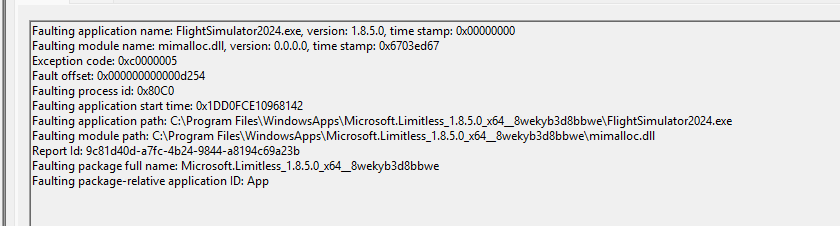
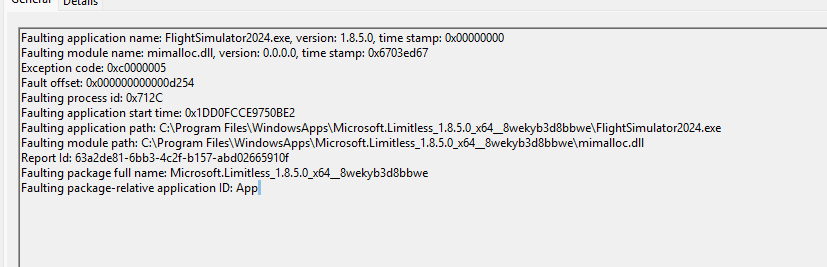
I have tried nearly everything to resolve these crashes, including reinstalling Windows, reinstalling FS2024, testing with two different sets of RAM (my current 32GB DDR4-3200 kit and a separate kit), increasing my virtual memory, and using different NVIDIA drivers.
PC Specs:

12th gen Intel Core i5-12400
NVIDIA GeForce RTX 3060 12 GB

32GB DDR4 RAM running at 3200 MHZ (base JEDEC speed, no XMP)

And MSFS is on its own SATA SSD.

Any help would be greatly appreciated, as the game is unplayable for me.

Hi bud, I keep getting the same fault as you whenever I have a CTD. All I ever get is 0x00000005, which points to an access violation. From what I’ve read, that basically means a memory read/write error, or that the sim tried to access something it wasn’t allowed to.

I’ve reset Windows, reinstalled the sim, and even gone through all my permissions with the help of Copilot, but still no joy. Every time I try to do a flight in the PMDG 777, I end up with a CTD at some point. I’ve had the odd successful flight, but they’ve been few and far between compared to the dozens that have crashed since SU5.

I just wish I had more to go on. Every time I check the Event Viewer logs with Copilot, I hit a dead end. It tells me which application crashed—Microsoft Flight Simulator 2024.exe—but it never tells me why it crashed. It’s so frustrating.

One thing I’ve read is that the upgraded 2024 version from 2020 is technically the same sim as the full 2024 version, but Windows handles it differently. Apparently, it also carries over a lot of legacy MSFS 2020 files that are no longer needed. I’m starting to wonder if one of those old files is causing an issue somewhere along the line. The strange thing is, my friend has the full standalone 2024 version, and his runs absolutely fine with no issues at all. Also, since SU5 the sim has become more strict in terms of permissions and memory plus settings

Many users have reported that after SU5:

Add-ons that previously worked started causing CTDs or instability.

Issues with WASM aircraft (like the PMDG 777 and other complex airliners) became more apparent.

Outdated or duplicated files, old packages, or conflicting mods that the sim previously ignored can now trigger crashes.

Problems with legacy files carried over from MSFS 2020 appear to have a bigger impact for some users.

When I’ve had ctd’s I run through a list of things including

Sfc scannow, DISM check, exclude AV from scanning MSFS and MSFS software files, CC Cleaner registry and custom clean, msfs/xbox App repair and resets, win updates, Chkdisk, Windows mem diagnostic, MS/Xbox App updates, empty comm folder, unable usb controller peripherals, complete DDU driver uninstall & reinstall

Just had my first CTD ever in MSFS24. SU6 just installed today.

Faulting application name: FlightSimulator2024.exe, version: 1.8.14.0, time stamp: 0x00000000
Faulting module name: FlightSimulator2024.exe, version: 1.8.14.0, time stamp: 0x00000000
Exception code: 0xc0000005
Fault offset: 0x00000000031f3194
Faulting process id: 0x14D8
Faulting application start time: 0x1DD2C047E76978F
Faulting application path: C:\Program Files\WindowsApps\Microsoft.Limitless_1.8.14.0_x64__8wekyb3d8bbwe\FlightSimulator2024.exe
Faulting module path: C:\Program Files\WindowsApps\Microsoft.Limitless_1.8.14.0_x64__8wekyb3d8bbwe\FlightSimulator2024.exe
Report Id: ca1124dc-06ae-405e-95f4-6a21c3b5a100
Faulting package full name: Microsoft.Limitless_1.8.14.0_x64__8wekyb3d8bbwe
Faulting package-relative application ID: App

So disappointed.