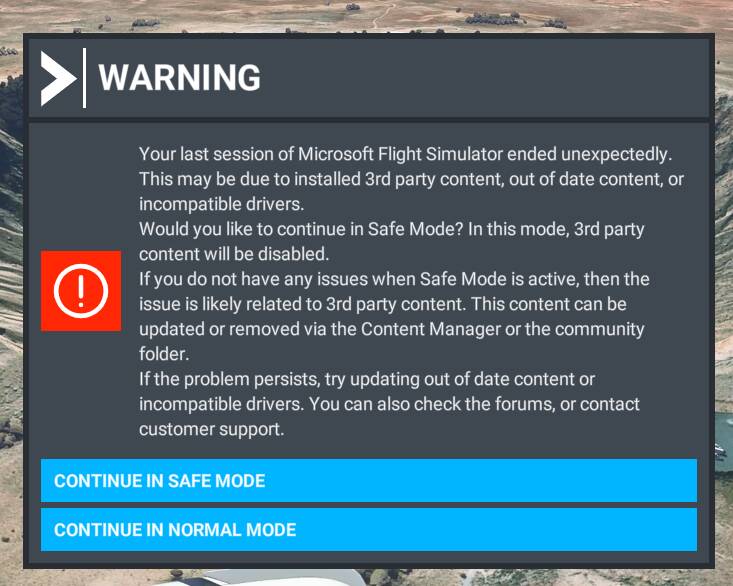
That’s also my experience - multiple CTD immediately after installing .18. It took a good 3 attempts after install just to boot to the main menu after install. Seems ok now, but getting there is frustrating.
It sounds like .20 is the same. Hopefully they can get this sorted about before live release, or the forums will be completely swamped with griefing.
Same here if the sim CTDS after I try to relaunch and click start in normal mode the sim will crash again after clicking the pop up, usally a full pc reboot fixes it
For me the same it is now even worse it starts asking to insert the disc for the store edition on my pc. On the Xbox I cannot repro the issue there it works fine
Having the exact same issue here. Starts up, then crashes. Sometimes I will have to relaunch it 3 or 4 times before it just runs. 1.27.18.0 (ms store version)
This morning after updating to 1.27.20.0 (steam version) I suffer continuous CTD over Milan (Italy) both in normal mode and safe mode, with any airplane.
Before the update i never suffered CTD and i was quite happy about the working of the simulator. But today it is unacceptable, MSFS2020 is totally broken. Impossible to fly.
I thought could be the addons like Linate payware (i do not have addons freeware installed) but are not the addons, because the problem happen even in safe mode.
I hope that Asobo fix this problem otherwise the simulator is unusable
Your issue seems unrelated to the kind of crash discussed in this thread.
Consider creating a new thread for better visibility.
Also, maybe test whether your crash is reproducible with DX11 and DX12, and add that information to your report in the new thread. It might also be useful to mention whether you have installed the World Update for the region or not – it might be relevant in case World Updates are not disabled in safe mode.
Does beta updates affect live builds? I have not used the Beta until now, the exact same bug has happened to me since a couple of weeks, no solutions. Sometimes ‘memory could not be read’ errors as well.
This has been happening for me too. Every first startup the sim closes very quickly, usually within 5-10 seconds. Second startup, the sim loads fine except that I now always have a black loading screen with just the coloured loading bar at the bottom visible.
This workaround (or process) helped me also to avoid CTD at first run:
Possible Workaround (at least at my End) for avoiding “your graphics card has encountered a problem” message AND CTD at first startup!
I´m at windows 11
HAGS is ON
RTX3090 latest Nvidia drivers
10900K
MSFS OneStore latest build .21
Counts for DX11 and DX12
Steps:
Rename your Official Folder (Like OfficialBKP) this is important to avoid that the later uninstall MSFS deletes all your MSFS app content
Rename your Community Folder (Like CommunityBKP)
Save away your MSFS LocalCache Files (in case you wanna use them (partly) later)
Uninstall the MSFS App via windows uninstall
Restart your PC (this is important to avoid install error messages in xbox app later)
Go To XBox app and install latest beta again
Rename your “official” folder mandatory to-> “Official” (without brackets!!)
Restart your PC (after install complete)
Start MSFS without Addons
Point the Update page path to your MSFS installation location (the SAME location before you uninstalled the MSFS app)
Set your settings according to your requirements (most is synced from cloud, except Graphics, Data and Traffic)
Start a flight (test it)
quit the flight
quit MSFS
Delete scenery indexes at local cache
Delete the new and empty community folder (which was created by the MSFS app during the last app start)
Rename your community folder (which contains all your addons to mandatory → “Community” (without brackets)
Optional: If liked or needed you can copy and paste your “content XML” and “exe xml” back into your local cache folder (do avoid pasting back the user.cfg as this is often a cause for issues!!)
Start the sim
In my case this is reproducable (now for the 3th time) and does eliminate the odd graphics error message at starting the MSFS app)
I did this with .18 and now with .21 several times and it always worked to permanently get rid of the odd message (TILL your update MSFS via XBox/Store again!!)
The described work around is also my standard process when a beta or any MSFS update gets released. It has saved me lots of errors and always worked like a charm.
No ctd at startup anymore or odd fps drops.
It looks like a huge workaround, but does not take much time (20 to 30 min incl. all the restarts and copy/pastings).