Custom Flight Planning Frustrations msfs 2024

Custom Flight Planning Frustrations msfs 2024.

I have been creating custom flight plans for myself, aviators, groups, live streams, group flights, fshub achievements, airline achievements and more for msfs 2020 and msfs 2024. Experienced in little navmap, simbrief, world map, fs24 flight planner, fs24 efb. I have created 100s of custom flight plans.

MSFS 2024 flight planning has become increasingly frustrating. Recently flight plan created for fs24 in little navmap will not load properly into efb with lots of navpoints and waypoints vanishing. When loading a successful flight plan into the fs24 efb then sending it to world map often the whole route disappears and there is merely a straight line.

I have visually confirmed that the same nave data and nav points exists in little navmap, fs24 flight planner, fs24 efb, fs24 world map and fs24 flight planner website. Though often with fs24 they don’t show up unless you zoom in real close. These navpoints seem to just vanish from flight route even if they are clear visible on the map.

I know there are limitations within actual aircraft depending on the aircraft navigations systems and data available. Some aircraft or systems can’t accept custom waypoints or have less navpoints. I’m aware that fs20 aircraft in fs24 have issue loading flight plan and often require the flight plan be loading via fs24 world map which get difficult when the fs24 world map removes the waypoints and creates a random flight route often with only departure and destination.

It should not be so frustrating to create a custom vfr flight plan with say 5 airports as navpoints, 10 navpoints and 10 manual waypoints and transfer the route from little navmap to the fs24 efb then sf24 world map and then to the aircraft your flying.

Even after confirming that little navmap, simbrief and fs24 flight planner all have the same data and route works in all three loading into the fs24 efb and fs24 world map still has problems and issues.

I have begun bypassing the world map and atc completely and starting the aircraft cold and dark at custom departure point at an airport. But issues with fs24 efb not properly loading flight plan remain.

Does anyone know if these issues are fs24 issues, streaming issues or an issue with my setup and system. And does anyone have ideas on how to resolve these flight planning issues which seem to be worse lately. Thanks for all your help and support.
If I understand you correctly, you would like to import an LNM flight plan into the aircraft of your choice. To do this, you are using a process involving several import and export operations, each of which is, of course, prone to error.

  1. Create the flight plan in LNM
  2. Export this flight plan from LNM to the MSFS 2024 .pln format
  3. Import this format into the route planner of the MSFS 2024 EFB
  4. Send the flight plan from the EFB to the world map
  5. Send the flight plan from the world map to the avionics in your aircraft

At first glance, this seems unnecessarily complicated to me.
But to better understand your problems, it would be helpful if you could show us a flight plan where this import process has not worked. We can then try the process ourselves.

Nothing complicated about that at all being the only way to get the route populated into the sim and avionics from the LNM created plan. LNM is the planner of choice for everyone I know not hemmed in by Xbox limitations.

Hi, thanks for responding.

It might seem complicated. But usually it takes 30 minutes to create a flight plan depending on purpose. Longer if they have to be fs24 and simbrief compatible for group flights cause people fly a wide variety of aircraft. But I enjoy the process.

Pretty much what I do.

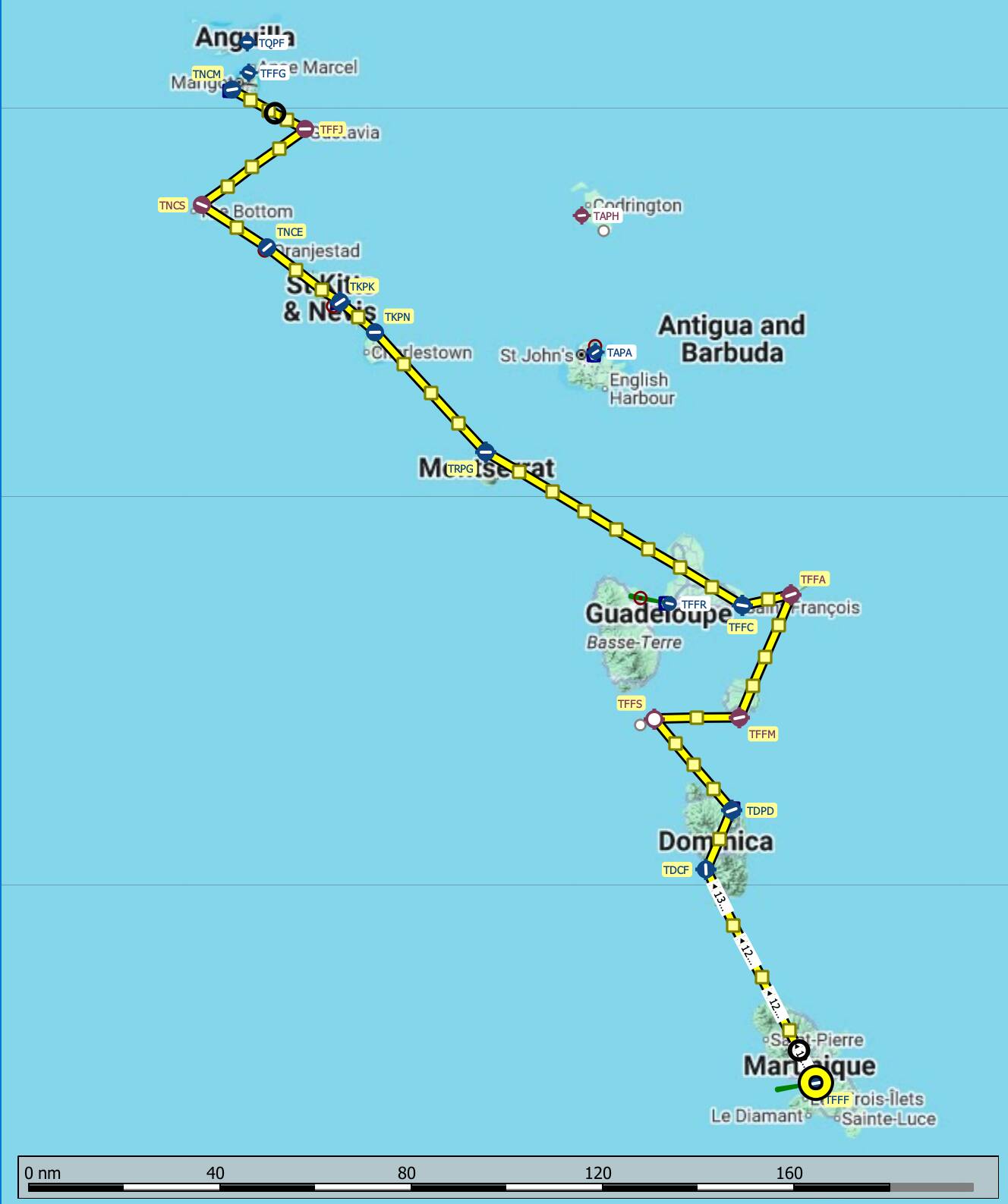
Below is a Caribbean vfr flight. I was able load the original into the fs24 efb but some airports went missing from the route which is why there are so many manual waypoints. When I loaded into the fs24 world map most of the airports went missing and another try produced a direct straight line with no airports or waypoints. There are 14 airports on this route. Route was flown in DHC6 Buffalo, PC12 and H47 Chinook.

FS24 VFR Le Lamentin TFFF to Princess Juliana Intl TNCM.pln (12.7 KB)


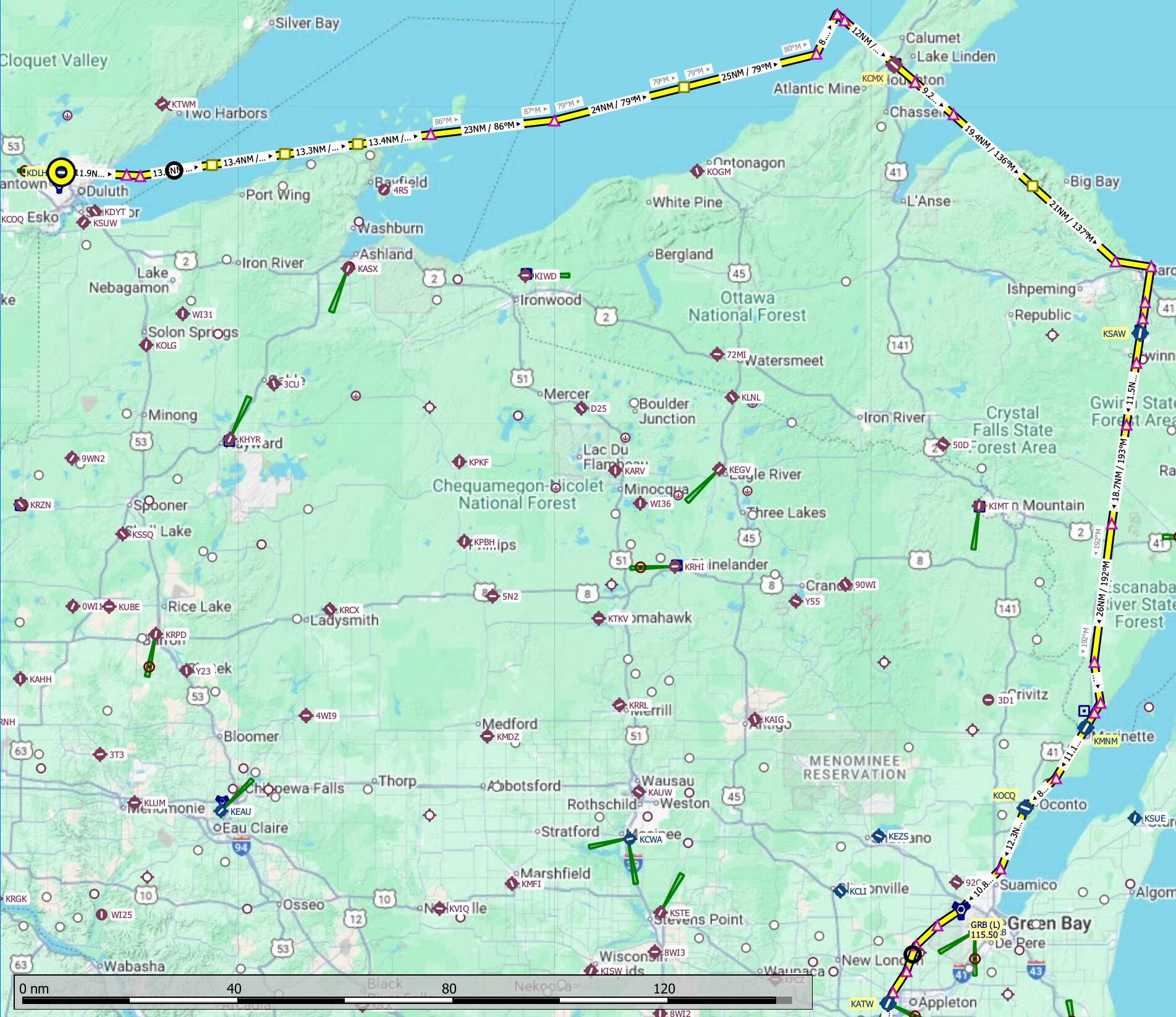
This is an Oshkosk route that I flew in the A400M and just flight Hawk so it was converted to simbrief but also tested in fs24 and fs24 world map. Confirmed to work in simbrief. Tested in sf23 efb where several waypoints and airports did not show up on the route though they were there. There are 7 airports on the route.

OshKosh FS24 VFR Duluth Intl KDLH to Wittman Rgnl KOSH.pln (11.7 KB)


Other flight plans with similar issues included a New Zealand vfr flight and Fiji vfr flight. These one contain a lot of navaids, manual waypoints and airports. A small note, the above flight plans are not in original form as I troubleshoot and do try to make sure all the waypoints and navaids show up for group flights.

If the issues continue I may create a test flight plan and post it here at later date. Thanks for all your help.

As far as I know, multiple landings and starts from en-route airports are not supported by the MSFS planner and avionics. You would have to split them up into single fligth plans.

Treat airports you want to land at as waypoints. I’ve done this loads of times over the years. In vfr it just means you have to do a manual landing and takeoff and continue on. Never had a problem with multiple landings and takeoffs with a vfr flight plan.

With ifr and simbrief its very different. Though you can do it. In most aircraft when you land the flight computer resets and your flight plan disappears from the aircraft.

I’ve been using the Flight planner, and I have a suspicion loading it while on the world map can get it messed up. I caught it a few times and just reloaded from the EFB.

With LNM, is there a way to bypass using the World Map?

If you can’t find another way, you could use simbrief, copy the route to simbrief from LNM and then use the EFB to import from Simbrief.

That’s neat, I didn’t know you could use the EFB to load from Simbrief.

It would be amazing if some day we could select parking and launch the sim to the flight plan, direct to flight.

Bypassing the MSFS 2024 World Map for flight plans.

  1. Load your aircraft cold and dark at your desired location.

  2. Activate the EFB from msfs toolbar.

  3. Load an a saved little navmap flight plan directly into msfs EFB.

or

  1. Use free simbrief addon within msfs EFB to import simbrief flight plan.

  2. Remember to load flight plan in msfs EFB into the avionics.

Notes: Make sure your saved littlenavmap flight plan is in msfs 2024 format. Sometimes it takes a couple of tries to get the EFB flight plan to load into the aircraft avionics and nav computer. I have found it best to try first with all aircraft avionics and nav systems turned off.

With msfs2020 aircraft that have not been made compatible with msfs2024 the flight plans may not load from msfs EFB into avionics and you have to load the flight plan into the world map first thru msfs EFB in order for flight plan to load into aircraft.

I tend to avoid sending flight plans to msfs ATC unless absolutely necessary such as flying an msfs 2020 aircraft in msfs 2024 that is not yet compatible. I have found that the flight route will change if uploaded to ATC world map especially with an IFR flight, happens all the time with me.

Why avoid sending to ATC?

I have found that the flight plan has always changed when loading into ATC world map especially IFR flight plans. For me IFR plans change often to a direct straight line route if loaded in ATC in msfs 2024. So I simply avoid ATC, never use the insim ATC anyway.

How do you send the flight plan from the world map to the avionics? I thought you could only send the flight plan to the avionics via the EFB? where is the option on the world map screen to send anything to the avionics?

The flight planner is seriously messed up, it’s done my head in, I can make a flight plan, I don’t see the point in making a flight plan in the world map, as there seems to be no way to save it and if/when I make a flight plan in the EFB, I have the option to save it and I do save it, but when I try load it, it gets loaded in missing everything, it gets loaded in more like a direct route, single line, but if I use that same save file and load it into the PMS50, it loads the flight plan perfectly fine.

but yeah, it’s so frustrating, even at times I’ll try and attempt to send the flight plan to the avionics via the EFB, which to me would mean it’s sending the flight plan to the aircraft onboard GPS etc, but I often get told it’s a VFR plan and that it’s advisory only and can’t be uploaded to the avionics!

Argggg, honestly, how is the system so messed up still, it’s been over a year now! I’m sure all of us who paid for this game, expected it to actually work! yet a whole year on, it’s still not working correctly

The reason it’s all so messed up is because when Working Title created the online flight planner and the efb, they used a different programming code from the one which Asobo/Microsoft used for the world map :astonished_face::exploding_head::zany_face:. You’d have thought they would have fixed it by now. Read about it here.

Reading this thread, I’m now aware that 2024 is vastly different than 2020 in that respect. I can create a custom flightplan in LNM, export as 2020 plan and just load it when in World Map page. I do not like, however, that all payware aircraft avionics, and ATC programs, only seem to be able to load Simbrief plans directly, not LNM

2024 sounds very complicated with intermediate steps.

However, even in 2020 avionics, I wish there was a way to use multiple airports as waypoints and, if desired, select procedures at those airports.

Unless I’m wrong, the in-game ATC, and even external ATC programs will only allow a procedure for the destination airport. I have to set up my flight plan but delete and reprogram the avionics for each leg if I want to use procedures. Is that how it is in real life?