DNS causing long loading time and no photogrammetry

TLDR - The sim has issues loading up, has blurry photogrammetry/satellite imagery, slow and failing marketplace downloads, and “low bandwidth” warnings when using NextDNS and Cloudflare DNS (both regular and security). Google DNS and Quad9 DNS work normally and do not present these problems.

Hello,

For the last few weeks, I have been experiencing odd behavior related to DNS servers. I’m seeing long load times, no photogrammetry/satellite imagery, and issues downloading in the marketplace. This seems to only affect MSFS 2024 and not my MSFS 2020 installation.

I’ve been a NextDNS subscriber for about 3 months now, and everything has worked in MSFS 2024 just fine until about a week or so ago. I went to do a flight and the satellite imagery was a massive blurry blob and all details were indistinguishable. I tried to fly thinking maybe it would load it, and it never did, so I quit halfway through. I tried to reload the sim several times, and it wouldn’t ever work. I did see a “bandwidth too low” warning, but I checked, and I was getting my full 1Gbps up/down. I ended up opening MSFS 2020 and flying in that sim, which loaded all of the photogrammetry just fine. After the flight I went back to FS2024 because I had marketplace updates available, when I tried to download them they were very slow and some even failed.

Fast forward to yesterday, I wanted to fly again. I tried loading FS2024, and it was stuck at 8% “loading packages”. I did some troubleshooting steps for that and eventually go into the sim. I went to marketplace and again the downloads didn’t work. I found a troubleshooting tip saying to change DNS. I figured it was ridiculous because my NextDNS logs weren’t showing anything blocked that seemed important, but I tried Google DNS (8.8.8.8/8.8.4.4.) and wouldn’t you know it, the sim loaded quickly, photogrammetry/satellite images were loaded and crisp, and the marketplace was downloading fast.

I don’t exactly like Google DNS for a host of reasons, so switching to that is not an option for me. I decided to try Cloudflare Security DNS (1.1.1.2/1.0.0.2), but now the sim hangs at 25% loading but loads in eventually. The photogrammetry/satellite is blurry and doesn’t load.

Next I tried regular Cloudflare DNS (1.1.1.1/1.0.0.1) and the sim will load up quickly without the 25% hang, but the photogrammetry/satellite still is blurry.

Curious, I then tried quad9 (9.9.9.9/149.112.112.112) and it also worked just like Google DNS. The sim loaded quickly, photogrammetry/satellite loads in crisp, everything is a-ok.

I’m curious what would cause the sim to essentially break with some DNS providers but not others. I’m aware of multiple recent Azure issues, and I can’t help but wonder if this is related?

For now, I will probably just use quad9 on my gaming PC, but is this something the team can investigate or is there something I can do to troubleshoot? NextDNS is a paid service I want to use, and I would engage them for support, but the fact that other free providers such as Cloudflare also seem to have issues I can’t help but wonder if this issue is coming from Microsoft servers.
Moved to User Support Hub > Install, Performance & Graphics

My Personal Comment & Observation

This article helps explain: How Long Does a DNS Lookup Take: Unveiling the Timeframe for Domain Name System Resolution

Might be worth trying an ipconfig /flushdns command in the Command prompt. A lot of the dns lookups are cached to the PC and can become outdated or corrupt.

DNS resulution is done once when the simulator is started. As soon as the connection to the IP addresses is established, DNS is out. Therefore it is extremely unlikely, that DNS influences the performance of the simulator once it is running.

Might be worth trying an ipconfig /flushdns command in the Command prompt. A lot of the dns lookups are cached to the PC and can become outdated or corrupt.

Yes, I did this as an initial troubleshooting step, and I’ve done it following each DNS change. I consistently see the same results, slow initial load and no satellite imagery on NextDNS, Cloudflare, and now CleanBrowsing, but normal operation with Google DNS and Quad9.

Glad I’m not the only one having problems with bandwidth these few days. Exactly the same problems as you described. However it doesn’t seem to be a DNS problem for me, as I don’t have a DNS set to any particular service.

What I can see is that MSFS 2024 is only using mostly 3MBit/s of my network, sometimes jumping to 50MBit/s and holding there for a few seconds. Like if it was bursting for data instead of constant stream. I’m on a 1GBit/s connection (850-950MBit/s real) with zero problems in any other application or web. Just seem to me Microsoft & Asobo servers are just underperforming like last year when 2024 came out and before that when 2020 came out.

Did the DNS flush an no perceivable improvement. Tried both West and North EU servers with no real difference either.

Should also mention the occasional “Connection Lost” messages immediatelly followed by “Connection restored”, not only the Low Bandwidth.

I don’t think that at this day and age, with servers as massive as Microsoft has, we should be waiting one minute to load data off the server. I’ve been stuck loading to JFK and my network traffic sits at 0,1MBit/s….

1 Like

One way that DNS can affect the experience, is that DNS resolution for large cloud services like Azure and Amazon is often based on your geographic location. So your ISP’s default DNS will resolve to a ‘local’ instance of Azure or Amazon - different from someone in another region. And even that can change if Azure or Amazon shuffle from node to node as load varies throughout the day. I think a lot of these issues are actually not client, server, or DNS - but instead at the mercy of the CDN caching and routing algorithms, from region to region.

When you set your DNS to Google or Cloudflare, you might get different routing (or might not, again, it depends on the algo). The logic of the CDN in the middle is what is confounding.

1 Like

MS is the MSFS not hosting in the Azure cloud, but at Akamai. Akamai is known for heaving large connections to the large Internet Exchange Nodes (like DE-CIX) all over the world, and for operating servers directly in the internet provider’s backbone. Bad luck for users of Internet providers not allowing to operate servers in the backbone and not heaving good connections to Internet Exchange Nodes.

VPNs like Nord VPN can be a solution then. It influences the routing between your PC and the Akamai Server and can maybe speed up the connection.

1 Like

When I look at the NextDNS logs while in MSFS I do see akamaized.net, but I also see a lot of hits for xbox gamepass, xbox live, virtualearth.net (bing maps), azureedge.net, and playfabapi.com (Azure). These are the ones I am at least sure I only see when the sim is open and never any other time (except xbox, it is less frequent when the game is closed though). There are some hits for microsoft, but I believe they are OS related.

I’m going to use YogaDNS to see if there is anything else being queried and apply rules so that they are processed with Google DNS or Quad9 while the rest of my system is on NextDNS. I think this will ultimately be the solution, just a matter of doing the work to figure out what domains are being queried by MSFS and adding them to my rule.

Judt analyze the established connections of the MSFS using TCPView causing significant load, so transmitting scenery data and plane content, and check to which servers they belong to. They are established right in the beginning starting the MSFS and not changing during runtime.

I believe I’ve solved the problem, or at least found a workaround.

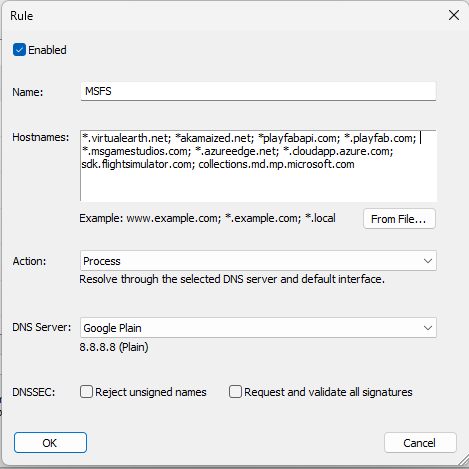
Using YogaDNS, I analyzed the traffic when launching MSFS 2024 from launch to fully loaded into the main menu. I took that log and compiled a list of domains that were being queried by the system during that time. Of course, not everything was related to MSFS 2024, so there was a small amount of sifting to do.

I added them all to a rule in YogaDNS and had it use plain Google DNS while my system was configured to use NextDNS. Sure enough, this solved the problem. I did trim down the list and test over and over to make sure I had the right group of domains. I may be able to trim it down more with additional testing, but I believe I had the main players in regard to CDN’s (virtualearth, akamaized, playfabapi, playfab, azureedge, cloudapp.azure), so I’m going to leave it as is for now. I may try to use Google DNS DoH or DoT, but it’s really not necessary for this.

Here is the rule I created in YogaDNS.

* The last two, SDK and collections.md.mp.microsoft.com I think can be removed, and I will likely try that soon. Those aren’t present until much later in the process, and I feel confident they are a non-factor, at least in my case.

1 Like