Good day all.
well as title states I upgraded my system yesterday…
from Rysen 5 5600x 6-Core/12-Thread to i9-12900K Desktop Processor 16 (8P+8E) Cores, 24 Threads
luckily I was able to “plug and play” with no windows reinstall
(so far )
old system DDR4 new DDR5
both 32gig using Oculus quest 2 using gtx 3070
after installing new hardware I let windows do a couple of updates and tried msfs2020 in vr
results in fps on same settings (preset low) . I tried to go to preset high and medium with fps even worse. fps on low preset 32fps
today I’m reinstalling msfs 2020 to see if any change but I have to say I’m so confused.
shouldn’t things be much better with the new system in vr?
thanks
Glenn.
MSFS is a very CPU intensive game, except when running in VR. When I played in VR, I had an AMD RX 6800XT (roughly equivalent to an RTX 3080) and I was always GPU limited.
My guess is you are also GPU limited.
If you want to confirm you can try the dev tools overlay or openXR toolkit overlay. But it’s almost certainly the case.
Especially because you came from a 5600, which while not the best is already a decent CPU. It’s not like you upgrade from a 2600k or something.
In VR you are probably GPU (not CPU) limited. You can check it with FPS display in developer mode.
1 Like
hey thanks for the info…
and here I thought going to the i9 things would be better…lol
does flying the sim in offline help in any way?
To a certain extent. You may see small boosts at a high quality payware airport but hardly enough for that wow-factor of flying in VR.
But keep in mind it’s the headset that still has to effectively render the image twice. You can have a fast CPU which is more than capable of managing all the data MSFS feeds it, but it doesn’t mean much if your GPU can’t process what is being fed to it fast enough.
its the opposite problem of what some people have, but the effects are otherwise the same: Some people have a super fast GPU like a 4090 but still running a 8th gen intel for example. the 4090 is basically waiting for their CPU to send data to the 4090 to get rendered, VR or otherwise.
Don’t let no one tell you your 3070 isn’t good enough. GPU limited isn’t the end of the world. It may take some tweaking with OpenXR Toolkit but it’s very possible to play smoothly, on a Quest 2 no less (the Q2 has a cell phone processor, your own smartphone has more oomph, link cable or not). I’m running a 3060ti which is marginally worse than a 3070 and everything is fine (65% render on HP Reverb G2 and i can still read instruments clearly)
I agree with the others that you’re probably GPU limited. Check the DevMode FPS stats.
But I’m a bit confused why you went from AMD to Intel, it’s been known for a while now that the x3D chips are the best choice for MSFS (I went AMD for the first time in decades for exactly this reason).
7800x3D is currently the best choice unless you want more cores to run an insane amount of addons/plugins/Tools in parallel.
1 Like
well it was my first amd chip and thought it would be ok for what I’m doing…started getting blue screens and such. figured I had better luck with intel and went back…
either way next upgrade in the new year maybe gpu…we will see
just got it back up and running today.
preset medium settings and so far so good. stable around 38fps with no flickering…
great info though…
1 Like
Just had a quick look at a GPU comparison chart so I understand how your GPU (3070) stacks up against my ageing 2080Ti. Using this a a very rough approximation it would seem Toms Hardware have the 2080Ti/3070 as being fairly similar.
From my own experience running a 10900k (overclocked), 2080Ti, 32Gb DDR4 and a Reverb G2, the experience in MSFS in VR is “ok”. Out in the wilderness away form cities it runs reasonably smooth, not so well in densely populated areas. I did come to the conclusion to obtain an improvement would really entail a decent GPU upgrade.
Regardless, it is best not to pay too much attention to FPS counters and instead aim for a smooth experience in VR.
I upgraded to a 13900k from a 7700k and saw a decent bump. I needed to upgrade to a 4090 to see MAJOR improvements in VR, though.
hey …great info guys.
well I’m not 100% sure what I did but…just did a flight from CYYZ to KJFK in cj4. and wow…smooth as butter. when I got into the city of kjfk area at 3000feet I could actually see the buildings as I do on most of the videos on settings…
however…
I did notice when I took off and started my climb to 20000 at around 8000feet my system started craping out, fps probably dropped to 8fps. I did the " Alt+Tab " and clicked on the sim to bring it back to normal then it did it again, so repeat steps and after that was fine .
any one notice this type of problem.
anyways…
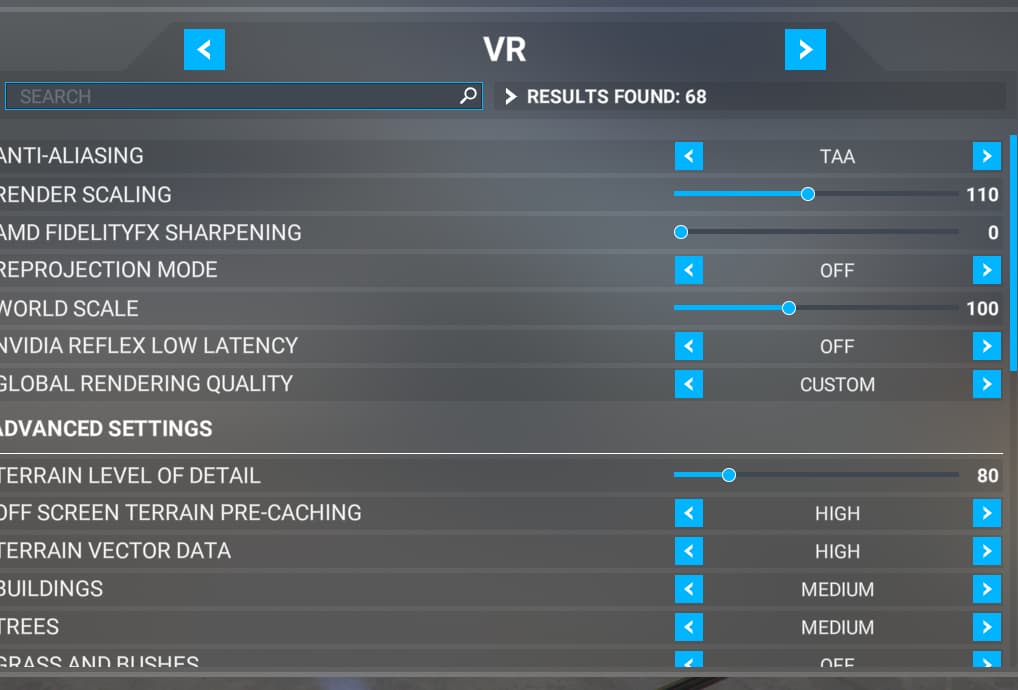
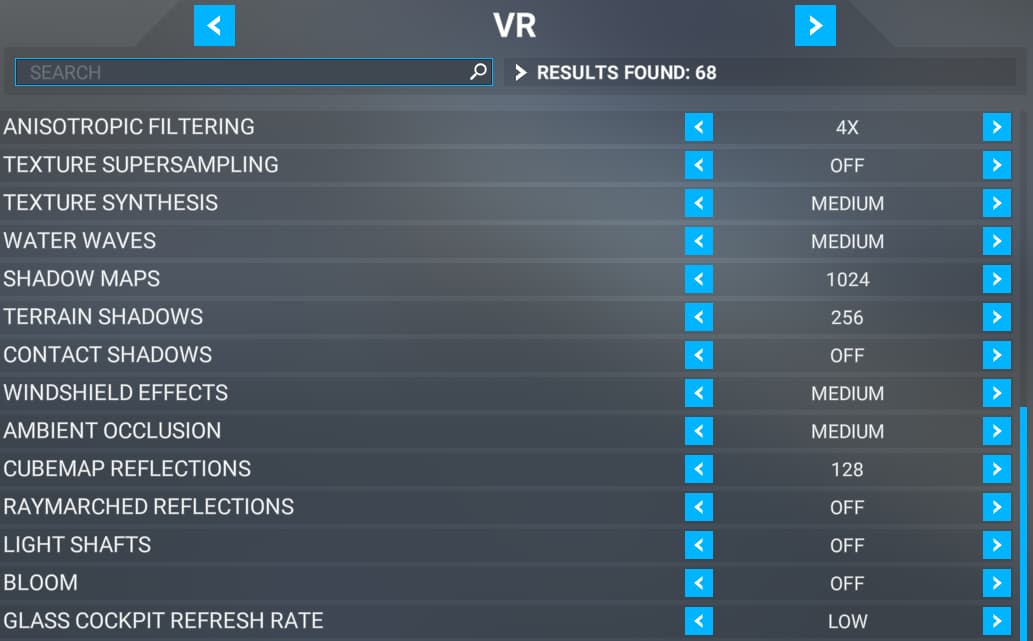
current settings in sim.
not using OTT.
What about GPU and mobo?
Render scale can really ruin performance if set too high and TLOD can really mess you up. 80% is a good start
If you use the Oculus Toolkit (or whatever it is) you might be able to squeeze a bit more and it’ll. iirc you can use it adjust the render resolution so it goes into the game “rendering less” and making the game work less hard. I’m using OpenXR Toolkit with my Reverb G2 and adjusting with the WMR settings i can get a playable framerate for the entire flight. Someone can correct me but you can do the same on Quest with the Oculus Toolkit.
Might also not hurt to turn on reprojection if you can support it. I’ve heard that works wonders (not for me strangely i have better frames with it off)
I agree render scale does make a difference…I find setting to 110 allows me to be able to read the dash.
If I set it lower almost everytime I have to zoom in to be able to read things on the dash.
I’ll try out the reprojection and see if it affects it.
just reading about the objects level of detail and may look at lowering that to see
yeah and that’s why you want to have it run through a lower render scale via oculus first before it gets through the game a second time (effectively). I haven’t checked my particular settings for MSFS in a while but i know for 2D i can run 140% and VR brings that down to maybe 110-120 or so however, i’m running the WMR scale about 60-70% and all the instruments are readable from a natural sitting position (in the sense you can figure it out relatively well but you may need to squint or lean in a little to clarify maybe. Just depends on your eyesight at that point (i’m a 4-eyes who wears my glasses under the HMD or i can’t see shhhhhhiiiiiii nothing)
By comparison, the Persian Gulf map running a flavor of Liberation for DCS runs pretty well in VR with a few players on the server (DCS is a pretty CPU intensive game as well). The higher res headset definitely helps though.
Just try not to be running on via steamvr because then it has basically Render a 3rd time through there and that will cause a problem. Think of it Oculus>MSFS instead of Oculus>SteamVR>MSFS
hey great info
I don’t run via steam as I find even just getting steam vr up and running becomes unstable just for that
I’m about to try out some small tweaks and see how it looks and runs.
too bad they make this thing so difficult to run on most systems…just like fsx , my old I7 7700k with a gtx 1070 and 32 gigs could never get it past 20fps and smooth.
when msfs 2020 came out I figured hey maybe better suited but nope…then when I got into vr well that made it totally worse…
things is once I flew in vr I can’t reallt go back to 2d…
yeah that’s kind of the downside with VR if anything besides the constant tweaking is that 2D just gets boring.
But otherwise i was using SteamVR just for comparison. Neither of us really need it since you’re using the Oculus API and i’m using the WMR one. My point is check out the Oculus Toolkit and you should be able to optimize your VR game a little better with it. loads of guides on what to do with it once you have it 
i have the toolkit but the OTT just messes my system up too much…even on default it won’t work smoothly…so removed it.
just tried reprojection mode and it’s a no go for it…
so far these are the best I can do
I raised buildings to high and grass and trees to low and so far so good .
clouds are a big killer for my sim. so clear days for me
yeah. the toolkit takes a bit to learn what each setting does so check some guides out for sure.
Also remember the Quest has nothing more than a cell phone processor powering it. Even with a link cable it’ll only do you so much good without heavy tweaking to be done (and a powerful system to boot)
I’m not saying go out and buy a better headset but it sounds like you’re figuring out what sacrifices you might need to make to get a smooth experience.