EFB orientation keeps switching from horizontal to vertical continuously when using screenshot functionality

ISSUE DESCRIPTION

Description of the issue: EFB keeps switching from horizontal to vertical continuously. It won’t stop.
I took a screenshot of my aircraft while the in sim EFB was open and this seems to have triggered it.
I note that there are reports of this in the DEV’s threads
https://devsupport.flightsimulator.com/t/efb-orientation-toggle-flickers-continuously-after-using-screenshot-tool/17910/9

FREQUENCY OF ISSUE

How often does this occur for you (Example: Just once, every time on sim load, intermittently)? This is the first time for me but others have experienced it.
Career mode VIP flight and I have to land in the dark so this is really annoying.

REPRODUCTION STEPS

Please list clear steps you took in order to help our test team reproduce the same issue:

  1. Career mode VIP flight

  2. Took screenshot of PC-24 while in exterior view with EFB open.

  3. returned to interior view and the efb would not and still does not stop switching from horizontal to vertical.

  4. Looked for other reports of this happening and found it in above Dev reports.

YOUR SETTINGS

If the issue still occurs with no mods and add-ons, please continue to report your issue. If not, please move this post to the User Support Hub.

What peripherals are you using: honeycomb

[PC Only] Are you using Developer Mode or have you made any changes to it? No

[PC, MSFS 2020 Only] Are you using DX11 or DX12? 12

[PC Only] What GPU (Graphics Card) do you use? 5080

[PC Only] What other relevant PC specs can you share?

MEDIA

I do not know how to take videos. I think the link above has some.

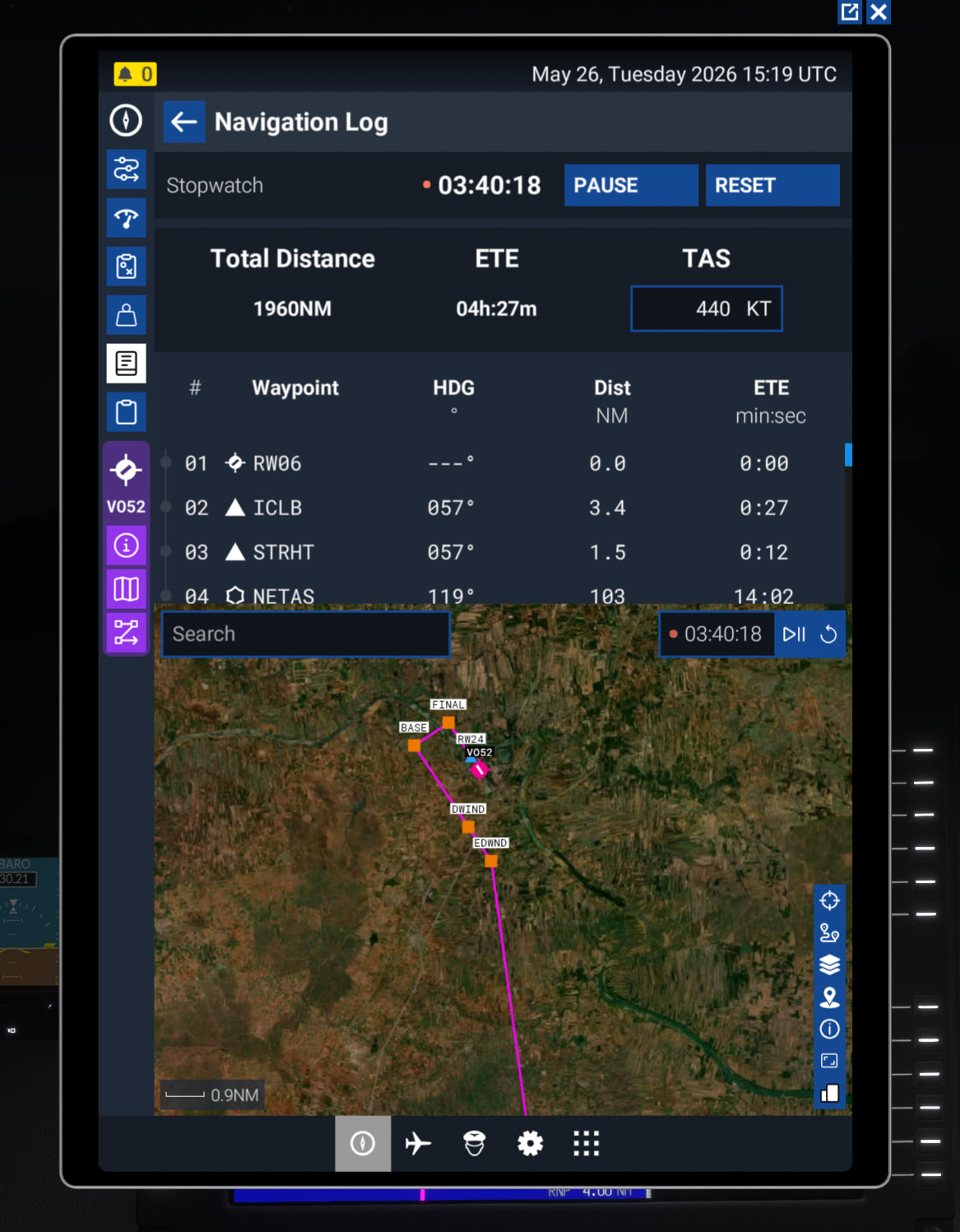
This screenshot is of the Navigation Log, it should not have the map on it at all, it does only list the waypoints normally but now the map is in it and flicks from one orientation to the other.
Title:

SU5 – Asobo Universal Tablet UI scaling broken on 1440p monitors (TAA, fullscreen, all aircraft)

Description:

Since SU5, the Asobo universal tablet (EFB) renders with incorrect UI scaling on 1440p monitors.
The interface appears stretched, columns overflow, text is truncated, and the layout does not match the desktop version.
This happens on all aircraft using the Asobo tablet (C172, Caravan, airliners, etc.).

The issue persists even with:

  • TAA (no DLSS)

  • Fullscreen exclusive

  • Windows scaling 100%

  • Cockpit zoom reset

  • Render scale 100%

  • Clean UserCfg.opt

  • No mods installed

This makes the tablet difficult to read and almost unusable for METAR/TAF/ATIS and other built‑in tools.

Steps to reproduce:

  1. Launch MSFS 2024 SU5

  2. Set resolution to 2560×1440

  3. Use TAA (DLSS disabled)

  4. Use Fullscreen Exclusive

  5. Open the Asobo tablet (METAR/TAF/EFB)

  6. Observe incorrect UI scaling

Expected result:

Tablet UI should render cleanly with correct layout, as in SU4.

Observed result:

  • Columns too wide

  • Text truncated

  • Layout shifted

  • UI appears in “compact/mobile” mode

  • Wrong internal render resolution

What has been tested (all unsuccessful):

  • TAA / DLSS / FSR

  • Fullscreen exclusive / Borderless / Windowed

  • Windows scaling 100%

  • Cockpit zoom reset (CTRL+Space)

  • Render scale reset

  • Switching 4K → 1440p → restart

  • Clean UserCfg.opt

  • No mods

  • Reinstalling the sim

Issue remains 100% reproducible.

System configuration:

  • RTX 5090

  • 2560×1440 120 Hz monitor

  • Windows scaling 100%

  • MSFS 2024 Version 66

  • Clean UserCfg.opt

  • No mods

Reproducibility:

100%

Impact:

The Asobo tablet becomes difficult to read and functionally broken for weather, checklists, and built‑in tools.