It can’t be calibrated by any realistic means as the instrument shouldn’t drift so there’s no dial for calibrating it in the cockpit, but the sim’s keybinding still works.
1 Like
Its supposed to be self correcting, which is currently bugged since it does not self correct to what the compass is saying. I already made a report.
Switching off gyro drift in settings also could be a solution.
Unfortunately it doesn’t seem to make a difference as it’s not technically gyro drift, at least the sim doesn’t seem to treat it as such.
It breaks all of the other planes because they are operating correctly. Plus you have to remember that you changed it and you have to remember to change it back or the other way.
“All” is incorrect, I believe there’s an entire thread dedicated to GotFriends planes doing the same thing. JustFlight as well, if I recall correctly. Furthermore, if you’re in 2024, it will remember your preset per aircraft so it’s a set-once-and-forget change that will be persistent between sessions.
If you’re in 2020 it just must be changed with the plane, but this has been an issue with several aircraft which is why even in 2020 I had natural and inverted versions of each preset and would change to whatever the plane called for.
This isn’t a new issue and, in my opinion, it’s not even an issue ¯\_(ツ)_/¯
It is a very nice aircraft but there are a few bugs.
-
I cannot find a way to bind the fuel pump button to my controls. I tried every possible option but nothing works.
-
If I don’t move the mixture lever with the mouse once, there is no fuel pressure building when you turn on the fuel pump. Moving the lever with my throttle quadrant has no effect. If I first move the mixture lever with the mouse a little, fuel pressure works fine.
-
I cannot find a way to bind the course indicator knob to my controls. I have found options to bind the heading bug knob, the altitude setting in autopilot, the vs setting in autopilot but no course indicator option.
-
When I press the vs mode button with the mouse, the digits that normaly show the altitude setting in the autopilot switch to the VS digits for a few seconds and you can see how much VS you are selecting. If I press the bind that activates the VS mode though, the altitude digits don’t switch so when I am turning the knob on my quadrant to change the VS amount, I cannot see how much I am changing it.
-
There is no knob to correct the gyro drift in the panels of the plane but the heading indicator does experience drift over time. This can be corrected via the binds available but there is not option on the actual panel.
I just found one more bug….
- When I bind the NAV lights on a button, I can turn them on but there is no button in the cockpit panel for the nav lights.
INCREASE / DECREASE VOR OBS
To the left of the master switch. Rotate the knob up.
Thanks for the vor obs setting!
About the nav lights I mean the green red lights on the wings. The bind is called set nav light.
Not the knob that increases the brightness of the avionics. If you bind the Set Nav Light and push use it you will see that the red green lights on the wings turn on, but there is no switch on the control panel of the cockpit to actually turn them on and off.
As I aforementioned it’s to the left of the master switch. I’m flying the Arrow in X-Plane 12 at the moment but it’s location is the same in the Dakota in MSFS 2024…
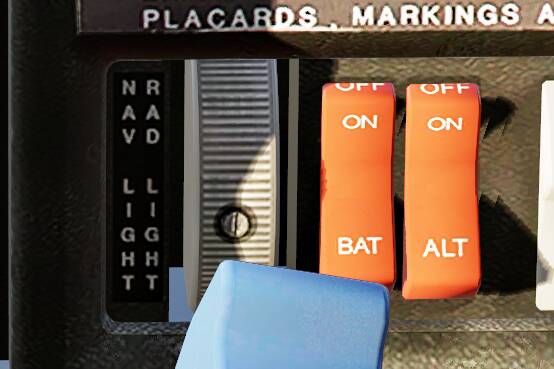
EDIT: Here it is in the Dakota in MSFS 2024…
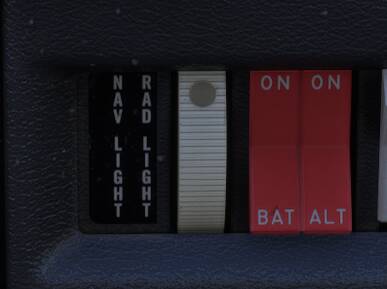
If you use AAO, SPAD or FSUIPC:
Binding the mixture lever to input event ENGINE_MIXTURE_LEFT using values between 0.0 and 1.0 does the job.
I haven’t used this, but assume this simulates the lever being moved with the mouse, and thus the code that opens the relevant fuel valves is also executed?
I have no clue what AAO,SPAD or FSUIPC is… Any guidance?
Wow I didn’t realize this knob also turns on the nav lights… I thought it only controlled the brightness of the avionics… Thanks! Do you have any clue about the fuel pump button?
It’s external software that allows for bindings in a more detailed way if you are on PC (which you are).
1 Like
Yeah I checked it out. I see thought that it is not free and that there is older version that is free. Do you need the newer paid version to do all that or can you do what you need with the old version?
I use FSUIPC so I can only talk about it. You’d need the paid version to do that and you should be willing to do some scripting.
I noticed that feathering the prop doesn’t increase MP.
Anyone else noticed that?
Propellers on single engine pistons don’t feather. But moving towards coarse pitch should increase MAP, power settings in general are not realistic on this plane.
2 Likes