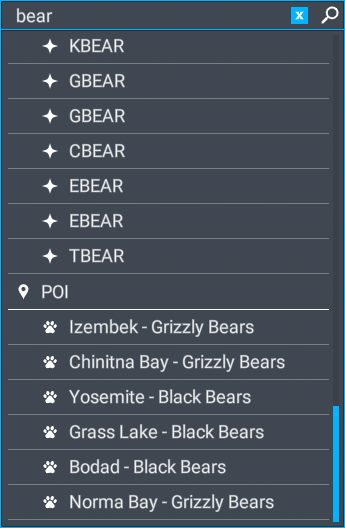
Do you have the same issue if you follow the OP’s steps to reproduce it?
YES
Provide extra information to complete the original description of the issue:
Xbox series X. After starting MSFS, “Fauna” cannot be found on the world map. But there are points on the map. After some time it can already "Fauna"be found with the help of the search.
If relevant, provide additional screenshots/video:
Do you have the same issue if you follow the OP’s steps to reproduce it?
I’m the OP. Actually, right now, I am not having this issue, and I wanted to mention that.
Provide extra information to complete the original description of the issue:
This seems to be an off-and-on thing. Seventeen days ago, this was reported to be an issue for someone, and for me now, it’s working fine. So whatever is going on seems to be inconsistent.
If relevant, provide additional screenshots/video:
I am having the issue and as mentioned the only way to get it working is to choose any airfield on map and press fly ,then leave that flight by going back to main menu ,then type in ’ fauna’ on world map and the list of animals then shows up in the world map search pane.This needs fixing .
Hi,
I’ve just finish a complete reload of everything, took 3days!
An guess what I still have the same issue ,going to any airfield on map first and leaving that flight enables the fauna list of animals .One for Microsoft
I just did a clean windows 11 install and reloaded msfs 2020. Did all updates for windows 11 and msfs library. Fauna have disappeared but were there before the windows 10->11 upgrade. The ambitious pilots shift+Z (display current latitude and longitude in flight) also fails to display after the upgrade.
GenuineRacer191 had the answer. You must first enter an airfield in the “SELECT DEPARTURE” field. Then the fauna can appear in the “search” field below and you can “depart” from that area.
 Actually, right now, I am not having this issue, and I wanted to mention that.