Using 1.6.34.0
Fenix EFB says “UNABLE TO CONNECT” I have check in the firewall and entries look ok to me.
I have reinstalled Fenix yesterday and today. It worked 2 weeks ago, but EFB is now dead.
What do I try?
Using 1.6.34.0
Fenix EFB says “UNABLE TO CONNECT” I have check in the firewall and entries look ok to me.
I have reinstalled Fenix yesterday and today. It worked 2 weeks ago, but EFB is now dead.
What do I try?
Launch MSFFS as administrator.
From where? It has dissappeared I think
The Store expects me to buy MSFS2024. So did the MS team correctly fix my account?
Open Xbox app. Right-click MSFS 2024 > Manage > Create desktop shortcut.
Go to desktop - right-click MSFS shortcut > run as administrator.
MSFS is not in the XBox App.
It implies I don’t own it.
Why didn’t you mention that you uninstalled MSFS? Missing or outdated information just wastes our time.
Fenix won’t work without MSFS installed. If MSFS doesn’t appear in the Xbox or Microsoft Store app and it seems like you don’t own it on your Microsoft account, you’ll need to contact Microsoft Support to sort that out.
To clear up the confusion, after trying several firewall settings and instals for Fenix I decided to reinstall the sim, then install Fenix.
After uninstalling the sim it disssappeared from my store; I then contacted support:
Finally bought a new copy of MSFS2024.
But the Fenix EFB still fails to connect, with MSFS run as admin from a shortcut.
In the firewall the Inbound rules are identical for Fenix.exe and FenixSim.exe and flightsimulator2024.exe
I fixed the connect error.
irrKlang.NET4.dll is not installed correctly (new Win 10 and Win 11).
It’s part of the Visual Studio C++ V14 Redistributable X64 package (I think).
I manually copied it into Windows\system32 and Windows\SysWOW64, as well as installing the VC package.
Then the EFB ran perfectly.
It’s DLL-Hell, seen it well over a decade ago in software development.
I’ve told Fenix support. Lets see what they say.
Edit:
There is a new Fenix build 2.4.0.3311, but it does not fix this problem.
I dont have the irrKlang.NET4.dll file in both paths. Where can I download it?
You don’t need it. Install the VC14 librairies as below.
I installed the latest build and that’s when the problem began. it happened before; I just had to wait for the next update after the newest update  . I hope i can find help on this.
I did not have the problem before the update.
Which Fenix build are you using?
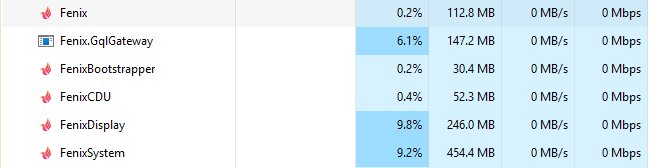
Look for Fenix.GqlGateway.exe in Task Manager, that must be running for the EFB to connect.
Task Manager reports 6 Fenix processes for me. It runs great with the WinCtrl MCDU, FCU, EFIS and the EFB works well.
It’s pushing my quad core Xeon hard - now I know why Fenix recommend 8 cores; 6 for them, 2 for the sim ha ha.
I joke, but its a good bit of software engineering to split out your product into 6 processes that will scale well on modern multi-core CPUs
i tried on all a319-a321. it says Fenix.GqlGateway.exe running
Hmm It looks like the bug is not fixed in Fenix 2.4.0.3311 as support implied.
If I uninstall the VC14 libraries the EFB fails to connect.
You can find them here:
EDIT I have filed a new support ticket.
so do we have to wait until the next update??
It depends. If you have Win 10/11 installed a year or more, the shared VC++ libraries may have been installed by another app, and Fenix will run fine.
Fenix was running ok for me, then I installed a fresh copy of Windows and the EFB failed every time.
So if your Fenix EFB fails to connect, I recommend installing Microsoft’s VC++ v14 libraries.