I see it on a low end system I7 11800H, 16GB with RTX3060 (6GB) flying the A2A Comanche. I can see a flash of what seems to be a part of the aircraft. Not present in SU3, and only seems to have appeared (for me) in the last 2/3 releases of SU4.
1 Like
I have the same issue in SU4, Hope this will be fixed before its going live 
1 Like
Lets hope 
theres no time for it, su4 goes live tomorrow or day after it, 
Please please please don’t let SU4 go live until this is fixed
1 Like
ISSUE DESCRIPTION
Description of the issue:
There is a jarring motion for a 1/2 second when you change camera views from External to Cockpit (or from Cockpit to External) - as if you are travelling at Warp Speed, as the cockpit elements are redrawn. This motion is much more noticable in the current build 1.6.15.0 than in previous builds. And because of the motion effect, it can leave you feeling just a little bit of motion sickness for a moment if you have a large screen (or screens!). Some people may be more sensitive to this than others…
It seems to happen in every plane, not just the 787. I hope the sudden sensation of motion change can be reduced - I think some people might be quite sensitive to it.
FREQUENCY OF ISSUE
How often does this occur for you (Example: Just once, every time on sim load, intermittently)?
Every time.
REPRODUCTION STEPS
Please list clear steps you took in order to help our test team reproduce the same issue:
-
Load in to any plane at a gate (eg, 787)
-
Change camera view to external view (I use a controller key bind). Notice the sensation of motion as the external view is drawn.
-
Change camera view back to Cockpit view - notice how the sensation of Warp Speed motion is much more pronounced?
YOUR SETTINGS
If the issue still occurs with no mods and add-ons, please continue to report your issue. If not, please move this post to the User Support Hub.
What peripherals are you using: keyboard, mouse, controller
[PC Only] Are you using Developer Mode or have you made any changes to it?
No (just FPS overlay)
[PC Only] What GPU (Graphics Card) do you use?
RTX 5090 / Driver 581.57 / 4K TV @ 120 Hz VRR / TAA @ 80 / Max Frames 33 / DLSS Frame Generation x2 / Ultra
[PC Only] What other relevant PC specs can you share?
9800X3D / 96 GB RAM 6000 CL28
MEDIA
Screen shot of the moment entering the Cockpit view from the External camera view - for less than a second, but still causes a small feeling of motion sickness!
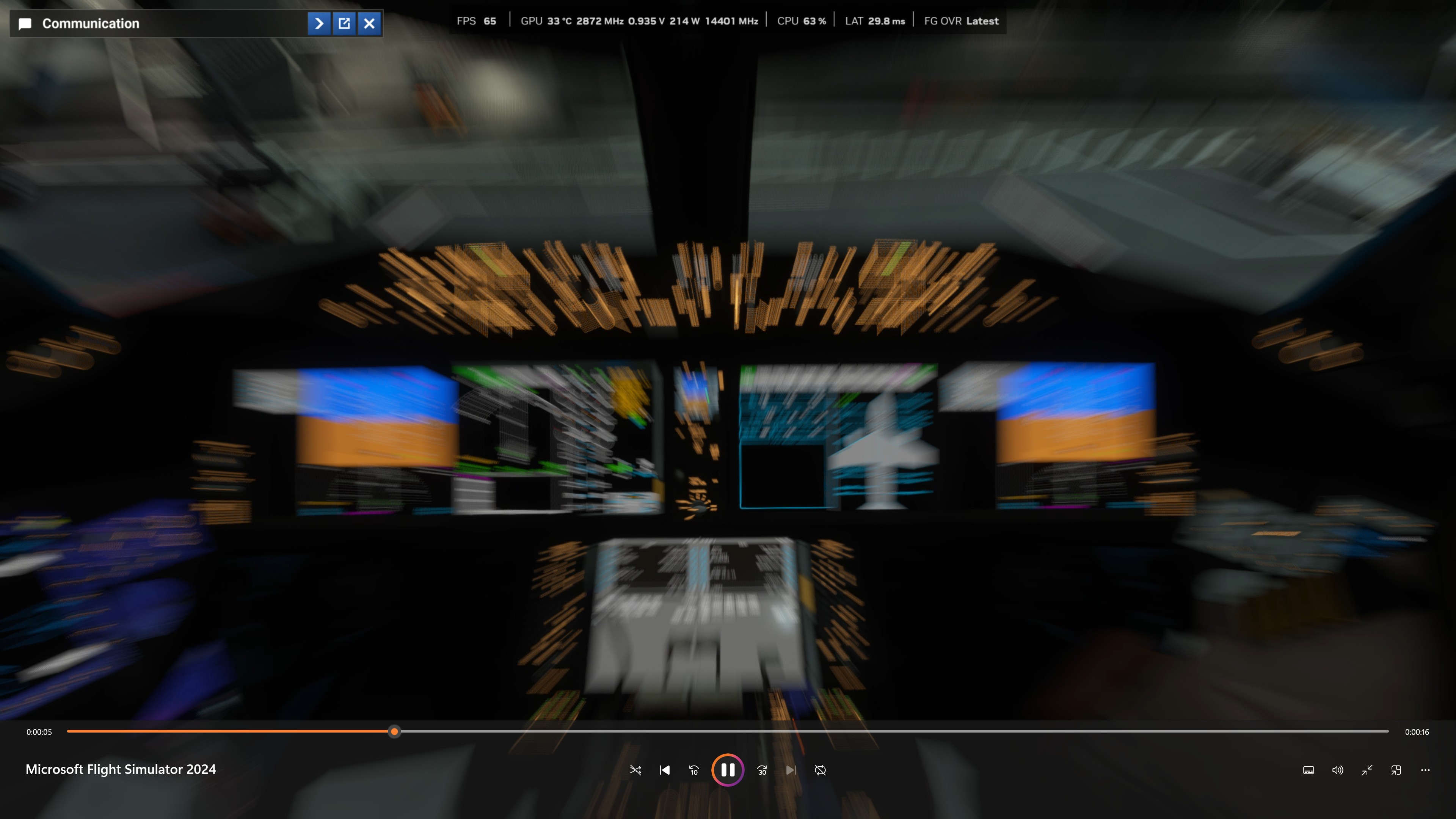
Today I updated to the new build, 1.6.16.0, and same flight in the 787 and this time did not get the warp speed camera change effect. I also turned Motion Blur off (not sure if that is the source?)
Edit - the above posts were a separate report, merged in to this thread, as they basically the same issue.
So, SU4 got released with this annoying bug that they have known about for a month. I’m sorry to say that this is very disappointing Back to MSFS2020!
1 Like
1 Like
Let’s hope this gets prioritized in the SU5 beta.
2 Likes
I’m also getting this now with SU4. It almost looks like for a split second it is loading MSFS2020 before switching to 2024. I get it when switching to external view with mid to long distance scenery, but also noticed it just now when switching back into the Dakota cockpit, it almost looked like a different aircraft for half a second. Not good.
1 Like
I get exactly this. It wasn’t present in SU3. Never mind waiting for SU5. This issue is awful. We need a ‘hot fix’.
4 Likes
Hear hear!
Not getting any of this in SU4 retail release (was not in the beta this time around but reviewed the above). I had started a flight in the PMDG 772 and noticed graphics slightly off, then I realized that SU4 had reverted back to DLSS 310.1.0. Terminated the flight and restored DLSS 310.4.0 in DLSS swapper and the graphic performance is now excellent (whereas it was only good back in SU3). So if any are using DLSS swapper and missed the reversion as I did, perhaps check these settings.
PC config in my profile. My graphics settings for 4k output: DLSS 4/Quality 310.4.0, preset k. V-sync set to monitor max (60 FPS) with Dynamic Settings target frame rate also set to 60 FPS. Getting great frame rates with very smooth view transitions and panning, in and out of the flight deck. TLOD/OLOD both 200; Buildings & Texture both set to HIGH. Glass cockpit displays smooth & legible. Very happy with SU4 so far. Cheers!
Edit/added: on latest Nvidia driver 591.44
First thing I did after SU4 installed.
I also tried going from TLOD 400, to 300, to 200 - no difference, still a big and noticeable transition.
2 Likes
Here’s a clip recorded when switching views, hope it helps (probably needs to be downloaded to play it, click the down arrow icon). Disp driver 591.44, Win 11 build 7309
https://1drv.ms/v/c/b0502749d85a54bc/IQDofxgI5X_PQ6UVeoxgZWHNAXM-rd5yfL4dqGpWyAoyJq0?e=czrfGH
I’m experiencing the same issue when changing views with the Fenix. I’ve also tried several different settings, but it doesn’t make a difference. I had much more comfortable flights with the SU3.
Yet another regression reported during the beta but just ignored and included anyway.
Sick of it. What’s the point in the beta tests…
2 Likes
I too am having this issue with the recent update, and only for FS24. I’ve tried on all of my addon planes (ini A350, iFly MAX 8, PMDG 777), and base planes included in the simulator, and all having the same issue.
I think the sim is literally switching from one image to another as in my post here -