Have you disabled/removed all your mods and add-ons?
yes
Are you using Developer Mode or made changes in it?
no
Brief description of the issue:
After creating a flight plan in FS after clicking fly now the flight plan is not in the plane. I have to recreate it in the G3000
Provide Screenshot(s)/video(s) of the issue encountered:
Detailed steps to reproduce the issue encountered:
PC specs and/or peripheral set up if relevant:
If on PC, Fault Bucket ID - Instructions here - Please type in just the Fault Bucket ID # rather than a screenshot for privacy reasons: KPHX-KLAS.PLN (1.5 KB) KDEN-KCOS.PLN (2.5 KB) KDEN-KSKX.PLN (2.5 KB)
For anyone who wants to contribute on this issue, Click on the button below to use this template:
Do you have the same issue if you follow the OP’s steps to reproduce it?
Provide extra information to complete the original description of the issue:
If relevant, provide additional screenshots/video:
Do you have the same issue if you follow the OP’s steps to reproduce it?
Had one work correctly, and then fail the next time, and one plan fail both attempts to transfer in the aircraft after setting up in the world map.
Provide extra information to complete the original description of the issue:
I flew KTPA IFR Low to KMCO/ILS 36R via TRAMP and the plan moved into the plane correctly and flew the plan fully as expected, the First time. The second time I tried the same plan setup it did not move into the aircraft.
I twice set up LFPG IFR Hi to EBBR ILS 25R-Z. The plan did not move into the plane at all (neither in the FLT PLAN tab, nor in the APPR selection block.
I tried both again after restarting the sim and neither flight plan would move into the aircraft from the WM.
Using no mods and standard (MS) nav data.
If relevant, provide additional screenshots/video:
Do you have the same issue if you follow the OP’s steps to reproduce it?
Yes
Provide extra information to complete the original description of the issue:
KSEZ to KDVT. RNAV 25L Approach, BANYO transition. Flight plan was blank when I entered into the plane and started up from C&D.
If relevant, provide additional screenshots/video:
Furthermore, after I entered the plan manually and requested IFR clearance, the waypoints that ATC used on my route were NOT the waypoints entered into the flight plan. Note on the screenshot that ATC is sending me to MAIER but that was never in the flight plan. It should be sending me to SNOBL. It also picked a different RNAV transition. It told me to go to POURS when I had selected BANYO when I manually entered the plan.
It remembers it in the CJ4 but doesn’t appear until the positioning is complete, nor does it show up on the VFR map until that point also. Flew from EGKK - LEIB earlier with a world map flight plan, but there were a couple of discontinuities.
That said I can confirm the Longitude and TBM don’t import the world map flight plan.
Had the issue on the Cj4. Flight plan from world map wasn’t in the flight plan but was in the VFR map and the Cj4 partially knew about it. FD was trying to find magenta line although it wasn’t on the planes nav map or flight plan.
I can’t even load the Cessna Longitude on Xbox Series X at any airport.. I would l to see the enhancements. I get a cdt on the tbm 930 soon after landing. I miss those planes.
Thought I was losing my mind this morning. Flying LFMC to EPPO and used the default low airways option on the planning map. Nothing when I started up the TBM on the GPS
Do you have the same issue if you follow the OP’s steps to reproduce it?
Yes
Provide extra information to complete the original description of the issue:
Tried multiple routes, for example, EGPE to EGPD on low level airways. Blank flight plan in the TBM930 throughout the whole flight from take-off to landing
If relevant, provide additional screenshots/video:
Have you disabled/removed all your mods and add-ons?
Yes
Are you using Developer Mode or made changes in it?
No
Brief description of the issue:
After having made a flight plan in the World Map screen, the plan does not carry over to the flight in the Daher 930. I have read in other forums that it does not work with any of the three aircraft that AAU1 enhances.
Provide Screenshot(s)/video(s) of the issue encountered:
Detailed steps to reproduce the issue encountered:
Just set up a flight in the World Map and open your aircraft. No flight plan is entered. You can set up a flight in the MFD controls below the screen, but they should already be there.
PC specs and/or peripheral set up if relevant:
No conflicts in any of the above in other aircraft.
If on PC, Fault Bucket ID - Instructions here - Please type in just the Fault Bucket ID # rather than a screenshot for privacy reasons:
No crashes involved.
For anyone who wants to contribute on this issue, Click on the button below to use this template:
Do you have the same issue if you follow the OP’s steps to reproduce it?
Provide extra information to complete the original description of the issue:
If relevant, provide additional screenshots/video:
 For anyone who wants to contribute on this issue, Click on the button below to use this template: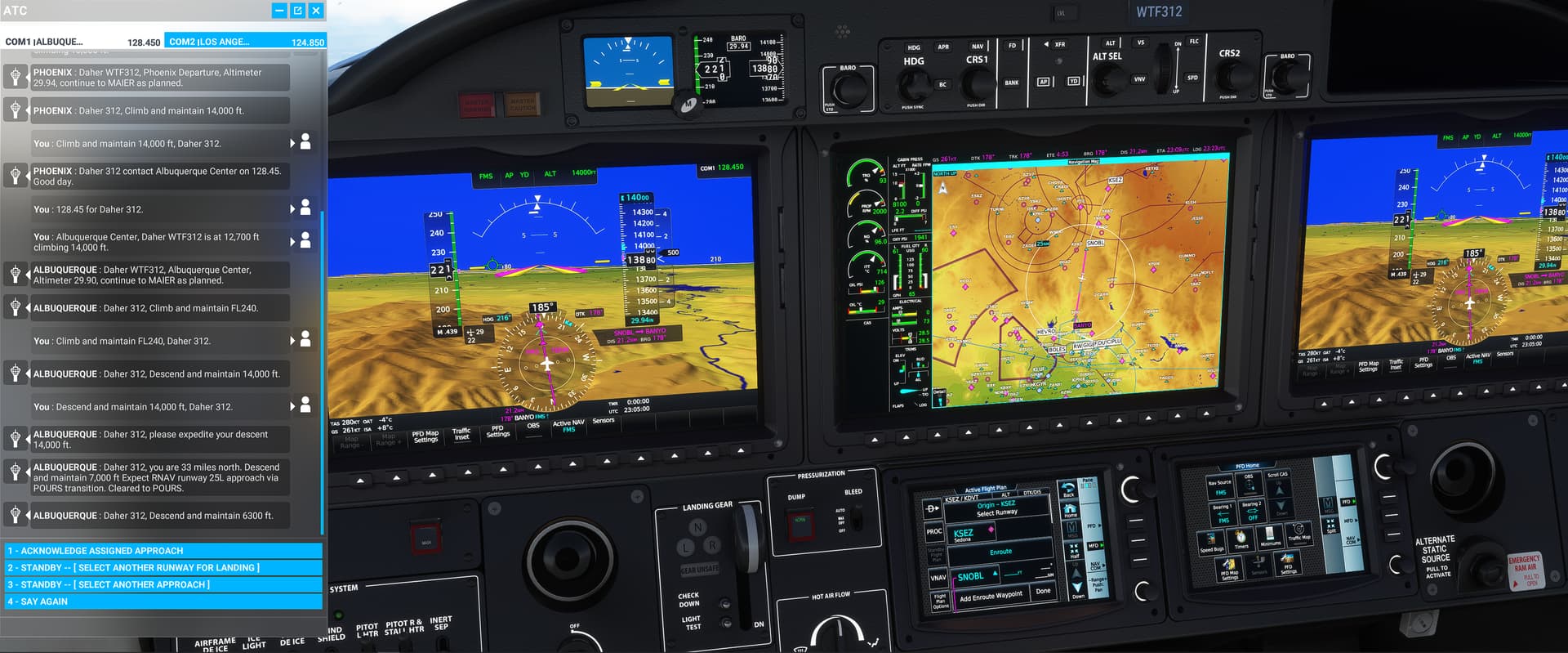
 I guess iniBuilds worked some other magic to get it in the A310.