Anyone have any information on when we are going to get the official update on these aircraft?
2 Likes
In 20 years if everything is going well 
3 Likes
yeah , i wish we can get something soon , i love the airplane but defiantly needs an update
1 Like
Just got back into it after over a year. Really enjoying it, loads of short haul routes to fly all over the world. Very nice in VR too. Flying with FLCH or VS is actually not too bad and RL pilots use it a lot too I guess. The functional FMS will be the icing on the cake. The correct update procedure is very important!!
2 Likes
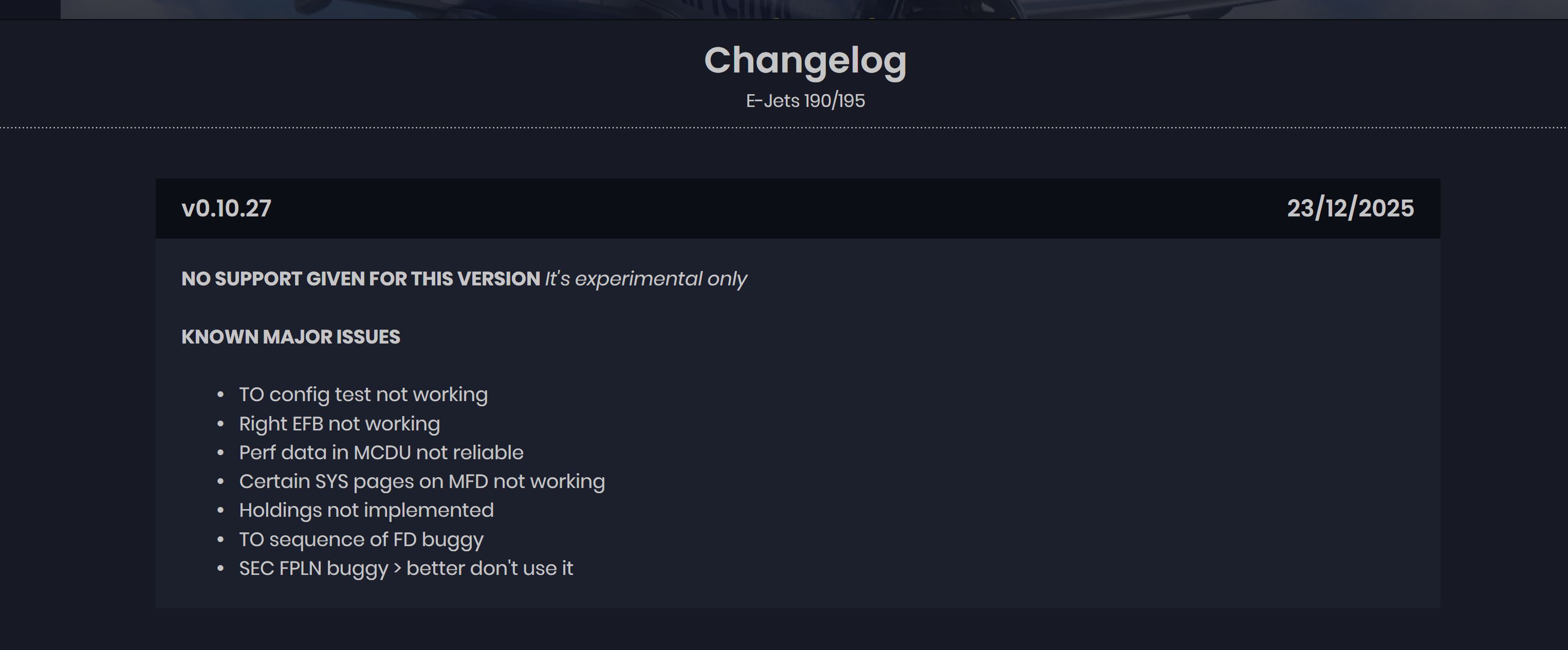
Great news, the experimental version with cFMS and VNAV is available to everybody now…
From FSS Discord:
Happy holidays from everyone here at FSS! It’s been another great year for us here, with new releases across our line of products. Being the E-Jets, here are some of what we did for this line below:
This year…
We released 5 across-the-board news and progress updates. (Read these at https://flightsim-studio.com/news)
We released 3 E-Jets updates and patches.
We released MSFS 2024 compatibility for the E-Jets.
We released our final plans and roadmap for cFMS.
We know it’s seemed like a pretty slow year, and frankly, it has. This last year, we have been all-in on the FMS - trying to get it done, to a high standard, as quickly as possible. Though this has led to a bit of a slowdown on the bugfixing side, we think it will be all worth it… right now.
The day is here.
As of today, we are entering stage 4A (of 5) of our final roadmap to v1.0: Experimental Releases of cFMS.
This means that we have a functional build of the entirety of cFMS, including LNAV and VNAV path calculation, as well as all of APv2 - LNAV, VNAV, and all other modes. The FMS/AP are also now capable of RNAV approaches. And, for the first time ever, it is stable enough we feel comfortable releasing it to all of you.
If you don’t remember, our full roadmap is here:
1: Internal cFMS Testing, LNAV-only AP: Complete
2: Community-involved cFMS testing, LNAV-only AP: Complete
3: Internal cFMS testing, LNAV and VNAV AP: Complete
4: Community-involved cFMS testing, LNAV and VNAV AP: Complete
New! 4a: Experimental Releases of cFMS: Available Now
5: Full Release of cFMS and APv2
To get started:
-
Read the information about this version on the [FSS Documentation Hub]( Things to know | E-Jet Series | FSS Documentation Hub "FSS Documentation Hub
( Things to know | E-Jet Series | FSS Documentation Hub )").
-
Make sure you have installed and activated the E-Jets via Aerosoft One or Contrail (Marketplace is not supported due to platform limitations).
-
In sim, you may have been activated automatically. If not, paste your key into the window which pops up.
-
If your data did not transfer, reset your EFB as necessary.
This has been by far the most difficult and complex project we have undertaken, and it’s something we have promised you all since day one. We thank you for your support throughout this product’s entire development cycle - rest assured, we don’t have too much longer until v1.0 is finally here. A huge thanks to everyone who has contributed to the development of the FMS - our outstanding @E-JetE-Jet Pilot team, the longstan@E-Jetsing @E-Jets Beta Team, and finally, our recent group of communit@CFMS-involved @CFMS Testers. Another thanks to our Discord and @Adminupp@Moderator@E-JetE-Jett team@Support (@Support, @Moderators, and @Support staff) f@E-Jetsr keeping up with everyone’s questions and anticipation up to this p@CFMSint.
Hopefully, this will make for a nice e@Adminupprly Christmas present for you all. Ou@Support development and testing teams have been working incredibly hard the last few weeks to make this possible. From everyone at FSS, happy holidays! May your skies be clear and your descents be easy.
Thanks,
The FSS E-Jets Team
The FSS Beta/QA Team
The FSS Community Team
7 Likes
I do not see that it is available via the aerosoft one launcher.
Where did you get the uodate?
I’ve been in the beta team, so I don’t need to update but it’s already available on Contrail. Aerosoft comes later, I guess.
Purchased it via Contrail. In my contrail app the latest version is v0.9.34+patch4. Is this the experimental one? Thank you in advance.
Tris
No, the latest experimental with cFMS and VNAV is 0.10.27. But wait a little bit longer guys, according to FSS Discord it’s not available even on Contrail yet.

1 Like
OK, thank you very much.
Happy holidays!
1 Like
Happy holidays to you too!
Can the OP or anyone from the moderation team pls change the title of this topic to FlightSim Studio E-Jets? Everything discussed here applies to all airplanes developed by FSS under the name: E170/175/190/195/195F
3 Likes
I was falling asleep an hour ago, now I’m too excited to think about it
Holy ■■■■ it’s happening, I’m not expecting a completely issue-free version but I’m so hyped, it’s testing time
2 Likes
There are still some bugs here and there (still tagged as experimental) but it’s pretty enjoyable imho. Enjoy!
1 Like
Does anyone know how to load the simbrief flightplan in the MCDU with the latest version?
Simbrief Import
In the MCDU, go to NAV → DATALINK → ADDRESS → FLIGHTPLAN and enter your SimBrief username as COMPANY ADDRESS. It will be saved to the work folder.
Route: Go to the RTE page on the MCDU and select FPL REQST SEND. This will import your latest SimBrief route, excluding the SID and STAR.
Performance: Go to the PERF INIT page on the MCDU and select SEND REQST. This will import the performance data from your latest SimBrief flight plan.
6 Likes
Anyone else experiencing a constant “jittering” of the aircraft during flight (cockpit view)? It feels as if the pilot (=your POV) got too much coffee.
(Speaking of the experimental mode here)
EDIT: SOLVED - reducing the “G Force” effect in the EFB did it.
Where to get the experimental version ?
Does that work for FS2024 also ?
I am using MSFS 2024, Aerosoft one delete the E-jets then then click the experimental version in grey to download. Here are the instructions;
Installation
If you’d like a behind-the-scenes look, you can switch to the Experimental branch.
Aerosoft One
-
Go to the product library and select the E-Jets.
-
Uninstall the aircraft if you already have it installed.
-
The experimental installation is in light grey at the bottom.

Contrail
-
Go to the respective product pae in the Contrail App.
-
Uninstall the aircraft if you already have it installed.
-
Then you will see two installation options: Stable and Experimental.

5 Likes