Is there a way to use the keyboard to provide inputs into the EFB?? No onscreen keyboard appears and it doesn’t appear to disable sim inputs when being used ?
The weird thing is, looking at you top picture, vertical speed is zero, yet the flight path vector is showing below the horizon and the altitude trend vector is showing negative. Everything seems to show correctly (including the green line on the vertical path display) except the vertical speed.
That was my thought too. I think at that moment the green line should be horizontal.
It got there eventually. Just after a protracted delay, which was admittedly weird.
The green line mimics the FPV, so looks correct. The VS seems off. None off that stuff is air data driven (not even the Vertical Speed), it is all coming from inertial sources so should be instant.
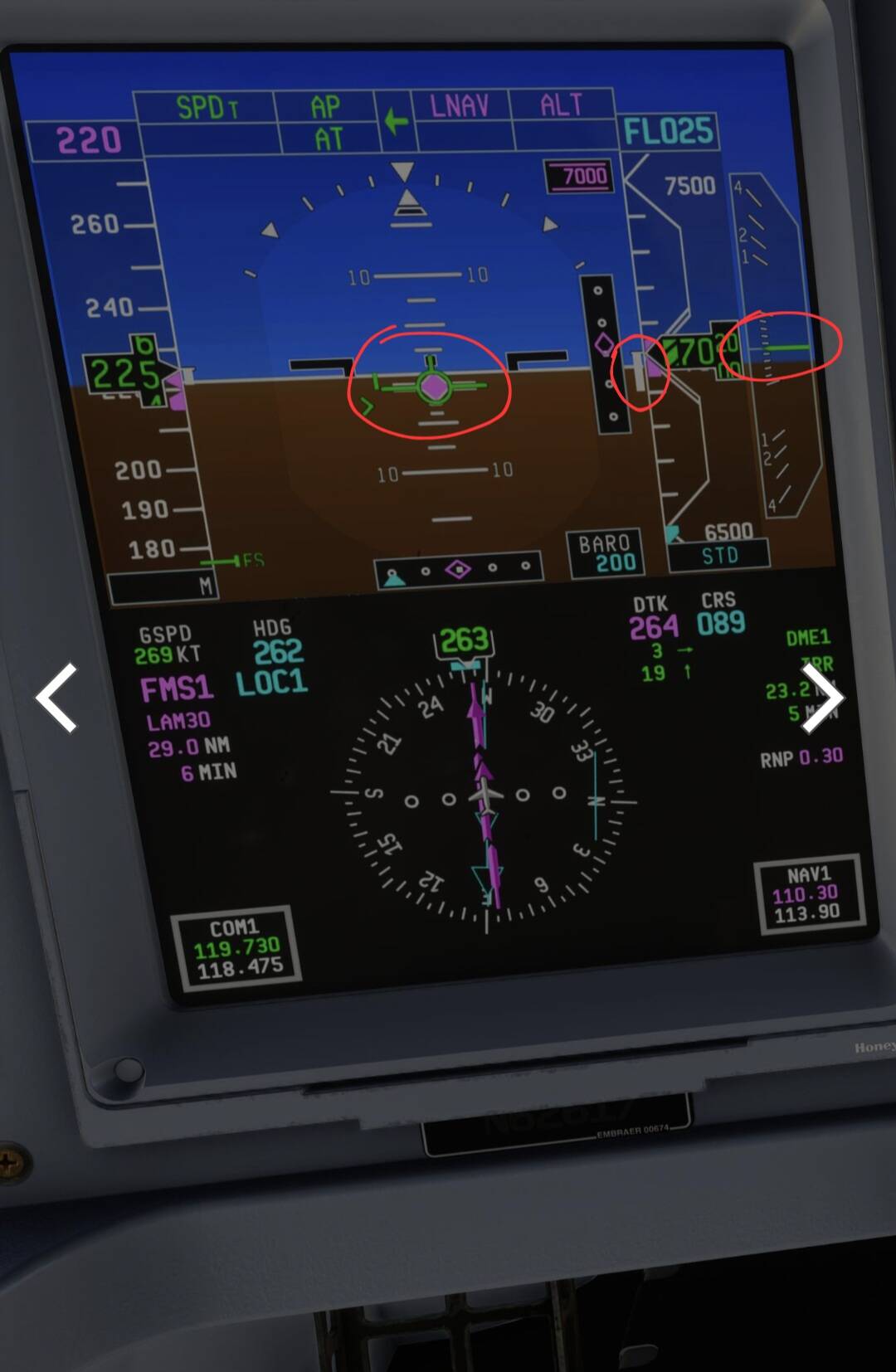
This does not line-up, FPV and altitude trend showing descent, vertical speed shows zero. The green line on the vertical profile matches the FPV and altitude trend vector.
About FLCH: I’ve checked videos just to make sure, and looked at ADS-B to get a better idea; the plane does pitch down, but not to level flight and not so abruptly; I don’t think I’ve seen one case where they dropped below 450 fpm upwards
Actually I’ve gone full tryhard about it so here are a few examples:
Exhibit 1: the AP is engaged at 2:30, notice that in VNAV FLCH it actually pitches up despite being below the requested indicated airspeed;
Exhibit 2: at 25:13 we can see that the speed limit has just been raised; the plane, in green FLCH, gently pitches down but does not go below +500 fpm, and then gently pitches up before capturing the airspeed. Again, unlike the FSS which sharply goes into level, waits there until it speeds up and the yoinks itself upwards to bleed out the excess
Exhibit 3: 25:03 is after crossing the FL100 gap, again a very slow pitch down that barely goes below +1500 fpm before going back up
Exhibit 4: cheating a little because it’s hand-flown, but notice from 2:32 (VNAV FLCH engaged) how even though there are two instances where the plane speeds up, it’s not commanded to level flight - always a climb
The TO problem was that my flight director ordered me to turn around after passing the threshold, which was not ideal - but again, except in very niche cases we should still be flying ahead and not what the FD is demanding
You won’t get me crying about this issue, but there have been far more egregious developers selling promises they wouldn’t keep before FSS was even founded. Ask P3D simmers how’s the LNAV v2 in their $70+ (before inflation) PMDG Boeings 
Superb flight from EGPH to EGLL this morning. VNAV is working great. Only question I have is how to change/delete ALT constraints on departure. I was cleared by ATC to FL170 but constraints were at 6000ft so I really needed to delete them but FMC ‘delete’ doesn’t work. Clicking on them doesn’t do anything. Can they be changed at all or are they hard wired into tthe new FMC for VNAV purposes? Should I just exit VNAV instead and use FLCH for departure climb?
Just type: / new altitude and click on the constraints, should replace it.
But that would not be VNAV conducive. I can’t just replace a FL06 constraint with say FL17, the aircraft would never make it in time. On other airliners I just delete the constraint (one way or another) and FMC recalculates the VNAV profile for the climb along with expected altitudes.
When you click. To/ga on ground lnav and vnav is preselected.
I tried to remove the vnav and lnav for example in USA because your SID is vector to a waypoint. Clicking on nav I remove lnav and after take off I just click heading.
To remove vnav I clicked vnav but nothing happens, idk if it’s a bug.so I clicked FPA or VS and then vnav was deactivated.
To climb without restrictions you have to get FLCH on green cause when it’s in magenta is always in vnav mode. My recommendation, when you get an instruction to climb and you want to remove the constraints. Just click VS and vnav will be deactivate, then click FLCH again and it should appear in green, then restrictions will be ignored.
Thanks, yeah it’s difficult to know what is a bug and what is just a quirky Embraer FMC! I suspected that I would have to do a straight FLCH. I will try disengaging VNAV by doing what you suggest the next time. This morning I just lived with the constraints on the climb (not ideal). Ideally i’d like to leave VNAV activated for ascent and descent, but be able to override the constraints.
I have to check what is bug or not with my friend ( e190 captain) and I have to try the descent with tailwind cause he told me that it’s difficult to decelerate.
His solution is to force the descent path to 2.5 degrees on the FMC ( perf init page 3 if I’m not wrong now ) instead default 3.0.
This experimental version sometimes it’s amazing sometimes fails, I found more fail on lnav than in vnav, specially when you want to to a direct to.
Most system pages are unavailable but I watched than in stable version are implemented so I guess it’s just temporally
I gave it another go. This time the FLCH seems to work better so far. In cruise now. I am just struggling directly after rotating/take off. The speed increases way beyond V2+10 kts, while I am maintaining the indicated 10-12 degrees pitch up.
Could you/anyone explain how to rotate/take off without overspeeding and fluently engaging FLCH mode?
TO and AT are armed/activated at take off.
Yeah, FMC PERF seems to be a dogs dinner mix of simbrief imported values, inop fields, efb imported values (ev. T.O. cg) and some manually changeable fields. I think I figured out enough to have a reasonable flight though. Takeoff trim in FMC is stuck on 0.0 though, and can’t be changed. But I just set trim value as shown on EICAS and it seems to work fine. I’ve not tried a direct to yet. Maybe I won’t go there yet .
All in all though some major steps forward. I hope they continue to evolve it.
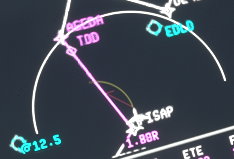
Are you setting correct derate as per efb calc? You have to enter all that stuff manually with this version. I commonly have to set a TO-2 derate with a flex temp of 35deg, they aren’t set as default in FMC, and there is no send to FMC function from EFB any more, but TO CG does seem to make it over somehow.
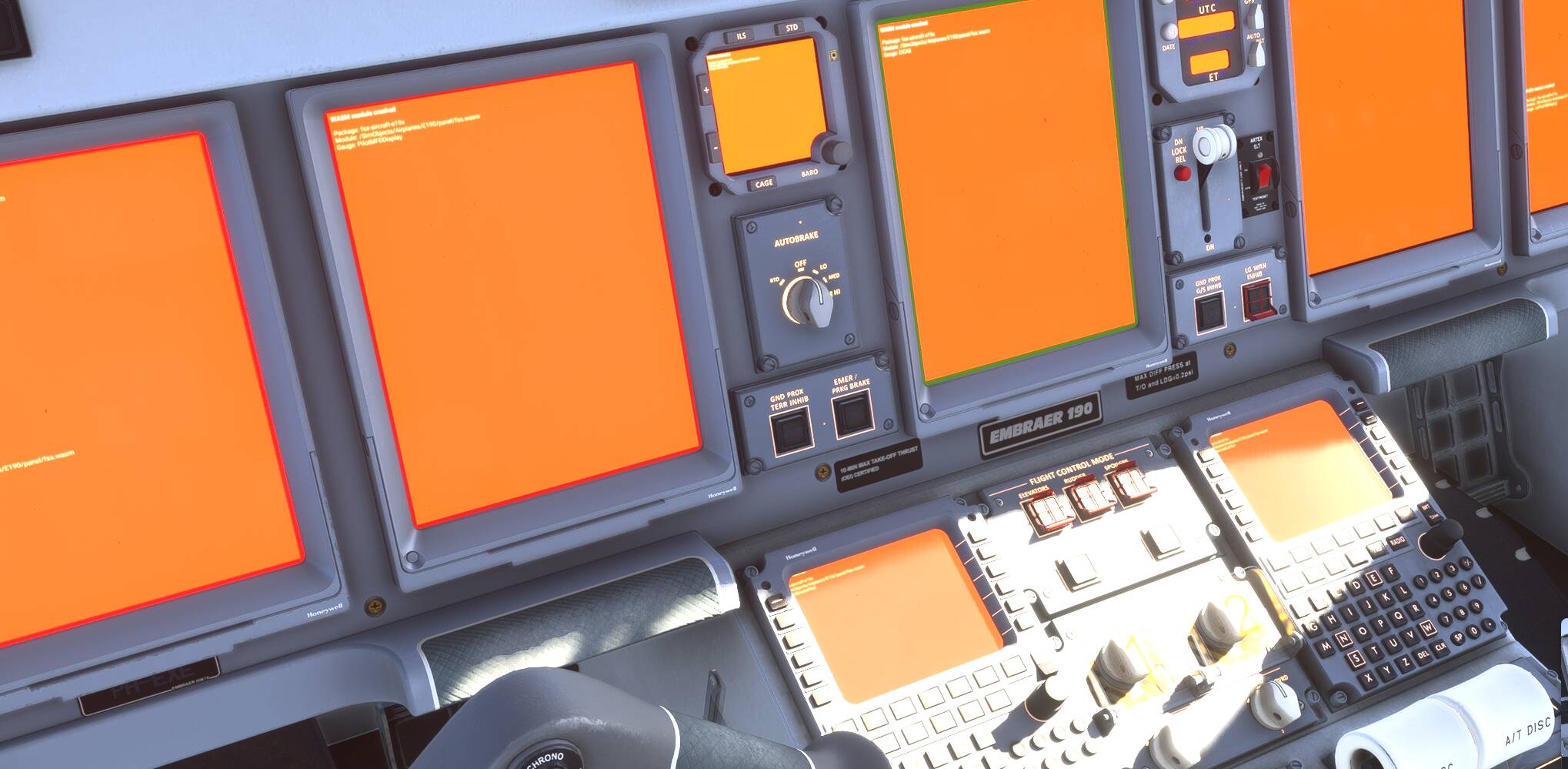
I’ve had this once in 5 flights. Many others are seeing this on various airliners (including pmdg 737) so I think it’s an intermittent SU4 thing rather than a FSS E jet thing.
Well, there are WASM crashes with other airplanes as well in SU4, so not necessarily the E-Jets fault.
Tbh, I never experienced it so far with the 737 nor the Fenix in SU4(beta)… But everyone is entitled to their own opinion! For me, the FSS ERJ goes back to its hangar for completion. My guess is this time next year. Hopefully.