ISSUE DESCRIPTION
Description of the issue:
The temperature of the port (left) engine on this aircraft runs significantly hotter than both the center & starbord engines at the same throttle setting.
FREQUENCY OF ISSUE
How often does this occur for you (Example: Just once, every time on sim load, intermittently)?
Every time
REPRODUCTION STEPS
Please list clear steps you took in order to help our test team reproduce the same issue:
- In free flight, select the Fokker F.VIIb 3m Trimotor Cargo (default livery)
- Start the flight at any parking spot at Darwin (YPDN), with a live weather setting during daylight hours.
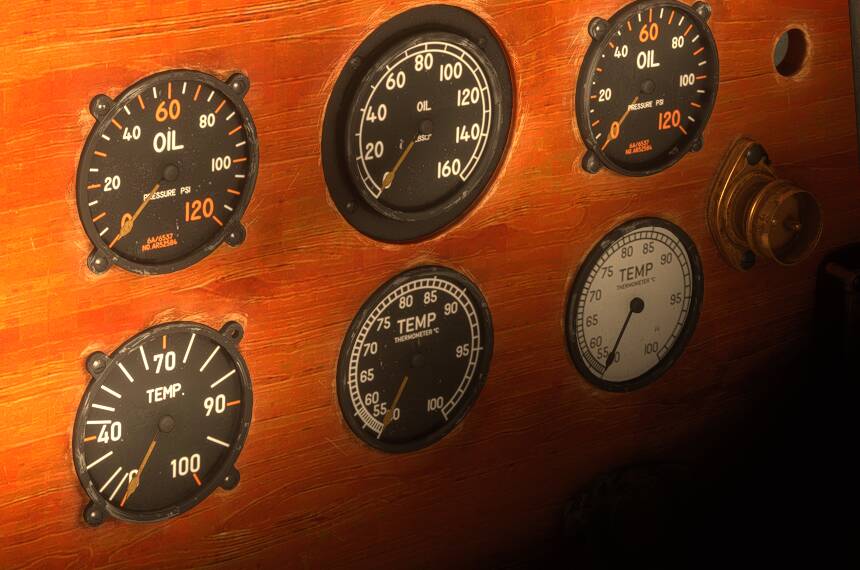
Note: I’ve specified an exact place as this was where I was at the time the screenshots below were taken. - Enter the cockpit. Notice the tempearature for the port engine reads ~40 (outside temperature at Darwin at the time), the other two ~ 50. (see screenshot #1).
This is OK as the 3 gauges are different and the center and right engines have different minimum settings on their gauges. If the temperature at Dawrin had been greater than 50 centigrade (!) one would expect the center & port engines would have shown that reading.
Note: Your temperature reading for the port engine may be different, depending upon the temperature at the time you test. If, for example, you had started somewhere in Antarctica, you would see all three temperature gauges showing their minimum values, as it rarely (if ever) gets above freezing in Antarctica (see screenshot #4) - Start the engines, taxi & take off.
It is important in this test that, if you have configured three throttle levers to bind to each of the three engines, that you move all three throttle levers equally - e.g. all three throttles should be at 0%, 10%, 50%, 75%, 100%, etc.
Notice how the temperature will rise for all three engines. However, the port engine now shows ~80 (note: this gauge has no units) and the center & starbord ~ 58 centigrade. (see screenshot #2) - Continue flying, open the throttles to maximum. Note how the port engine will show ~ 96, and the center and right engines ~68 centigrade. (see screenshot #3)
Expected behaviour: Since the port and starbord engines are the same, I’d expect to see their temperatures to be the same for an indentical throttle setting.
YOUR SETTINGS
What peripherals are you using, if relevant:
N/A for this issue.
[PC Only] Are you using Developer Mode or have you made any changes to it?
No / No
[PC, MSFS 2020 Only] Are you using DX11 or DX12?
N/A
[PC Only] What GPU (Graphics Card) do you use?
AMD Radeon RX 9070 XT (16GB) Driver v26.1.1
[PC Only] What other relevant PC specs can you share?
Expand to see my basic PC specs:
| Item | Setting |
|---|---|
| CPU | i7-12700K (no overclocking or undervolting) |
| RAM | 32 GB 5200 MHz DDR5 CL40 RAM |
| GPU | AMD Radeon RX 9070 XT (16GB) Driver v32.0.23017.1001 (Adrenalin v26.1.1) |
| Rebar BIOS Setting | On |
| OS | Windows 11 Pro 25 H2 v26200.8246 + all OS updates. |
| MSFS 2024 Edition | MS Store Aviator + all WUs & CUs |
| Current Build Version | SU5 v1.7.27.0 |
| Downloaded Core Content | None (i.e., all Streamed) |
Expand to see my graphics settings
| Item | Setting |
|---|---|
| Display Mode | Full Screen |
| HDR10 | On |
| Exposure Compensation | EV-1 |
| Full Screen Res | 3840 x 2160 |
| Anti-Aliasing | TAA |
| Render scaling | 100 |
| AMD FidelityFX Sharpening | 200 |
| Max Frame Rate | On |
| Max Frame Rate Value | 60 |
| Frame Generation | AMD FSR 3 |
| Framerate Multiplier | 2x (N/A) |
| VSync | Off (N/A) |
| VSync Interval | Monitor refresh rate (N/A) |
| Dynamic Settings | On |
| Frame Rate Target | 40 |
| - | - |
| Global Rendering Quality | Custom |
| Terrain LOD | 400 |
| Off Screen Terrain Pre-Cache | Ultra |
| Displacement Mapping | On |
| Buildings | High |
| Trees | Medium |
| Plants | High |
| Rocks | High |
| Grass | High |
| Object LOD | 200 |
| Volumetric Clouds | Ultra |
| Texture Resolution | High |
| Anisotropic Filtering | 16x |
| Water Waves | High |
| Raytraced Shadows | Off |
| Shadow Maps | 2048 |
| Terrain Shadows | 512 |
| Contact Shadows | High |
| Windshield Effects | Medium |
| Ambient Occulsion | High |
| Cubemap Reflections | 256 |
| Raymarched Reflections | Medium (reduces windshield reflections) |
| Light Shafts | Ultra |
| Depth of Field | Ultra |
| Motion Blur | Off |
| Visual Particle Effects Quality | High [NEW SU5] |
| Glass Cockpit Refresh Rate | High |
| Characters Quantity | Low |
| Characters Variety | Ultra |
| Characters Quality | Medium |
| Airport Services Quantity | Low |
| Airport Service Variety | Ultra |
| Parked Aircraft Quantity | Low |
| Parked Aircraft Variety | Ultra |
| Aircraft Traffic Quantity | Low |
| Aircraft Traffic Variety | Ultra |
| Road Traffic | Ultra |
| Sea Traffic | Off (Using Seafront Simulations Global Shipping 24) |
| Fauna | Ultra |
| Seatbelt Visibility | On |
MEDIA
Cold & Dark - Darwin

Takeoff
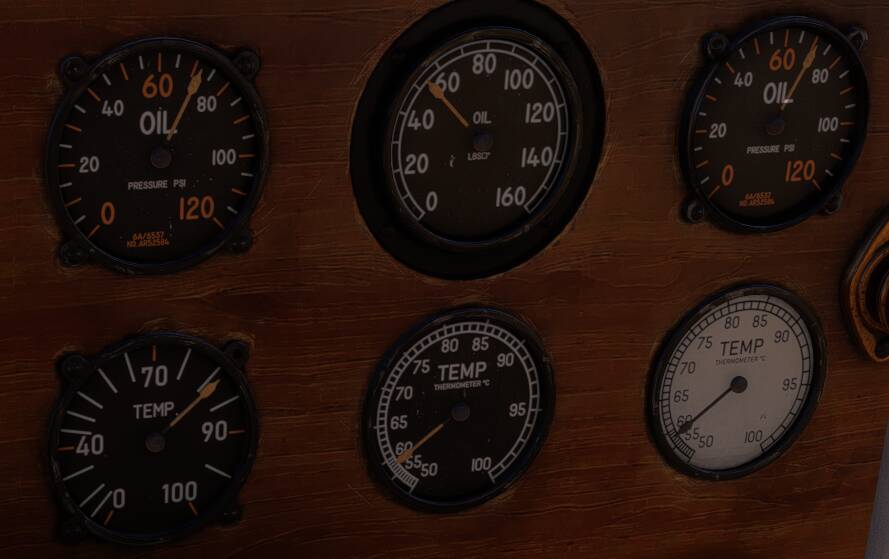
In flight
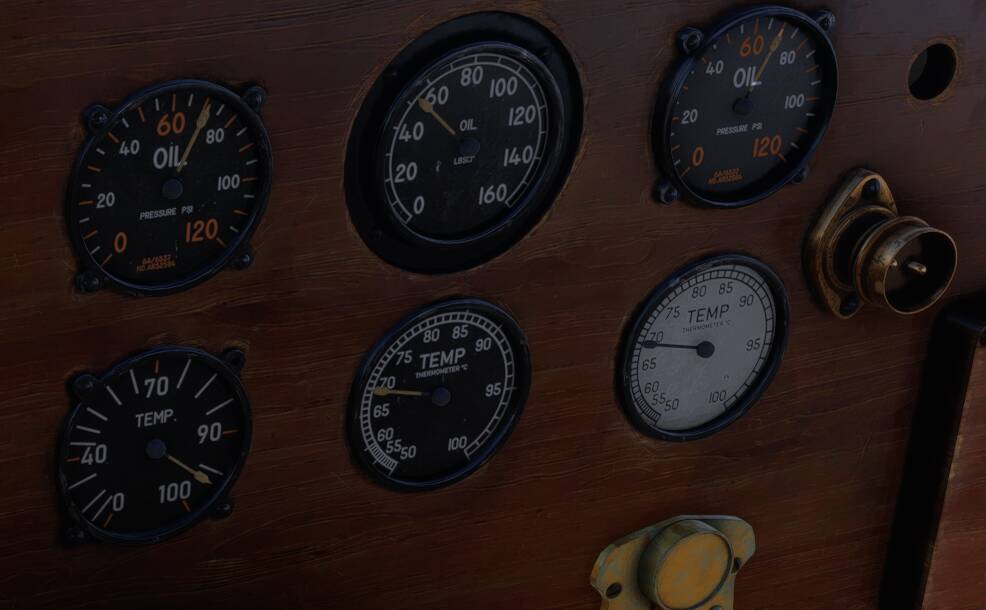
Cold and Dark, Antarctica: