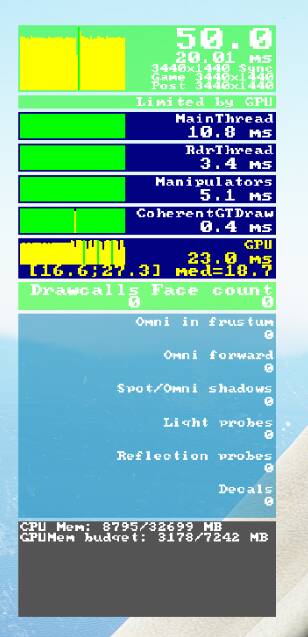
So here’s a thing, I turned on Intel Virtalisation in my Bios, and my performance seems to have increased to a steady 50 fps from 30 fps, even though I have the frame rate locked to 30 in the sim menu. I have standard settings in Nvidia Control Panel with it set to ‘let the application decide’ 3D settings. Monitor running at 100mhz. Any idea why this would happen?
i9 -9700, 2080RTX, 32 gb RAM, running at 3440x1440 100mhz.
Not sure what all this means?
I think I’ve read somewhere that locking to “30” actually locks to half the refresh rate, which at 100 Hz would be 50 fps. So that might be the reason. If there’s a connection to the VT-d BIOS setting I have no idea though. Could it be coincidence? Did you test with the exact same settings (plane, runway, time of day, weather, no traffic etc)?
Before I turned virtualiastion on I was getting 30 fps locked at 30fps.
Then please turn off virtualisation for us once again and double check it that way. Just to make sure.
3 Likes
By default, it’s off for most of us and I know that some have it on for better and others find it having it on makes it worse.
thanks for the information.
1 Like
Mine is the other way around. It’s Limited by Main Thread with Virtualization On. and I’m running at 10-15 FPS on Lowest settings.
With Virtualization Off, I’m getting stable 30 FPS on ULTRA, and like your screenshot, I’m no longer getting Limited by Main Thread and instead limited by GPU.
I tested with SVM on and off on my Ryzen 7 3700X yesterday and found no difference in performance. I believe it’s a red herring.
Apologies all, just tested with it off, and it appears that it is indeed a red herring.
Something else must’ve changed to give me the FPS increase 
3 Likes
Hey, don’t knock a free, large FPS increase in any case. 
2 Likes
Intel Virtualization Tech and Intel VT-D Tech are 2 different things and can be both turned OFF safely if you don’t use any kind of virtualization like VMware, Virtual Machine, etc. I always seen a slight improvement with those settings OFF, including temps ones during stress tests. At least with my previous Asus P8Z77-V MB and my current MSI MPG Z490 Gaming Edge Wifi.
i just turned mine off as well…i dont see any difference…still around 21-22 fps and still limited by cpu/gpu…on gtx 2060…and cpu around èà% max…so this trick ddint help at all…just hping on the update on the 27th of july..cheers
1 Like