I get this error on startup.
If I right click on the FS Icon, then Right click on Microsoft Flight Simulator and select “Run as Administrator” the FS will startup correctly.
..
Where can I go to change the FS Icon to always run as admin ?

Giving multiplayer games administrator access to the operating system has traditionally been a bad idea, due to exploit concerns. Probably best fix the source of the problem, whatever that is. (I have the Steam version, which is very different, so I don’t know)
When I right click on the FS Program Icon, select it and open the advanced selection, the options to change it to run as admin is “Greyed” out. I am logged into my PC with admin priv.
I can right click on the Icon and then select run as admin and all is well but I still need to change it so that I do not have to do that every time.
Running Win10, OS and MSFS all up to date.
…
Where is the location for the actual Startup program or exe ?
My community and Official folder is under C:/MSFS/Packages
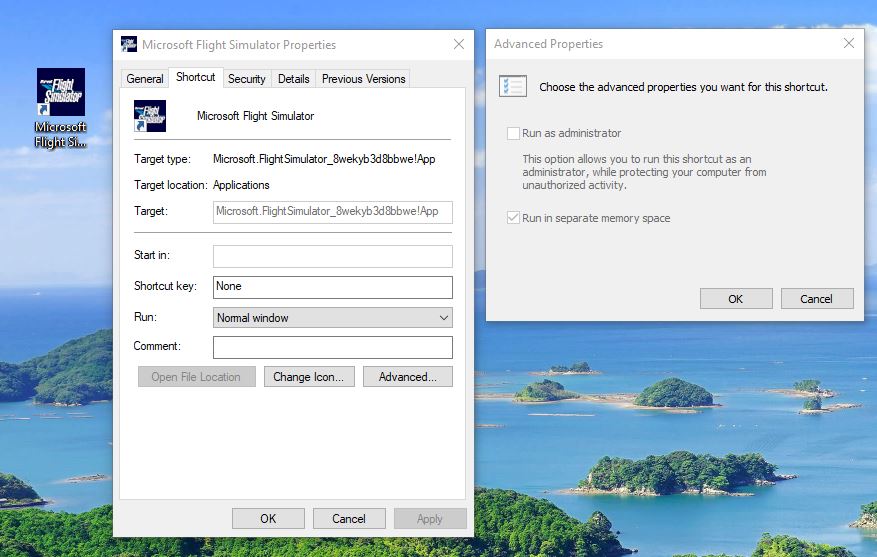
Same here. Looking into it myself. I can make it run as admin always but I want to find out why this happened. 21h2 all updated and worked fine prior to su9 update. Will post back if I discover something.
Agree, we should not have to right click on the FS icon and then have to tell it to run as Admin.
This forum location just does not give enough exposure for a MSFS run failure problem.
The forum have a search function 
=> 0x800701b1
https://forums.flightsimulator.com/search?q=0x800701b1%20order%3Alatest_topic
Example:
Well, thanks for the search tip. I tried it.
Didn’t turn up much for me.
..
So, this runtime error that presented itself immediately after the last update, apparently does not have many users in the same situation or it is not much of a bother to have to run as admin or there isn’t enough exposure for this topic when it is buried deep down in the community support, Misc, ms-store
Question, those that have the issue with run only as admin after SU9, do you have MAFS installed on a drive other than OS/boot drive?
What I have discovered is permissions changes in SU9. I believe the changes did not take into account an install on another drive (ex: D:). This may be the explanation for not affecting everyone’s machine.
Theory and still looking into, info/help appreciated.
edit: and likely the reason other apps like FS are being a problem
Thanks for trying to help.
NO, MSFS is installed on my OS (C: Drive). No other drive present and has been this way since Fs was released. This error popped up immediately after the SU9 update.
GL, and just fyi, here’s the only log evidence I can find (log info that’s different than running as admin).
Destroyed Desktop AppX container deleted for package Microsoft.FlightSimulator_1.25.7.0_x64__8wekyb3d8bbwe…
trying to trace the “NULL” packet reason info atm…
Thanks for your efforts !
If I find a solution or run across any grand ideas, I will pass on to you.
MeridianOwl and all, I have resolved it on my machine.
- Maverick installed fine but all content wasn’t there. Content manager said it was ok and there.
- However, now Itlay IX showed partially installed (in CM). Specifically the main 2 and 13 related.
- Deleted/uninstalled them via game, deleted community folder contents (have backup).
- It just reinstalls over exactly the same. Tried many ordered etc… ya know routine…
- Did a OS MSFS program start menu, more, settings, reset (the reset/repair WITHOUT DATA LOSS)…
It fixed it! possibly the later may be all it takes. GL everyone.
edit/add It booted with shortcut without admin and after about 8GB dl, good.