FS Not Starting

:wave: Thank you using the Bug section, using templates provided will greatly help the team reproducing the issue and ease the process of fixing it.

Are you using Developer Mode or made changes in it?

NO

Have you disabled/removed all your mods and addons?

NO

Brief description of the issue:

FS Not Starting?

Provide Screenshot(s)/video(s) of the issue encountered:

None

Detailed steps to reproduce the issue encountered:

Double click on FS Icon to start, and before the Asobo Sceeen appears, it just shuts down?

PC specs and/or peripheral set up if relevant:

i9-11900K, 32GB Ram, RTX3090

If on PC, Fault Bucket ID - Instructions here - Please type in just the Fault Bucket ID # rather than a screenshot for privacy reasons:

Build Version # when you first started experiencing this issue:

Latest FS version


:loudspeaker: For anyone who wants to contribute on this issue, Click on the button below to use this template:

Do you have the same issue if you follow the OP’s steps to reproduce it?

Same

Provide extra information to complete the original description of the issue:

Yesterday FS was working fine, and now it will not even start.

If relevant, provide additional screenshots/video:

No applicable

If on PC, Fault Bucket ID - Instructions here - Please type in just the Fault Bucket ID # rather than a screenshot for privacy reasons:
Yes, observed since … yesterday after installing win 11 update KB5022303, KB5022546 … just close shortly after the initial slashscreen … runs on the second attempt fine.

I had the same problem and I also believe it started about the time I got that update. You might give a try to checking your virtual memory settings. Mine were customized and I changed them to allow Windows to manage them (the checkbox at the very top). After that, I have not had a problem since. If it’s already set that way, then I don’t know what to tell you. Best of luck.

Thanks yes. It was directly after Win11 22H2 update KB5022303. It seems a Microsoft update is not compatible with a Microsoft product. However, this seems to have only happened to some, as the forums have not been swamped with this. FS is still not starting. FS Support Request 181350, 13/01/2023.

I am having the same issue! I have to start the program a few times (today 3 times) before it loads! Once it loads it works! Not sure what happened but this is after the latest beta update and perhaps the latest Windows update!!! Glad others are experiencing the same.

I have finally heard from FS Support, and they say it is modules that are preventing FS from starting, none of their suggestions are working. The community folder is empty, NO other modules loading, the GeForce overlay is disabled. No more I can do, and yet FS still will not start?

stop your VR services and running VR tools… and also check the “disk” warnings, and the other logged errors around..

Thanks. ALL VR tools are disabled, checked disk, and performed ‘scannow’ no problems found, performed other disk scans for errors and corrupt files, none found. No error logs found. As said, community folder is empty. Disabled BitDefender Anti Virus and all other BD Apps, disabled Nvidia GeForce Game overlay. FS Support told me to delete Context.xml, ALL DAT files and delete the Rolling Cache file within the FS Folders, done this. FS Support are running out of ideas. In Config I have disabled all non essential apps in Start Up, so Win 11 starts with minimum apps. Other than removing the whole of FS and a re-install, that would take a huge amount of time. I am fast running out of options. I am now thinking of seriously removing FS completely from my SSD, and totally forgetting FS altogether. It has been 6 days now and I have had enough of this! Thanks again for all suggestions

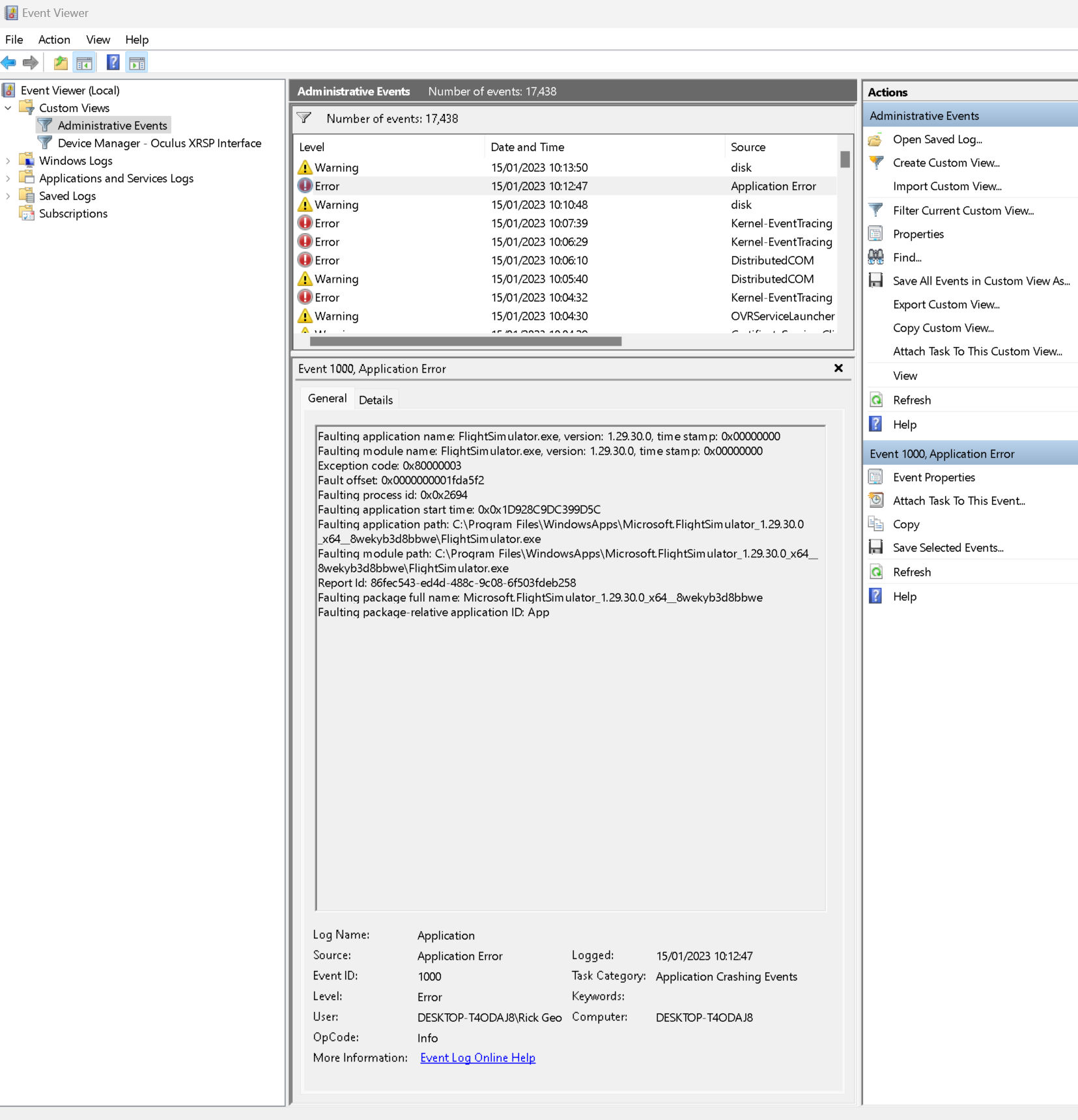
I meant: I see lots of error messages nearby the crash, have you checked that ? E.g. there is a warning about OVRServiceLauncher ( which is so far I know “VR” ).. we also can see Kernel-EventTracings and then these the warnings about “disk”.. Whats all of that ?

Thanks. I know the Event Viewer shows a lot of errors, ‘red Xs’, ‘!’ ect. It looks a mess, but I have no idea what is going-on, or how to fix them. It may be related to the fact that FS will not start? Probably the only way to fix all these things is to do a fresh install of Windows 11, plus FS, and all my other apps and games. This would take a massive amount of time. All I know is, that I have performed several scans, and no problems detected. The PC runs fine, never shuts down, so do all my other apps, games and sims. I may perform a Win 11 fix and re-install, but keep FS, apps, games and sims. Or a complete fresh install of Win 11 and everything else. I need several free days to do this, but don’t think I can spare the time.

I have that KB installed, and MSFS starts without issue:

wmic qfe list

Caption                                     CSName    Description      FixComments  HotFixID   InstallDate  InstalledBy          InstalledOn  Name  ServicePackInEffect  Status
http://support.microsoft.com/?kbid=5020880  AZATHOTH  Update                        KB5020880               NT AUTHORITY\SYSTEM  12/31/2022
https://support.microsoft.com/help/5012170  AZATHOTH  Security Update               KB5012170               NT AUTHORITY\SYSTEM  12/31/2022
https://support.microsoft.com/help/5022303  AZATHOTH  Security Update               KB5022303               NT AUTHORITY\SYSTEM  1/15/2023
                                            AZATHOTH  Update                        KB5020487               NT AUTHORITY\SYSTEM  12/31/2022

Just a thought or two, may or may not help.
Have you updated MS Store? Looking particularly at Xbox app which has almost always been the source of any problems I’ve had. Try logging out and logging back in.
In the Apps section of Windows go to the MSFS entry and try the repair option - it shouldn’t lose any data unless something serious is corrupted, in which case MSFS should afterwards redownload any missing files.
If all other programmes are working okay it’s likely not W11 if you’ve installed all its updates. Then it seems your only other option is a re-install of MSFS which you can also do through the Windows Apps facility. Don’t just delete the folder as MSFS has tentacles all over the place!
My guess would be you’ve got a corrupted startup file, not allowing MSFS to start up and self-correct. Sorry can’t help more with that.

well, as mention I see at least a service related to VR tools, but where you mentioned all about VR is disabled.

You can simple open the message and check the content. We can not magical oracle the content of that errors.

You can also simple check whehter other updates are installed ( windows update , and also “programme and features” and sort by date ).

I assume the other mentioned hints, like store update etc, you tried already. And also do not start the app with a created link on the desktop, instead try to start from store direct.

Good News. FS is now running fine, after a reset. I did try a repair first, but that did not work. The reset deletes everything so I had to download the whole of the 123.79 GB sim, which took several hours. And I have started to download all the world updates and other stuff. I have started FS and flown several flights at different times, and all is running fine smooth and sharp graphics. No idea what caused the problem, some conflict or possibly malware?

in rare cases users reported that files becomes invalid on disc. Beside of an game update , I would have no idea how this can happen if there are no issues with the disk or the filesystem. But can be other reasons too, who knows.. hard to say.