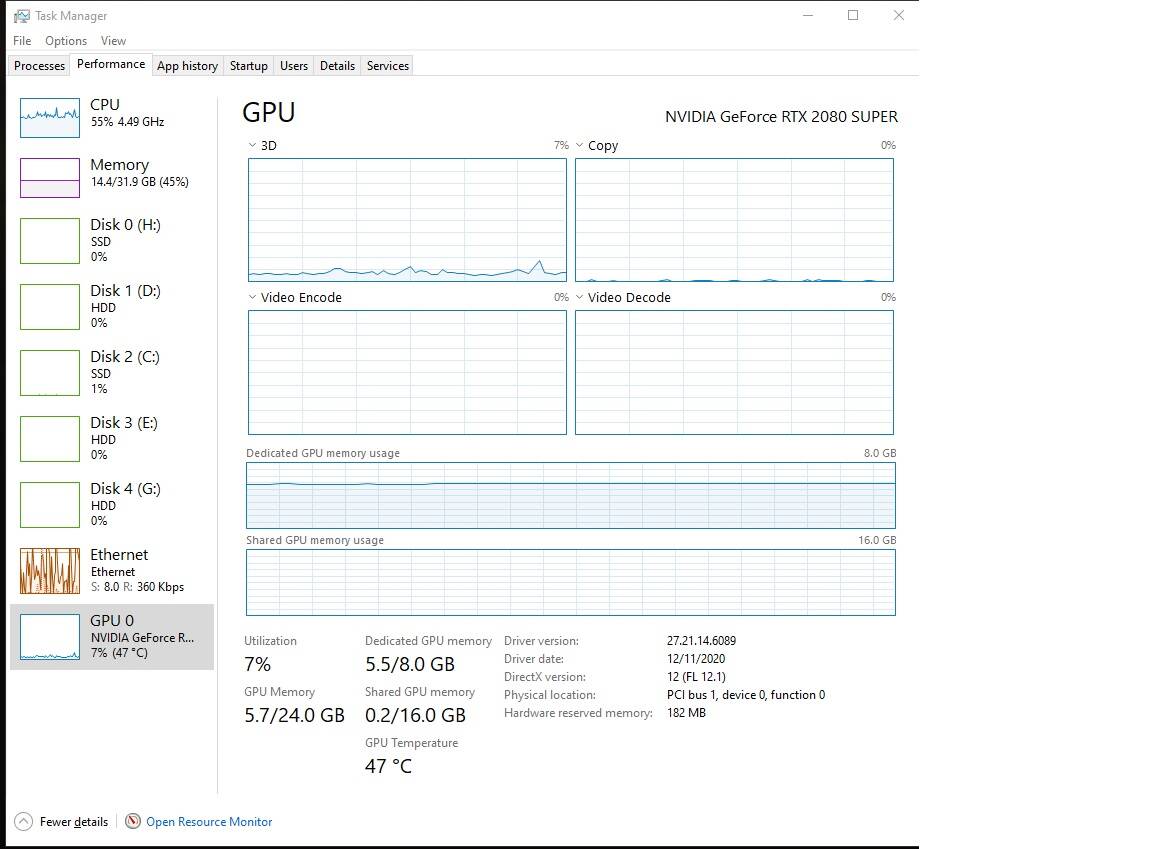
It’s my first time to post about this sort of topic. Was having problems with crashes and things in the beginning. Changed some CPU setting and got a new video card and it all seemed to have gotten better. But recently.. about the time MS released the US World Update.. My CPU is getting taxed much more than my GPU. Before My GPU would be at about 80% and my CPU around 50% but now.. it’s gone crazy. The last update/patch it has remained the same. If it’s a setting that I’ve done, I have no idea what I did.
The game is still fairly stable but it’s only using about 7% of my GPU while my memory usage has doubled and my CPU usage has increased by about 20%.
This screenshot was taken over London on a clear day and my GPU should be getting hit hard. (Settings are on High). It will still crash but less often. Any ideas why the game is taxing my CPU and barely using my GPU? Thanks for your help.
The CPU (main thread) dictates the amount of frames that get generated. If you GPU is powerful enough to process those frames at your resolution and graphics settings, it will sit idle the rest of the time.
This mean you have plenty of headroom to increase your resolution and/or graphics settings.
What CPU are you running? If you were able to make the CPU generate more frames, the GPU would get more of a workout as well.
You could try lowering some CPU intensive settings as well (glass panel refresh rate, AI traffic, ground aircraft etc), to see if that helps feeding some fore FPS for the GPU to handle.
Task manager GPU usage is unreliable, check with another source such as MSI Afterburner.
If you get remotely acceptable framerates (say above 15 fps) then the GPU is used a lot more than 7%. I’d say if you hit even 10 fps then 7% isn’t correct.
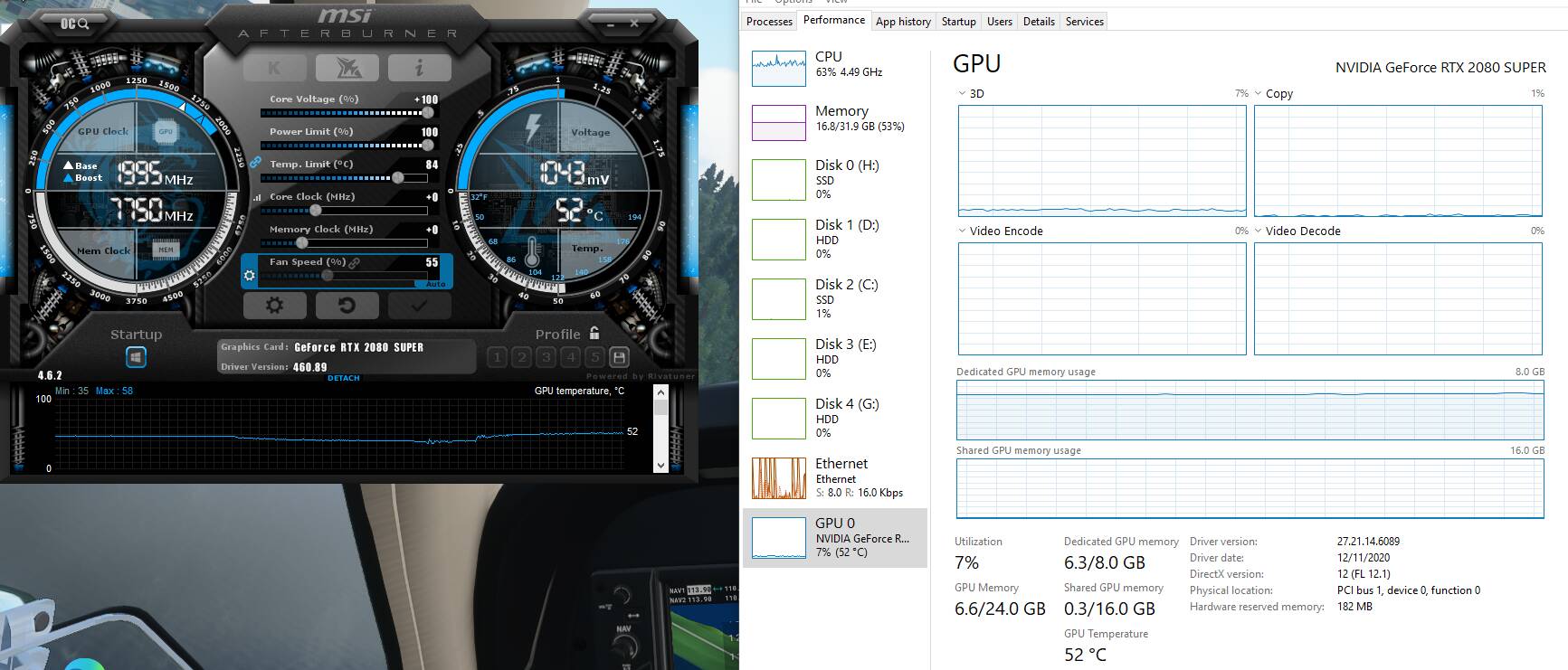
I actually am running MSI Afterburner.. how can I tell my GPU usage using the program? I don’t know much about how it works. I’ve up’d the core voltage but I’m nhot doing anything with the Core Clock or Memory. Attaching a pic flying over the heart of London getting 35FPS showing MSI and Task Manager. If you think that all looks normal then great! I’m good with the framerates.. just wanting to make sure the system is using my GPU to the fullest.
Are you sure you need to increase the voltage? Do you have stability issues? It will give no benefit other that possibly aiding stability with faulty card, but it does risk damaging it, and causes extra power/heat!
Anyway, if you double-click the temperature graph at the bottom it will detach into its own window. You should be able to see a GPU usage graph there. If not, go to the settings, then “Monitoring” and ensure it is checked there.
Yep.. still on high flying over Scotland at 60FPS and my GPU according to MSI is at around 75%. That makes a heck of a lot more sense. Thanks for the tips guys!
I am seeing your network working its butt off. I could be way off base here, but I suspect you are either running without rolling cache or you are flying in a new new area. Your system may be waiting for the data required to calculate the next frame to download. Your CPU does not appear overworked, so unless your 0 core is slammed, there must be something else you GPU is waiting on. I would guess the CPU is waiting too.
Yea, I need to turn my rolling cache back on. I had it at 500gb but turned it off because I heard there were some problems with it and some troubleshooting I was doing before I replaced my RAM. (Which solved a plethora of problems).
I should turn the cache back on and see if that helps anything but my internet seems to be keeping up. Been flying this whole time since the responses started today. Started in Stornoway and flying to London City at night at 8500’ in a Baron… over Manchester in weather now but still at 54FPS and GPU at about 70% and CPU is at 55%. So seems like it’s doing fine. Once Mort and Aeluwas gave me some tips.. I’m at least seeing the correct numbers which makes me feel better.
After this flight I’ll turn the rolling cache back on. Ground textures looked really good.. it’s night now but the night lighting is great. I’m running on High-End. I think it’s actually running fine.. I just didn’t know what I was looking at as far as GPU usage.
I recently reinstalled the OS then reinstalled MSFS. I began to see exactly what you are referring to. There is a setting in Windows. Go to Settings - Gaming. Off to the right you will see a link called Graphics Settings. There is a switch for GPU Scheduling. When set to Off (which mine was) I see the behavior that you describe, CPU around 60% and GPU around 5%. When I turn it on the GPU usage jumps to about 70%. Interestingly I see very little difference in performance although it might be slightly better with the switch turned off and the GPU showing low usage. I have just left it off.
hm, found this thread after installing a RTX 4090 and task manager is showing 0% load for the GPU when flying in MS Flightsim… I mean it’s a fast GPU, but 0 to a max of 1% seems weired..
CPU is a i7 11700K and at least one core seems to be quite busy during sim.
The screen is showing crazy high FPS around 90 to 100, but the actual picture is rather stuttering..