ISSUE DESCRIPTION
Description of the issue:
Context:
-
I am using MSFS 2024 with 3 monitors (TVs @ 120 Hz). Prior to SU4, FSR3 Frame Generation was working well on all 3 monitors.
-
In SU4, the combination of: 3 monitors, FSR3 Frame Generation, NVIDIA GPU, and GSync/VRR, would result in some kind of “frame pacing” issue that would freeze, and sometimes crash MSFS (reported as a bug).
-
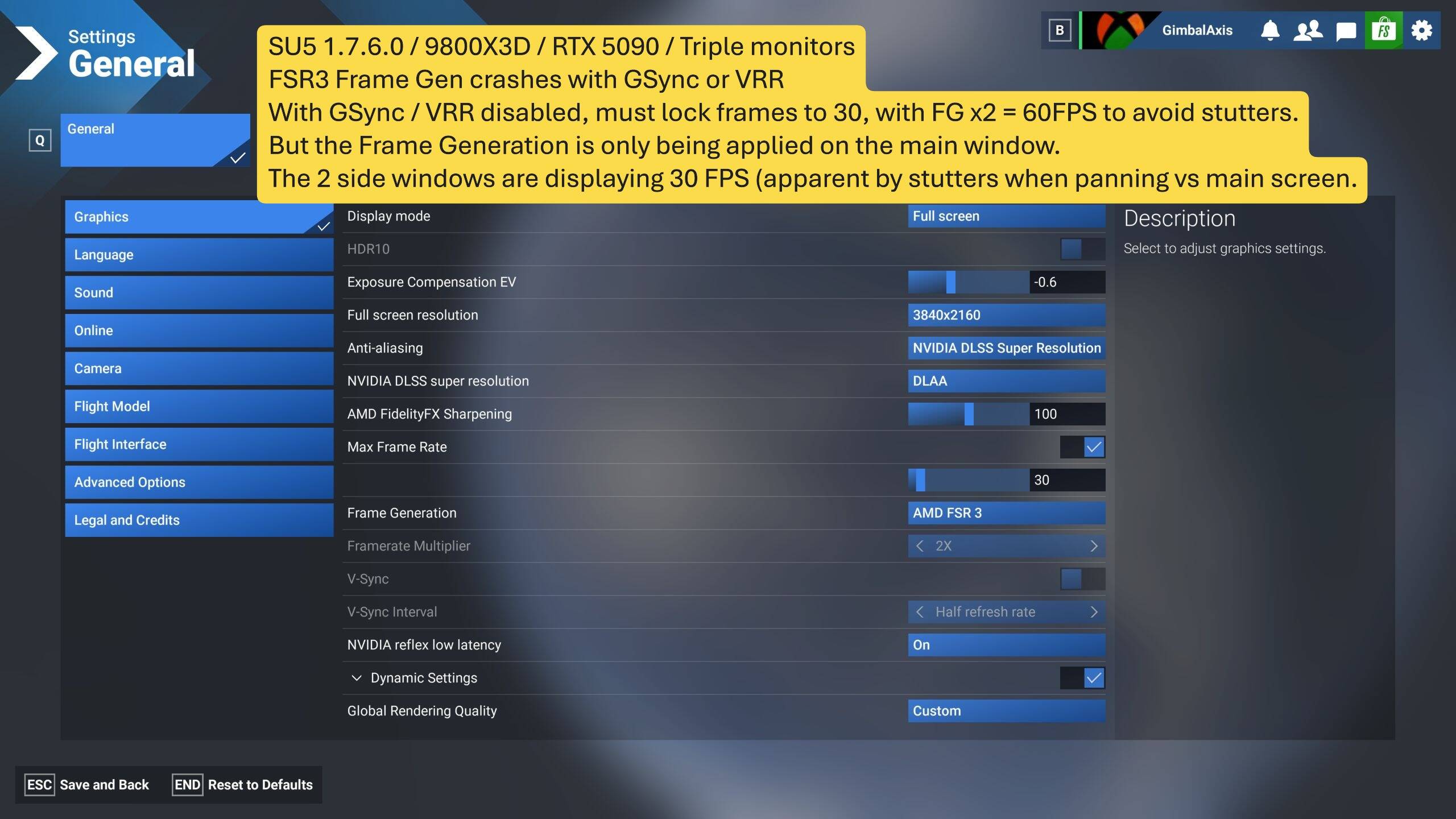
In the new SU5 Beta, FSR3 Frame Generation appears to work IF GSync / VRR are disabled… BUT it is only working on the main window in a multi-window set up. It is apparent when panning, the main screen is a fluid 60 FPS, while the side screens are obviously at 30 FPS because of the stutter / jerky motion.
-
Note, this is not because of high TLOD or anything, I’m getting clean performance stats, it’s just that FG isn’t being applied to the side screens in SU5.
-
EDIT 2026-03-09 There was a temporary work around: you could toggle Frame Generation OFF, Save, then ON again, and FSR3 FG would work on additional screens for your flight… but as of today, v1.7.10.0 has taken away the work around. So now it is 2 regressions/bugs, which leave us with zero ability to have Frame Generation on additional screens.
Note also that the other Frame Generation option, NVIDIA DLSS Frame Generation, only works on the main screen in a multi-window setup up - so AMD FSR3 is the only native Frame Generation solution available to us… it’s important!
FREQUENCY OF ISSUE
How often does this occur for you (Example: Just once, every time on sim load, intermittently)?
Every time.
REPRODUCTION STEPS
Please list clear steps you took in order to help our test team reproduce the same issue:
-
Triple Monitor setup, with main screen at 4K, side screens at 2K, set MSFS Graphics settings per my specs below, with Max Frames at 30 + FSR3 Frame Gen x2.
-
Load in to MSFS and pan the camera around
-
Observe how motion is fluid on the main screen, but not on the side screens
YOUR SETTINGS
If the issue still occurs with no mods and add-ons, please continue to report your issue. If not, please move this post to the User Support Hub.
What peripherals are you using:
Keyboard, Mouse, Xbox Controller
[PC Only] Are you using Developer Mode or have you made any changes to it?
No
[PC Only] What GPU (Graphics Card) do you use?
RTX 5090 (Driver 591.86 latest)
[PC Only] What other relevant PC specs can you share?
9800X3D / RTX 5090 / GSkill 6000 CL 28
3 Samsung TVs @ 120 Hz
NVIDIA Control Panel: GSync Compatible is OFF
NVIDIA Control Panel: Monitor Technology: Fixed Refresh
NVIDIA Control Panel: Vertical Sync is set to "Adaptive (half monitor refresh rate)
Windows Displays: 120 Hz VRR is OFF
MSFS Graphics (see screen shots): DLAA / Max Frames 30 / FSR3 Frame Gen x 2 / High
MEDIA
I don’t really have a way to capture the issue comparing the motion on the main screen vs the side screens, but it is obvious that the main screen is at 60 FPS and the sides are at 30 FPS.
Can conmfirm what @GimbalAxis has indciated - When running a multi monitor/render window setup (in my case three monitors), turning on FSR3 Frame Generation is now only activating frame generation on the main screen. Previously (since its introduction), FSR3 Frame Generation would work on ALL render windows.
- This is not linked to G-SYNC or VRR as I am not using either.
- Changing anti aisling/upscaling from DLSS to FSR or TAA makes no difference - Frame generaiton still only works on the main render window.
- Activating/Deactivating V-SYNC in the NVIDIA Control Panel makes no difference.
This is a deal breaker for me as running a triple monitor setup you need frame generation to work accross all three monitors.
My Settings
- 9950X3D / RTX 5090 / GSkill 6200 CL 30
- 3 LG OLEDS TVs @ 60 Hz
- NVIDIA Control Panel: GSync Compatible is OFF
- NVIDIA Control Panel: Monitor Technology: Fixed Refresh
- NVIDIA Control Panel: Vertical Sync is set to "Monitor Refresh Rate” or “Off”. Makes no difference.
- Windows Displays: 60 Hz
- MSFS Graphics: Max Frames 30 / FSR3 Frame Gen x 2
I can also confirm FSR3 frame gen is only working on main screen in su5 beta. I am also not using VRR or vsync.
Same here on my triple screen setup and it used to work very well on SU4.
@GimbalAxis Do me a favour and try this
- Load up in game with all three render windows setup
- Enter OPTIONS and change your Frame Gen to DLSS. Hit Resme
- Enter OPTIONS and change your Frame Gen to FSRF. Hit Resume.
Doing this is returning frame gen to my side monitors. No idea why or what the bug is, but doing this is fixing it for me. I’m guessing its some dud data getting saved somewhere and the initial FSR FG is perhaps DLSS Frame Gen??
OK, so this did seem to make a difference, the motion on the additional side windows is now smoother (although there is an odd “jump” that happens.)
It raises an additional bug - it means that the Setting for Frame Generation > FSR3 is really setting DLSS (which we know only works on 1 window)… EDIT - or it means no FG is applied to the additional windows.
AND … If the User-selected value is not being applied correctly for THIS Setting - what OTHER Settings are not being applied correctly (and harming performance)??
AND … will the setting “stick”, or do we have to check every time we use the sim?
This has been a chronic problem with the Settings system in MSFS 2024 since the beginning - it’s unreliable.
I tried this and it seems to bring back the AMD FSR frame generation that wasn’t working on the side screens. Thank you for the idea and what appears to be a workaround for now until this regression in SU5 beta is fixed.
Yes - but will the setting “stick”, and, what OTHER settings are not being saved correctly??
People with only 1 screen will think they are using FSR3 Frame Gen when it might really be DLSS without knowing (EDIT - or no FG on side windows). We noticed FG was wrong because of the side screens not having FG (which is characteristic of DLSS).
This kind of thing really undermines trust in the Settings - and in the code / strategy Asobo is using to manage them.
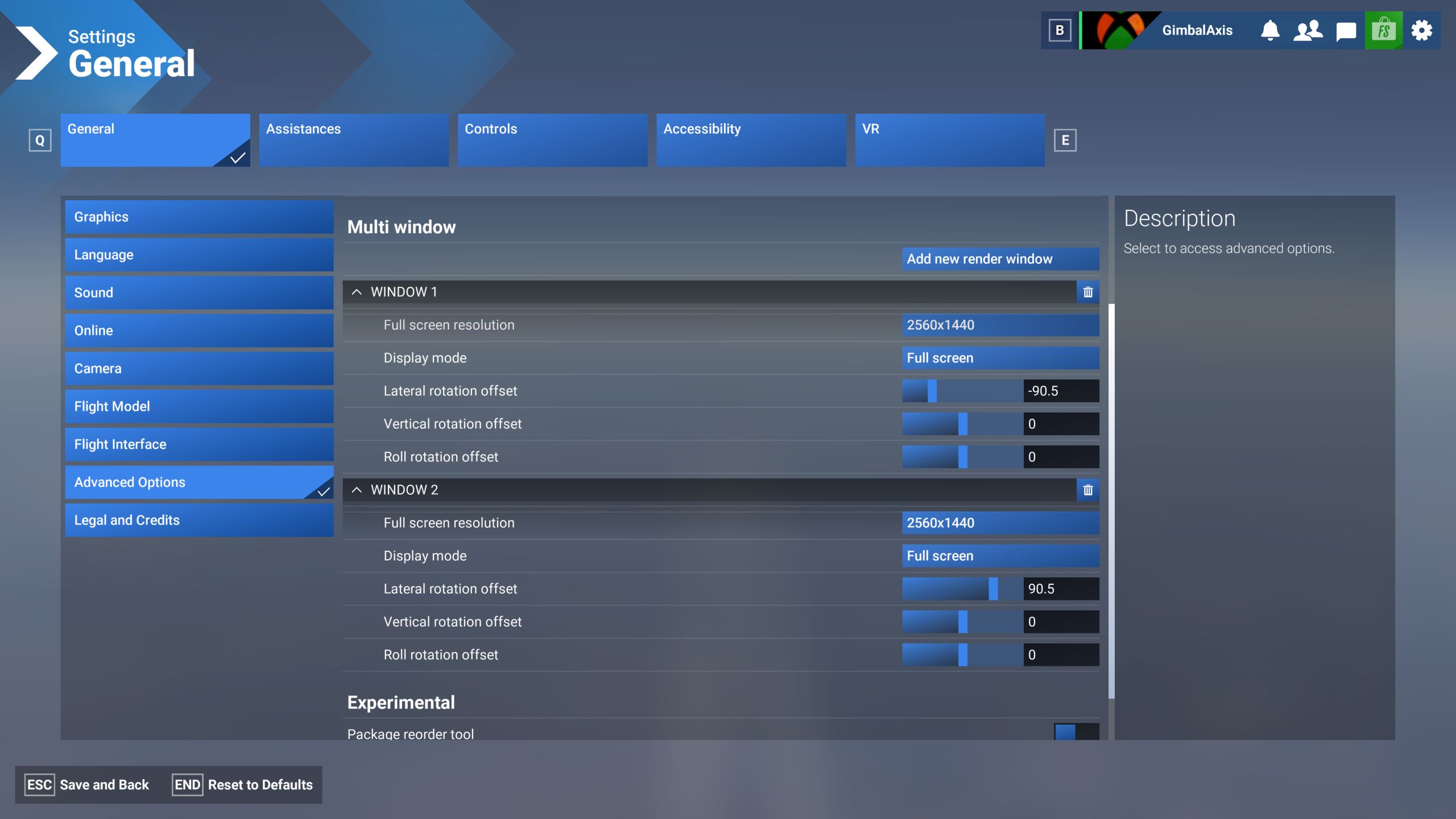
I’d love to know how you managed to line up your screens correctly. I find it impossible to do because of the way the camera goes when you go into settings
I just did -90.5 on the left, and +90.5 on the right… the .5 is just adjusting for the bezel of the TV
But, there are issues:
- I’m not sure if it the “smart” aspect of the Samsung TV, or MSFS, but they are always off a bit vertically, and if I’m bothered, I go in and adjust slightly per flight (since each flight seems offset slightly differently)
- Sometimes I have to adjust the amount of angle because from one flight to the next the camera view seems to change a bit - so 1 flight 90.5 might be fine, the next I have to set to 91, and so on.
- The setting seems to assume your additional monitors are physically at the same number of degrees you enter (which mine are not). My screens are at 45 degrees to each other, but I’m using 90 degrees in settings… so it doesn’t look entirely correct, but still worth it to me for peripheral / look around purposes.
- I built my table with 3 screens sitting on it so that I could slide the side screens in towards me to adjust the angle, which helps.
Amazing they havn’t done anything about this, lierally impossible to set the extra windows
I don’t think anyone at Asobo or Microsoft use multiple monitors, which is really too bad. Peripheral / look around views are so immersive for flight simulation. I assume they don’t because if they did, these issues would be very apparent to them, and likely fixed. We are on our own, it seems.
Given that it is pretty much impossible to set the positions on the screens now just shows they probably havn’t even looked at it since 2020. Maybe when Playstation and Xbox starts supporting multiple monitors they will take some notice
not beta related, but this little scenery might help calibrating multiple screens (not sure it works in 2024)
Lets keep this thread on topic - Can we get a moderator to mark this has bug logged so it can be tracked and then ignored, sorry - corrected in future updates.
I can confirm that the workaround - to toggle Frame Generation to DLSS, then back to FSR3 - does not “stick”. I just booted the PC and loaded in to a flight, and it was back on DLSS for Frame Gen, even though in settings it still was showing FSR3.
EDIT - it is either using no FG, or DLSS FG, instead of FSR3, on side windows.
I had to toggle it again. And so that means, again, Settings are not being read or saved reliably or correctly.
The root of the problem is the Settings system - from graphics settings to control settings to career and log book - all of it is “unreliable” and without verification or error correction.
Same here. I did a few more flights today and had to use this workaround to get AMD FG to actually work for each flight despite what the initial graphics settings option showed when I first started the sim. I rebooted the sim entirely between flights and it’s clear the settings aren’t being read/used.
Asobo does not use triples. For them the multi monitor setup is working well. so we do not expect any kind of development on this unfortunately.
it works on 24 as well is really good but only useful for identical monitors. Same physical size and resolution though.
Who is the “we” in this? I expect multiple monitors to be supported.