Mobiflight supports LeoBodnar BBI-64 cards no problems. I haven’t tested but I imagine all of LeoBodnar boards are supported.
Thx. I didn’t realise MF had HID support. Useful to know for future reference. Always though it was Arduino only. I don’t keep track of it that regularly because I don’t use it.
Hi Sling, works perfectly. Even easier than using Mega, obviously for inputs only.
Just a heads-up to @TonyV3711, I made a button box that uses a Leo Bodnar BB-64 board, and run it through SPAD. I’m able to control the G1000, the GNS530 and 430, the GTNs, and plain NaV/COM radios with it.
6 dual-concentric pushbutton rotary knobs and 6 pushbuttons.
The only thing I don’t use it for is the line select keys as those are so positional and change functionality based on mode. But knob and pushbutton wise, it works great.
What is SPAD? Some kind of add-on software?
Yes, third party input/output manager. Customizable per aircraft, can coordinate standard sim commands and many other variables.
Thank you! It does look like one answer to the situation. Does it specifically include the G1000 knob and button functions? The YouTube video I watched did not specify…
Have you checked Mobiflight? It’s free and I think it controls all the G1000 functions. You could ask at their forum or Discord.
It does all the buttons and knobs. I am not sure about the LSKs, because I’ve not tried to implement them. Can check later this week.
As @JCSLOVE mentioned, you can also check out the presets already defined for Mobiflight on their Hubhop website. Direct link is below. There are nearly 17,000 defined presets that include code snip-its for all manner of planes, add-ons, systems, etc…
It can be daunting at first, but use the filters on the left to help narrow things down based on what you’re looking for.
They are also very helpful on their Discord, but it helps to go in there with specific questions instead of a “How do I do everything!” question.
Unfortunately, this is a case of not knowing what I don’t know! I got the box already built - not in a million years could I have built something like this. It is already assembled, contains the knobs/buttons, and has 2 of something called Bodner boards in it. These are, apparently, the actual interface between the switches and the computer. All of this is wired up. The computer recognizes each of the Bodners as an input device, apparently not unlike a joystick, and XPlane and Windows can see all of the devices. So can MSFS, apparently.
Mobiflight appears to be associated with a different brand of hardware interface - Arduino. Never heard of it, although that was also true of Bodner when I bought this thing! The tutorials on their website appear to be related to the actual wiring up of one of these interfaces, which has already been completed on mine.
I’ll have to look on YouTube to see if there are any videos showing how Mobiflight is used after all of the wiring is complete…
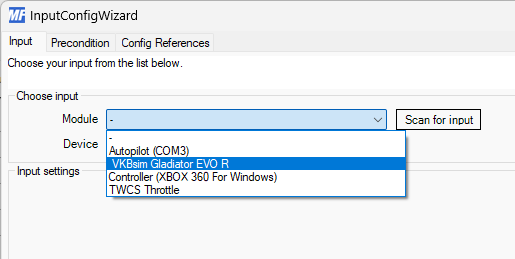
That’s what MF uses for its interface to the computer, but that doesn’t mean you need an Arduino based button box. For example, I just got a new joystick today (VKB Gladiator NXT EVO), and I can select in from the available modules in Mobiflight and then assign actions to buttons. Here’s what that looks like in the dropdown box where I can select what device I want to configure. The detection of the joystick was automatic with Mobiflight, I didn’t need to set it up.
I’ve never used a Bodnar board, so someone here can correct me, but I’m assuming Mobiflight will see it as well.
I have my old collective that I made with a Bodnar board. I’ll check it out tomorrow and let you know.
The YouTube videos I have found from the Mobiflight site are of little use to me, since they assume a far greater familiarity with things like boards, events, and variables than I possess. I have no idea what they are talking about most of the time, and the process looks to take days or longer to complete…
Is Spad.Next simpler than Mobiflight? Does it work more or less like XPlane itself does - ie, start it up and begin selecting what button controls what function in the simulated aircraft, in a more or less straightforward manner?
I’m not familiar with Mobiflight, but I am fairly familiar with SPAD.
SPAD can be fairly complex as well, and the reason is it has to be because none of the sim makers, hardware makers, or third-party shops have decided upon a standard of logic or language in flight simming (there are some third parties like simconnect that try). But to be fair, the systems they emulate don’t, either, so you end up with a mishmash of variables for input and output alike. The sim itself is pretty anemic as to what it accepts for input variables.
Then you have us makers on the outskirts. Some of us have a four button box and want it to do 12 different functions. What these programs lack in simplicity make up for it in ability and can allow us to accomplish that. So yeah, you may have to understand programming logic and language, to an extent, no matter what system you’re using.
That said, SPAD does have some fairly simple modality in setting button presses axes to “simulator functions,” meaning the standard functions that are expressed in the sim’s control menu itself. X axis set to control aileron, for example. Pretty easy to knock that out. Set a knob to control altimeter, a switch to control master battery in most planes. But again, not every plane is simple or standardized enough to recognize everything, which is where we get into the weeds.
I think that the “simple modality” would be all that I would need, considering that all of the building and wiring are done and my computer recognizes the lash-up both in windows and in both simulators. It sees the thing as two “button boxes” (that is what we called them) - two because of the need for more than the number of inputs that a single board provides. In XPlane it works just great. I need only to relate each button and knob to the appropriate input on the G1000 (that is all this thing is for, no other inputs at all - the Alpha and Bravo handle those).
I’ll check and see whether SPAD has a try-before-you-buy feature. If not, the price does not seem excessive, even if I have to declare it a loss!
Thank you for all of the very helpful information, and happy holidays!
Hi! Who made the button box? is it commercially available?
I’m in the process of making one myself. I’ve found with MSFS2020 Mobiflight does a great job at mapping the button inputs in a simple interface (for free), but the one I’m making needs only 1 USB, but because of the sheer number of inputs, I’ll need breakout boards which Mobiflight doesn’t support (strictly speaking, it does, but not the modern communication type they use now - 2 Wire Serial 2IC).
I’ve been appalled at the high cost of off the shelf button interfaces, so I’m thinking of designing and making some commercially available just as button boxes that can be on your desk and mount to your monitor.
The G1000 displays can “breakout” by clicking and holding the right alt button, and then the window can be scaled on a monitor to line up with button box softkeys.
The box was made by a friend of mine, who is very adept at computers and electronics, exactly the opposite of me! It is crude on the outside; made, as it is, from wood and lucite, but it all works. The buttons and knobs are apparently commercially available, and have all of the functionality of those on the G-1000; ie, inner and outer knobs with push-in functionality on the inner concentric knob. There are enough of these gadgets, arranged more or less as they are around the MFD or PFD on the real thing, that just about all functions of the G1000 can be tied to the physical knobs and buttons. Due to cost and availability of “real estate” on the surface of the box, only the PFD/MFD knobs/buttons are included, and thus not the ones on the comm panel in between, which are not really used in simulation to any great extent. Each of the knobs/buttons are wired to one of two Bodner boards (two are needed due to the number of input devices), which in turn are tied to the computer by two USB cords. The computer sees this assembly as two independent inputs, “button box 1” and " button box 2". SPAD.Next allows for the inputs to MSFS; XPlane already has enough well labeled interfaces built into it that no extra software is required to fully hook up the box(es) to that sim. My friend told me that it cost around $200 for the components, and as you can see, practically nothing for the materials to build the box! It doesn’t look too great but it works perfectly! As in life, looks aren’t everything!
It seems that I cannot add a picture of the unit - sorry!
Is it up and running then?
Yes it is! There is one issue with the workings of the com radio, but that is minor. All else works well through Spad.Next. That program is not the easiest thing in the world for a non computer sciences major to be involved with, but it is do-able and it works.