When trying to start the simulator I don’t get the splash screen and after a couple of minutes I get an error box that states that:
C:\ProgramFiles...\GameLaunchHelper.exe
This operation returned because the timeout period expired.
A restart usually fixes this issue, however I sometime have it after a fresh boot. I’m not quite sure what this issue is and is driving me crazy. I have reinstalled the sim, cleaned my community folder, reinstalled Windows. I still keep getting this reoccurring error.
Same issue here - have you solved it already ?
Sadly I have not. Restarting my PC usually gets it working but that’s a frustrating solution.
Reinstall Gaming Services.
How to
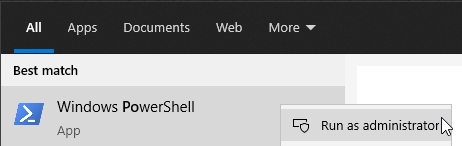
In windows seacrh bar type
powershell
right click on powershell and select run as administrator
Copy/paste into powershell window (right click to paste into powershell window)
Remove-Item -Path “HKLM:\SYSTEM\CurrentControlSet\Services\GamingServices” -Recurse
press enter
Copy/paste into powershell window
Remove-Item -Path “HKLM:\SYSTEM\CurrentControlSet\Services\GamingServicesNet” -Recurse
press enter
Copy/paste into powershell window
get-appxpackage Microsoft.GamingServices | remove-AppxPackage -allusers
press enter
//////////////////////////////////////////
Restart PC.
/////////////////////////////////////////
Run powershell as administrator.
Copy/paste into powershell window (right click to paste into powershell window)
start ms-windows-store://pdp/?productid=9MWPM2CQNLHN
Click get /install
//////////////////////////////////////////
Restart PC.
/////////////////////////////////////////
Done that before, didn’t resolve.