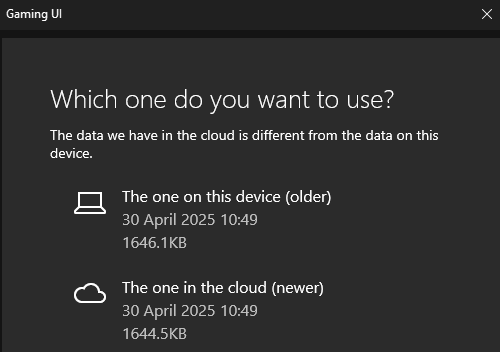
This is not a bug report simply a question (see picture). How do I go about fixing this and/or finding the culprit? I suspect others have experienced this too. It started happening about two weeks ago or so and now MSFS 2020 will not shutdown completely. It will close the window (full screen selected) as if it actually shutdown but still shows active in my task bar and will not start again unless I use Task Manager to end task. I’ve added a few apps to the program during the time when this started happening but honestly I added so many all at once I’m at a loss to which app (if at all) is causing this. Some things added or updated during this time were a Nahamic driver update, one of those smaller MSFS updates, I added AIG Manager and AIG Traffic Controller as well as Enhanced Traffic Live. I also downloaded the Flightsimware C24R Sierra and a couple Piper Arrows from Just Flight. I’ve selected both the “older” and “newer” options on the notice multiple times. Neither fixed anything. As I said this isn’t a bug report and is still working as long as I close with Task Manager but I sure would like for it to operate normally. Thanks.

I’ve had that on occasion. I always choose the local copy.
Have you ever figured out why it happens?
No, but I can guess. For some reason the client fails to update the cloud copy with your up to date profile, either during or immediately before shutdown. When the cloud copy is reported as newer I suspect that a profile wipe is imminent so always choose the local copy, even if it’s slightly older.
Do you have AIG Manager or Traffic Controller by chance? I’m suspecting that’s the culprit. If not, the only other thing I downloaded around the time it started happening was a Nahamic driver and the C24R Sierra. I even called MS XBox and they had no answer other then to do a reinstall. With all the stuff I have in Community that wasn’t going to happen!! I’m just used to using Task Manager now.
The above was the last time I saw this, so I’m not too fussed about it.